YouTube Shorts Dimensions, Size & Specs Guide (2026)
Everything you need to know about YouTube Shorts dimensions in 2026 — from the ideal 1080×1920 resolution and 9:16 aspect ratio to file size limits, safe zones, and what happens when you upload the wrong size.
FlowShorts Team
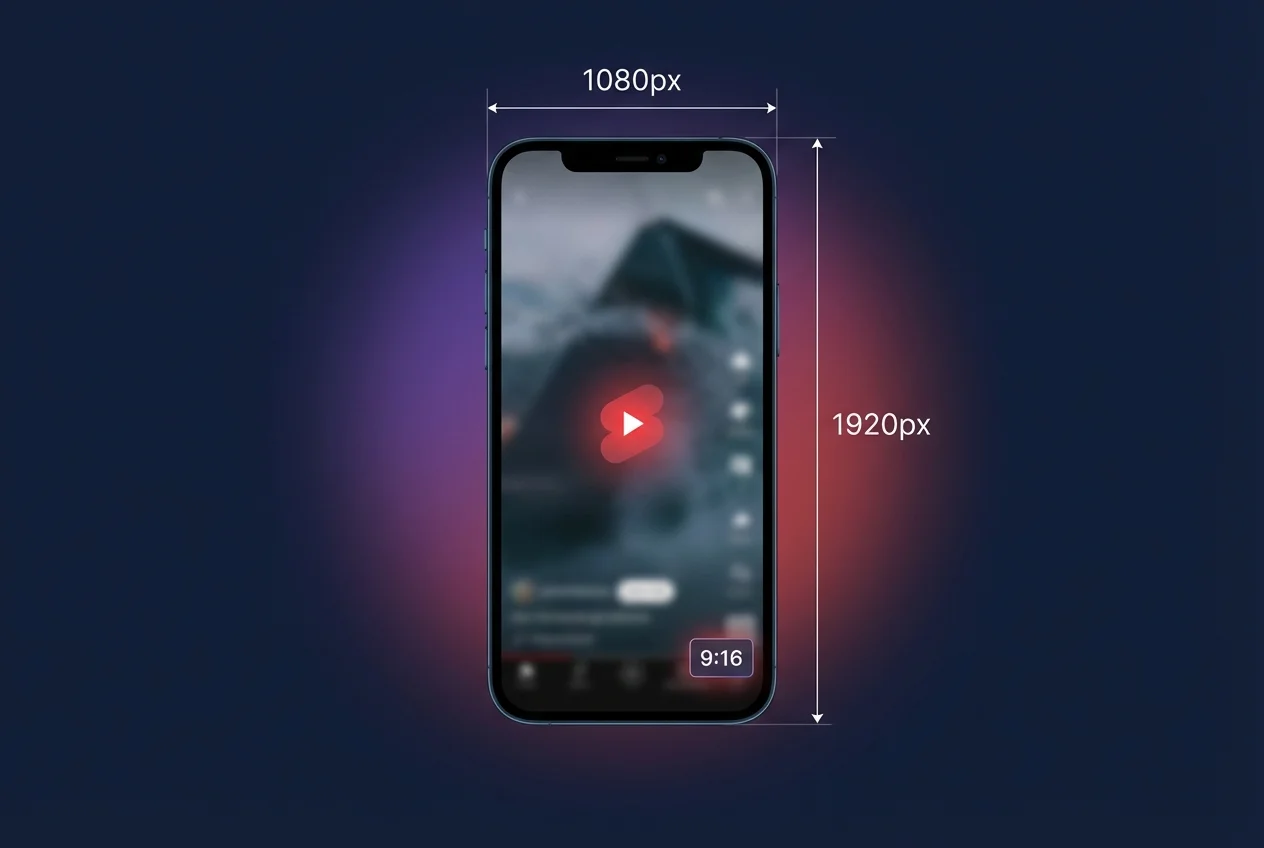
The correct YouTube Shorts dimensions are 1080 x 1920 pixels in a 9:16 aspect ratio. Upload a landscape video and YouTube won't classify it as a Short. Use a resolution below 720p and it'll look blurry on every modern phone screen.
This guide covers the exact resolution, aspect ratio, safe zones, file specs, and what happens when you get the dimensions wrong.
Quick-Reference Specs Table
Every YouTube Shorts spec you need when exporting or uploading:
| Specification | Recommended Value | Notes |
|---|---|---|
| Resolution | 1080 x 1920 px | Full HD vertical. Minimum 720 x 1280. |
| Aspect ratio | 9:16 | Square (1:1) is accepted but adds black bars. |
| Max duration | 3 minutes (180 s) | Extended from 60 s in October 2024. |
| Max file size | 256 MB | YouTube accepts up to 256 GB, but Shorts are typically 30-80 MB. |
| File formats | MP4, MOV, WebM | MP4 with H.264 + AAC is the safest choice. |
| Frame rate | 30 fps or 60 fps | 60 fps is better for fast-paced or gaming content. |
| Video codec | H.264 | H.265 (HEVC) also accepted. |
| Audio codec | AAC at 128 kbps+ | Stereo recommended. |
| Bitrate | 8 Mbps+ (1080p) | Higher bitrate = sharper output after YouTube re-encodes. |
| Copyrighted music | Max 60 s | Use royalty-free audio for longer Shorts. |
Source: YouTube Help Center — Create a Short
Resolution and Pixels
The standard YouTube Shorts resolution is 1080 x 1920 pixels — Full HD rotated into portrait. This is what YouTube's own Shorts camera records at and what the algorithm expects.
YouTube supports uploads up to 4K (2160 x 3840), but every Short is served to viewers at a maximum of 1080p regardless of source resolution. Uploading at 4K increases file size and upload time without improving quality. On the low end, 720 x 1280 is the minimum — anything below that looks soft on modern phones with 1080p+ screens.
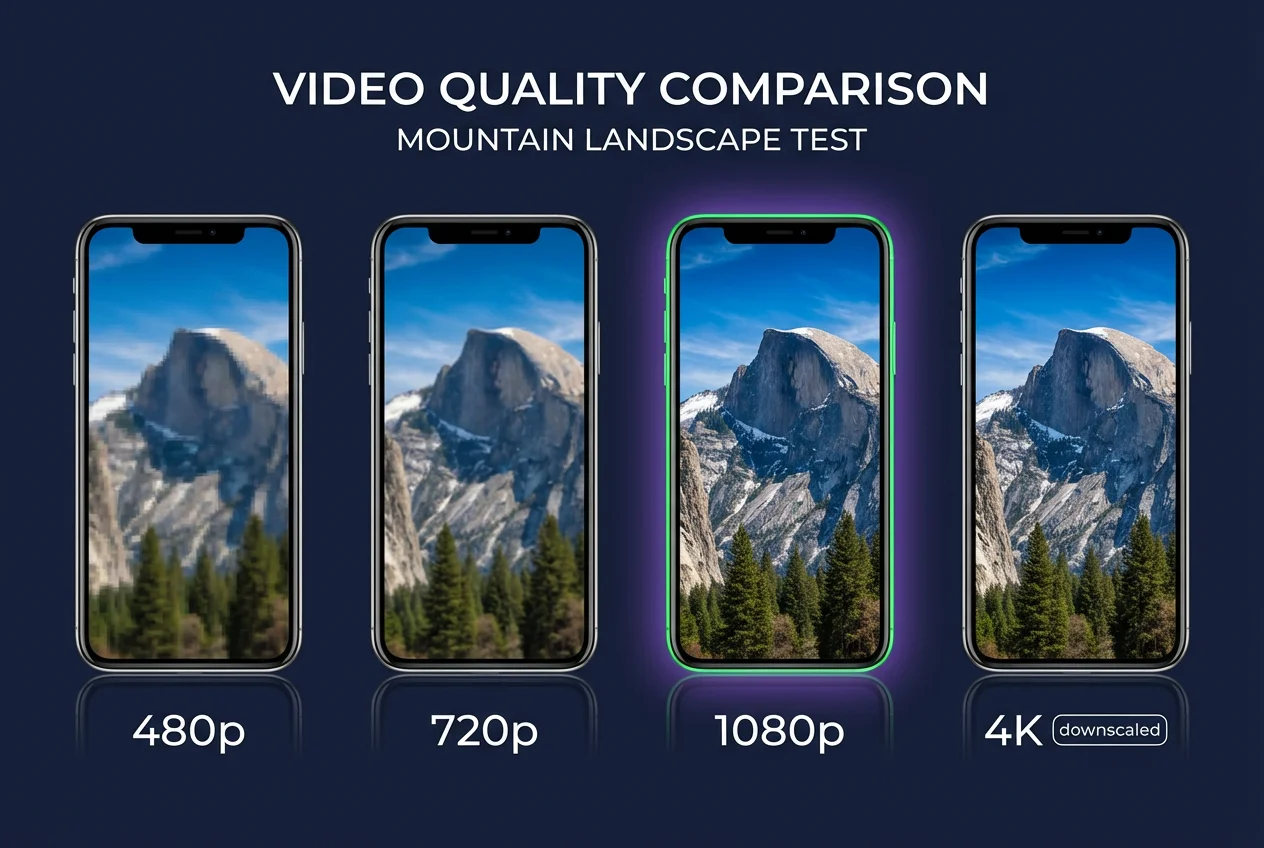
| Resolution | Pixels | Quality | Verdict |
|---|---|---|---|
| 480 x 854 | 409,920 | Blurry on most devices | Avoid |
| 720 x 1280 | 921,600 | Acceptable | Minimum viable |
| 1080 x 1920 | 2,073,600 | Sharp on all devices | Recommended |
| 2160 x 3840 | 8,294,400 | Downscaled to 1080p | Unnecessary |
Set your editing project to 1080 x 1920 before you start editing. Resizing a finished landscape video to portrait always looks worse than designing in vertical from the beginning.
Aspect Ratio
The correct YouTube Shorts aspect ratio is 9:16 — nine units wide by sixteen tall. YouTube uses the aspect ratio to decide whether a video qualifies as a Short: the video must be at least as tall as it is wide. Anything wider than square (like 4:3 or 16:9) is treated as a regular video.
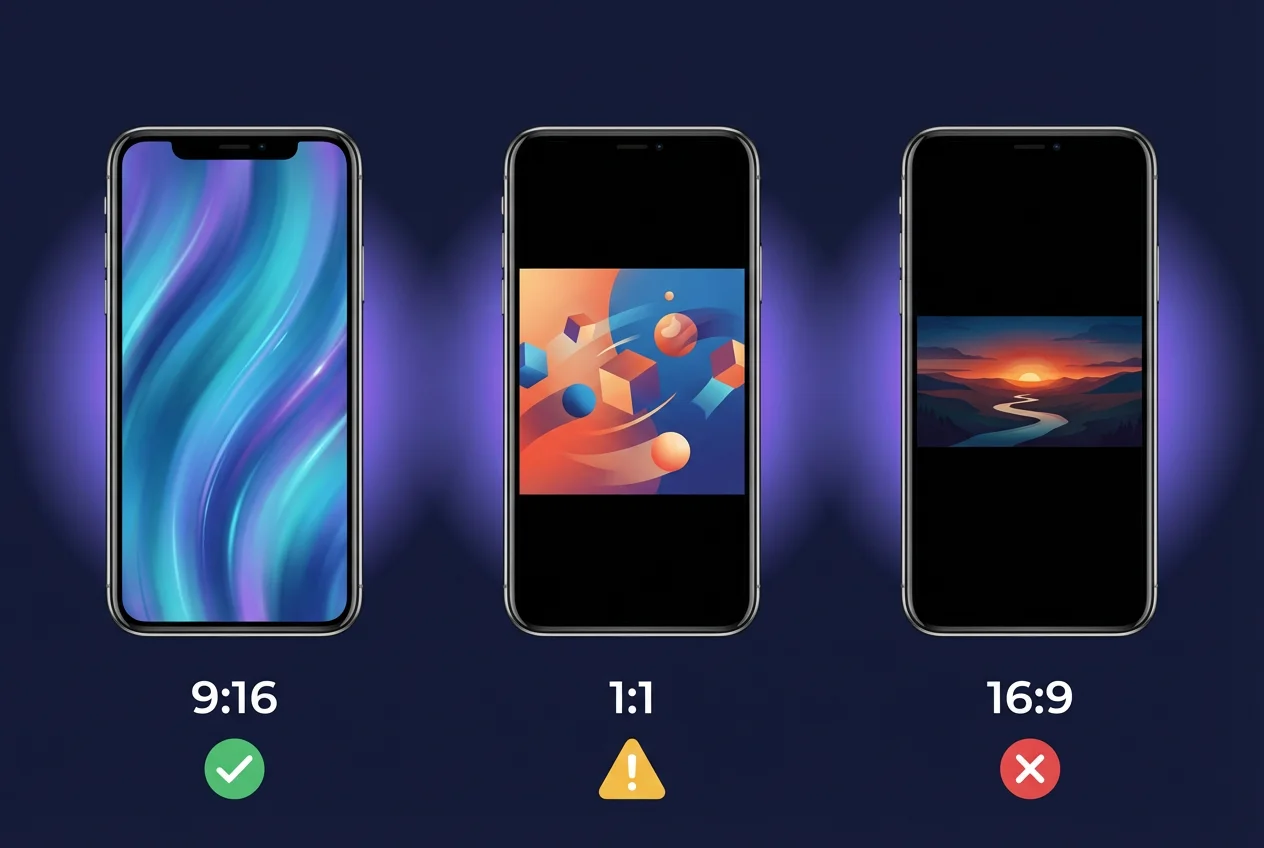
| Aspect Ratio | Pixels | Shorts Feed? | Display |
|---|---|---|---|
| 9:16 | 1080 x 1920 | Yes — full screen | Fills the entire Shorts player |
| 1:1 | 1080 x 1080 | Yes — with bars | Black bars above and below |
| 4:5 | 1080 x 1350 | Yes — with small bars | Slight bars, still works |
| 16:9 | 1920 x 1080 | No | Uploaded as regular video |
Always use 9:16. Square videos technically enter the Shorts feed, but the black bars signal "repurposed content" to viewers and typically see lower watch-through rates.
Safe Zone Dimensions
YouTube's mobile interface covers parts of your video with UI elements: the channel name, subscribe button, like/dislike/comment icons, and the video description. Keep all critical content — text overlays, faces, logos, calls-to-action — within the safe zone:
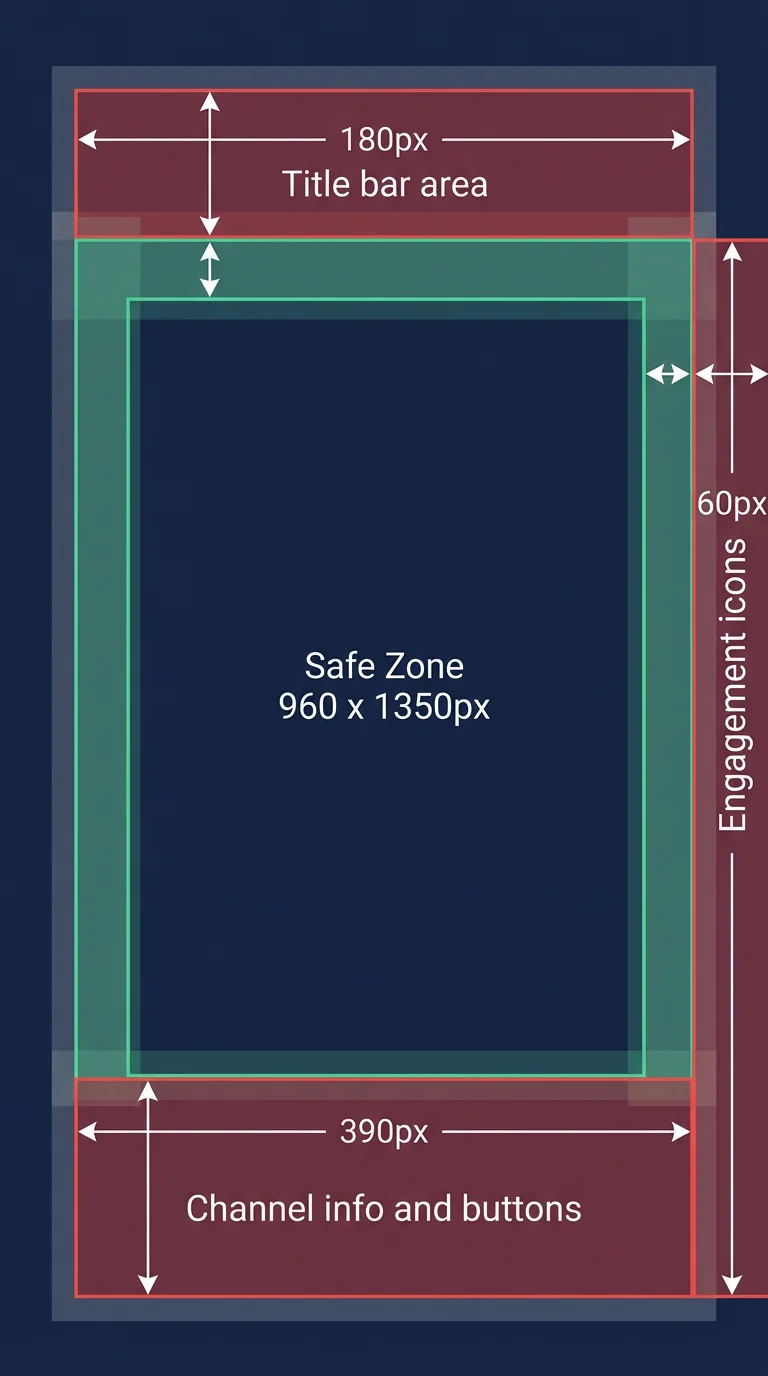
- Top margin: 180 px from the top edge (title and status bar area)
- Bottom margin: 390 px from the bottom edge (channel info, CTA buttons)
- Side margins: 60 px from each side (engagement icons on the right)
- Effective safe area: approximately 960 x 1350 px centered in the frame
Use a minimum font size of 24 px for any on-screen text so it's readable on smaller phones.
Create Faceless Videos on Autopilot
FlowShorts generates and posts AI videos to YouTube, TikTok & Instagram while you sleep.
Try FlowShorts Free →File Format, Size, and Length
File Formats
MP4 with H.264 video codec and AAC audio is the most reliable combination. It processes fastest and has the fewest compatibility issues.
- MP4 — recommended, universally supported
- MOV — works well, common from iPhone recordings
- WebM — supported, mainly used by screen recorders
- AVI, FLV, MKV, 3GP — accepted but less common for Shorts
File Size
A well-encoded 3-minute Short at 1080 x 1920 / 30 fps typically weighs 30-80 MB. YouTube's platform-wide upload limit is 256 GB, but there's no separate Shorts file size cap. Keeping files under 256 MB ensures fast uploads and smooth processing.
Video Length
YouTube Shorts can be up to 3 minutes (180 seconds) as of October 2024. There's no minimum length. However, YouTube's algorithm favors Shorts under 60 seconds for initial distribution in the Shorts feed, per data shared at YouTube's Made on YouTube 2024 event.
| Length | Best For | Algorithm Performance |
|---|---|---|
| Under 15 s | Hooks, teasers, memes | Moderate — too short for strong retention signals |
| 15-45 s | Tutorials, tips, reactions | Highest — strong completion rates |
| 45-90 s | Storytelling, mini-vlogs | Good if retention stays high |
| 90-180 s | In-depth explanations, reviews | Lower initial push; works for loyal audiences |
What Happens If You Upload the Wrong Size
Wrong Aspect Ratio (Landscape)
If your video is wider than it is tall (anything wider than 1:1), YouTube classifies it as a regular video, not a Short. It won't appear in the Shorts feed, the Shorts shelf on your channel, or the Shorts tab on mobile. You lose access to the Shorts algorithm entirely, even if the video is under 60 seconds.
Too Low Resolution (Below 720p)
Videos below 720 x 1280 will upload and can be classified as Shorts, but they'll appear visibly pixelated on modern smartphones. Blurry videos see significantly higher swipe-away rates.
Square Video (1:1)
Square uploads enter the Shorts feed, but YouTube adds black bars above and below. This wastes roughly 40% of the available screen space and makes content look repurposed rather than native.
Oversized File (4K Export)
Excessively large files (4K at high bitrate) take longer to upload and process, but the final output quality is identical to a standard 1080p upload. YouTube re-encodes everything to 1080p for Shorts playback.
Create Faceless Videos on Autopilot
FlowShorts generates and posts AI videos to YouTube, TikTok & Instagram while you sleep.
Try FlowShorts Free →Thumbnail Specs
YouTube supports custom thumbnails for Shorts (added in 2023):
- Resolution: 1080 x 1920 px (same 9:16 ratio as the video)
- Formats: JPG, PNG, or GIF
- Max file size: 2 MB
Thumbnails appear when your Short is displayed outside the Shorts feed — on your channel page, in search results, and in suggested videos. In the Shorts feed itself, the video auto-plays and the thumbnail isn't shown. Choose a frame that clearly communicates the topic in vertical format.
Tools for Creating Correctly Sized Shorts
These tools handle YouTube Shorts dimensions automatically:
- CapCut: Free mobile/desktop editor with a 9:16 Shorts preset. Good for manual editing.
- Canva: Has a "YouTube Shorts" template at the correct dimensions. Best for text-heavy or graphic-based Shorts.
- Adobe Premiere Rush: Supports vertical projects. More powerful but steeper learning curve.
- FlowShorts: AI-powered Shorts generator that exports at 1080 x 1920 automatically with voiceover, visuals, and captions. Designed for creators producing Shorts at daily scale.
Free YouTube Tools
Common Questions
What Are the Exact YouTube Shorts Dimensions in Pixels?
1080 pixels wide x 1920 pixels tall. This is Full HD resolution in portrait orientation with a 9:16 aspect ratio. The minimum acceptable resolution is 720 x 1280.
Can I Upload a 1920 x 1080 Horizontal Video as a Short?
No. A 1920 x 1080 video is in 16:9 landscape format. YouTube won't classify it as a Short regardless of its length. You need to crop or re-create the video in 1080 x 1920 (9:16 portrait) for it to appear in the Shorts feed.
How Long Can a YouTube Short Be in 2026?
Up to 3 minutes (180 seconds) as of October 2024. There's no minimum length. For best algorithmic performance, 15-45 seconds tends to generate the highest completion rates.
Do YouTube Shorts Support 4K?
You can upload at 4K (2160 x 3840), but YouTube downscales it to 1080p for playback. There's no visual quality difference for viewers. Export at 1080 x 1920 to save time and storage.
What File Format Is Best for YouTube Shorts?
MP4 with H.264 video codec and AAC audio at 128 kbps or higher. This combination processes fastest and has the fewest compatibility issues across devices.
Related Guides
- How to Post YouTube Shorts
- How to Get More Views on YouTube Shorts
- How to Monetize YouTube Shorts
- Best Hashtags for YouTube Shorts
Related: YouTube Video Length Limits (2026)


