30 Best Hashtags for YouTube Shorts to Go Viral in 2026 (Copy-Paste List)
Discover the 10 best hashtags for YouTube Shorts to boost your views and subscribers. Learn a complete strategy for general, niche, and trending tags.
FlowShorts Team

Hashtags on YouTube Shorts are visible keywords you add to your title or description. Unlike tags (which are hidden metadata), hashtags show up as clickable links that viewers can tap to browse related content. They also help the algorithm categorize your Short for search and the Shorts feed.
This guide covers which hashtags to use, how to combine them, and common mistakes that limit reach.
How Hashtags Work on YouTube Shorts
YouTube displays up to three hashtags from your description as clickable links above your video title. When a viewer clicks one, they see a feed of other videos using that same hashtag.
For the algorithm, hashtags serve as classification signals. They help YouTube understand:
- What topic your Short covers
- Which audience segments should see it
- What other content it relates to
Hashtags are not the primary ranking factor. Watch time, completion rate, and engagement matter far more. But hashtags give the algorithm a push in the right direction when your video is new and has no performance data yet.
Hashtags vs. tags: Tags are hidden metadata you add during upload (covered in our YouTube tags list guide). Hashtags are visible text starting with # that appear in your title or description. Use both.
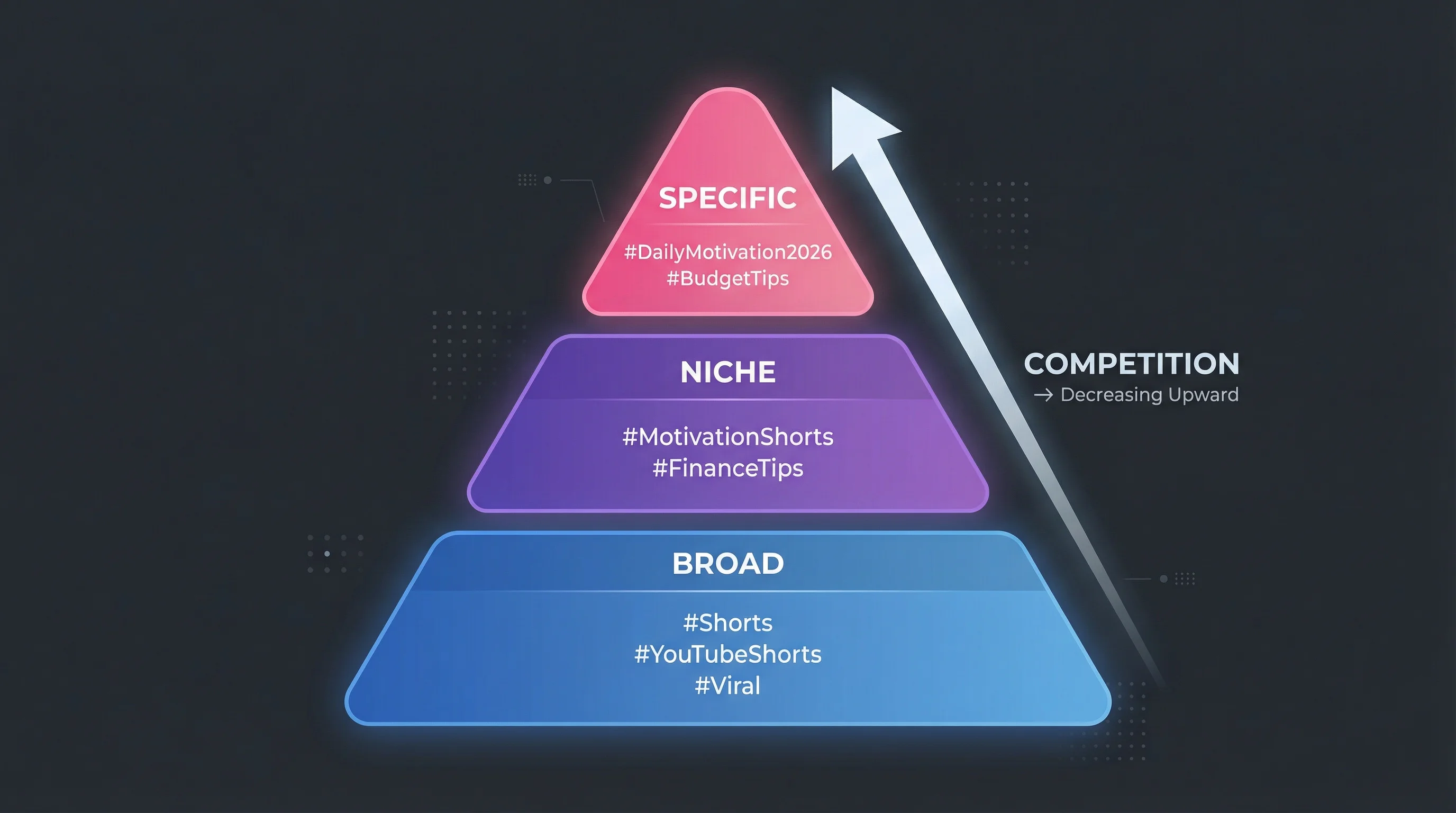
The 3-Layer Hashtag System
Every Short should use a combination of three hashtag types. This balances broad discovery with niche targeting.
| Layer | Purpose | How Many | Examples |
|---|---|---|---|
| Platform | Tells the algorithm this is a Short | 1-2 | #Shorts, #YouTubeShorts |
| Niche | Targets your specific audience | 2-3 | #FinanceTips, #CookingShorts, #GamingClips |
| Topic | Describes this specific video's subject | 1-2 | #BudgetMeals, #PS5Review, #StudyWithMe |
Total: 3-5 hashtags per Short. YouTube allows up to 15, but using too many dilutes relevance and can look spammy. Stick to 3-5 focused hashtags rather than 15 generic ones.
Best Hashtags for YouTube Shorts by Category
Platform Hashtags (Use on Every Short)
| Hashtag | What It Does |
|---|---|
#Shorts |
The most widely used Short identifier. Signals short-form format to the algorithm and works cross-platform (TikTok, Instagram). |
#YouTubeShorts |
YouTube-specific identifier. Helps categorize your video for the Shorts feed and search. |
Include at least #Shorts on every video. Add #YouTubeShorts if you have room. These are baseline tags, not growth drivers on their own.
Discovery Hashtags (For Reaching New Viewers)
| Hashtag | What It Does |
|---|---|
#FYP |
Borrowed from TikTok's "For You Page." Widely used across platforms to signal content designed for algorithmic recommendation. |
#Trending |
Best used when your content ties to a current event, meme, or cultural moment. Has a short shelf life but can drive spikes in views. |
#Viral |
Signals high-engagement intent. Use when your content has a strong hook, surprise element, or emotional payoff. |
Let AI Handle Your Posting Schedule
FlowShorts auto-posts videos at the optimal time to YouTube Shorts, TikTok & Instagram Reels.
Set Up Auto-Posting →Discovery hashtags work best when your content actually delivers on the promise. Adding #Viral to a mediocre video won't make it perform. The algorithm tests your Short with a small audience first; if they don't engage, it stops pushing regardless of your hashtags.
Niche Hashtags (For Targeting Your Audience)
These connect your content with viewers who actively follow specific topics. Replace the bracketed terms with your actual niche:
| Niche | Hashtag Examples |
|---|---|
| Finance | #FinanceTips #InvestingForBeginners #MoneyTips #FinanceShorts |
| Fitness | #WorkoutShorts #HomeWorkout #FitnessTips #GymMotivation |
| Cooking | #CookingShorts #EasyRecipe #QuickMeals #FoodShorts |
| Gaming | #GamingShorts #GameClips #[GameName] #GamerLife |
| Education | #LearnOnYouTube #EducationShorts #StudyTips #DidYouKnow |
| Beauty | #MakeupShorts #BeautyTips #GRWM #SkincareRoutine |
| Tech | #TechShorts #TechReview #Gadgets #TechTips |
| Travel | #TravelShorts #TravelTips #[Destination] #TravelVlog |
| Motivation | #MotivationShorts #Mindset #SelfImprovement #DailyMotivation |
Niche hashtags are the most important layer. They're where you move from "show this to everyone" to "show this to people who care about this topic." A Short tagged #Shorts #CookingShorts #15MinuteMeals will reach a more relevant audience than one tagged #Shorts #Viral #FYP.
Engagement Hashtags (For Driving Interaction)
| Hashtag | When to Use |
|---|---|
#WaitForIt |
Videos with a surprise ending or payoff |
#DidYouKnow |
Educational facts or surprising information |
#POV |
Point-of-view storytelling format |
#Challenge |
Participating in or creating a challenge |
These work when the content matches the hashtag. #WaitForIt on a video with no payoff will frustrate viewers and hurt your completion rate.
Hashtag Formulas by Goal
Copy these combinations and swap in your niche-specific terms:
Maximum reach:
#Shorts #YouTubeShorts #FYP #[YourNiche]Shorts #[SpecificTopic]
Niche authority:
#Shorts #[YourNiche]Tips #[YourNiche]Shorts #[SpecificTopic] #LearnOnYouTube
Trend riding:
#Shorts #Trending #[TrendName] #[YourNiche] #[SpecificTopic]
Community building:
#Shorts #[YourNiche]Community #[YourNiche]Shorts #ContentCreator #[SpecificTopic]
Common Hashtag Mistakes
Let AI Handle Your Posting Schedule
FlowShorts auto-posts videos at the optimal time to YouTube Shorts, TikTok & Instagram Reels.
Set Up Auto-Posting →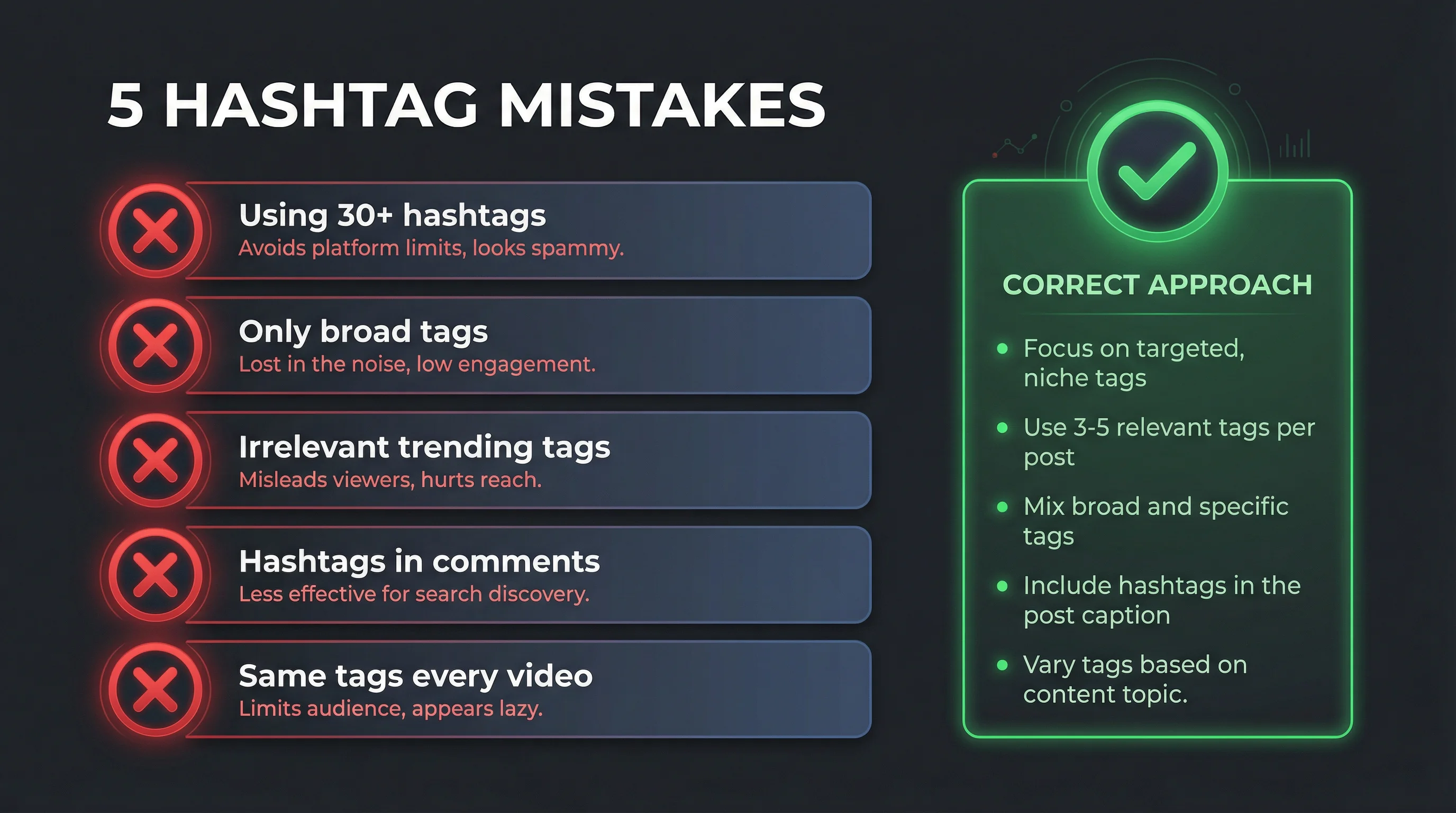
Using 15 hashtags on every video. YouTube allows up to 60 hashtags in a description, but only displays the first 3 above your title. Overloading with hashtags can trigger YouTube's spam filters and actually reduce your reach. 3-5 well-chosen hashtags outperform 15 generic ones.
Only using broad hashtags. #Shorts #FYP #Viral on every video puts you in competition with millions of creators and gives the algorithm no signal about your specific topic. Always include at least 2 niche-specific hashtags.
Never changing your hashtags. Using the identical hashtag set on every video limits discovery. Vary your topic-specific hashtags to match each video's actual content.
Putting hashtags only in the title. Hashtags in the title take up character space and can look cluttered. Place them at the end of your description instead. YouTube will still display the first 3 above your title.
Using irrelevant trending hashtags. Adding #Trending to a video with no connection to current events doesn't help. The algorithm evaluates whether your content actually matches the hashtag's topic based on viewer behavior.
Common Questions
Do Hashtags Actually Help YouTube Shorts Get More Views?
They help with initial classification, not ongoing performance. Hashtags tell the algorithm what your Short is about so it gets shown to the right test audience. After that, your video's actual watch time, completion rate, and engagement determine whether it gets pushed further. Good hashtags on bad content won't save it.
How Many Hashtags Should I Use on YouTube Shorts?
3-5 per video. YouTube displays up to 3 hashtags above your title. Using more than that is fine in the description, but diminishing returns kick in quickly. According to YouTube's hashtag guidelines, using more than 60 hashtags in a single video will cause all hashtags to be ignored.
Should I Use #Shorts or #YouTubeShorts?
Use #Shorts at minimum. It's recognized across platforms and is the most common short-form identifier. Add #YouTubeShorts as your second hashtag if you want platform-specific targeting. Both together is fine; they're not redundant because they serve slightly different search queries.
What's the Difference Between Hashtags and Tags?
Hashtags are visible text in your title or description (e.g., #Shorts). Tags are hidden metadata you add during upload in the "Tags" field. Both help the algorithm classify your content, but they work through different mechanisms. For a full breakdown of tags with copy-and-paste lists, see our YouTube tags list guide.
Does #FYP Actually Work on YouTube?
#FYP originated on TikTok and has no official function on YouTube. However, it's widely used by cross-platform creators, and many viewers recognize it. It won't hurt to include it, but don't rely on it as your primary hashtag. Your niche-specific hashtags do more work for YouTube discovery.
Related Guides
- YouTube Tags List: Copy-and-Paste Tags by Niche
- How to Get More Views on YouTube Shorts
- How to Post YouTube Shorts
Free YouTube Hashtag Tools
Generate optimized hashtags for your next Short automatically:
Need content ideas? Browse YouTube Shorts Ideas by Niche — 30+ niches with hooks and concepts.


