How to Start a Faceless YouTube Channel and Actually Grow
Learn how to start a faceless YouTube channel with this practical guide. Get actionable tips on niche selection, content automation, and monetization.
FlowShorts Team
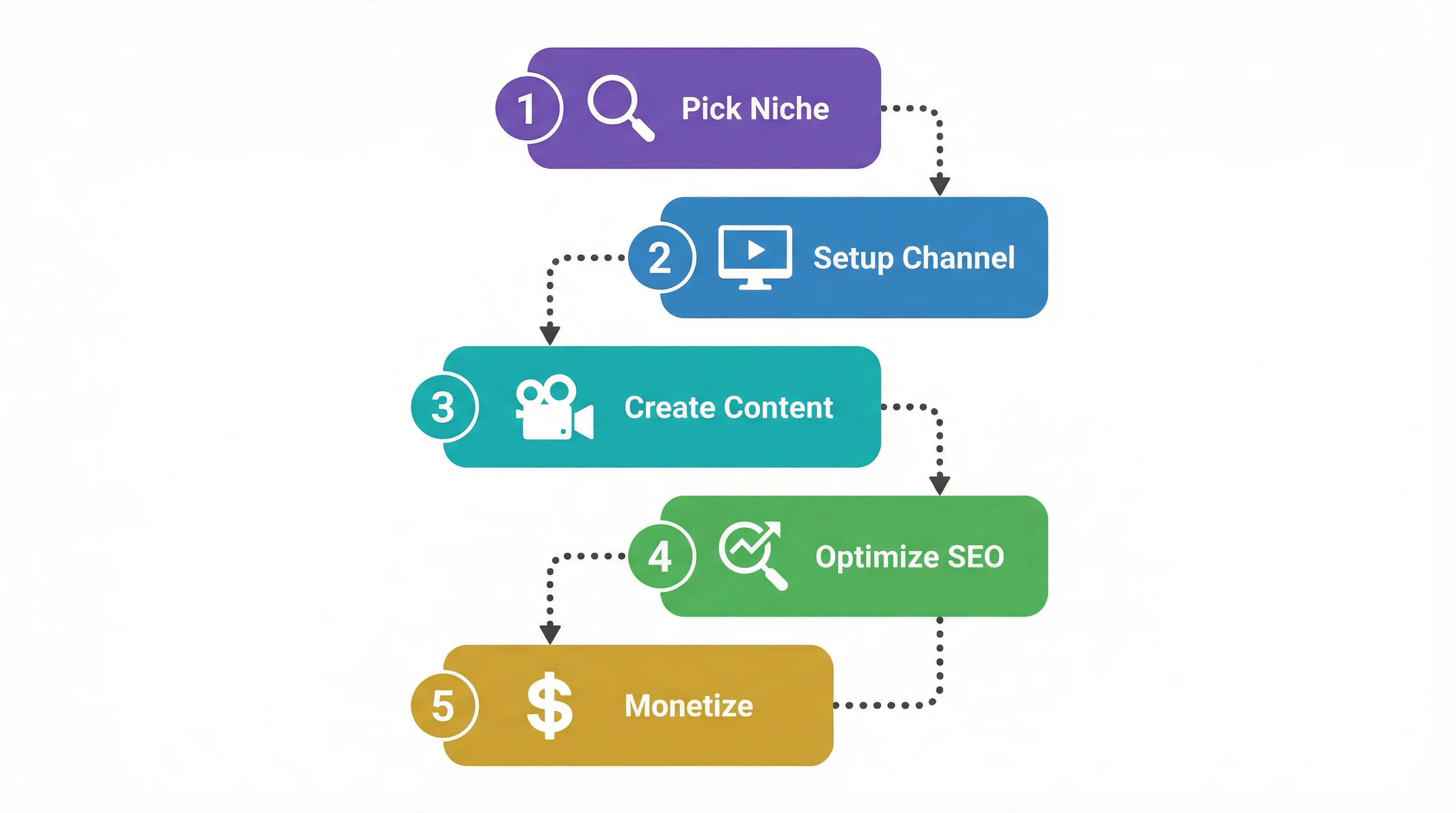
So, you want to start a faceless YouTube channel. At its heart, the entire model comes down to four things: picking a profitable niche, dialing in a smooth content creation process, nailing your SEO when you publish, and having a clear plan to make money. The whole idea is built on creating compelling videos using stock footage, animations, screen recordings, and voiceovers—meaning you never have to get in front of a camera.
Why Faceless YouTube Channels Are a Smart Move

The thought of building a huge online audience without showing your face might sound a little strange, but it's quickly becoming one of the smartest ways to grow on YouTube. A faceless channel isn't just a gimmick; it's a genuine business model built for efficiency, scale, and privacy. And creators are catching on for some very good reasons.
First off, the faceless model rips away the single biggest roadblock for most would-be YouTubers: being on camera. It lets you put 100% of your energy into the quality of the content itself—the script, the visuals, the story—without the pressure of being a "personality." That shift is incredibly freeing and opens the platform to experts who have amazing things to share but just prefer staying behind the scenes.
Beyond just comfort, the business advantages are huge. Production time and costs drop dramatically when you're not filming yourself. Forget about expensive cameras, fancy lighting rigs, or setting up a perfect backdrop. Instead, you can invest those resources into smart tools like stock footage libraries and AI voiceover software, making it totally possible to create professional-grade content on a lean budget.
The Power of Automation and Scalability
One of the best things about running a faceless channel is how much you can automate. A personality-driven channel is tied directly to the creator; they are the brand. A faceless channel, on the other hand, can be run like a media company where the content creation itself becomes a system you can delegate or even outsource.
This freedom lets you build a content engine that works for you, not the other way around. Here’s why that’s so powerful:
- Consistency Without Burnout: You can produce and schedule videos weeks or even months ahead of time. This lets you keep up the consistent posting schedule that the YouTube algorithm loves, all without the daily grind of filming.
- Scalable Production: Once you have a workflow that works, you can easily ramp things up. Maybe that means launching a second channel in a totally different niche or just doubling the output on your first one. Your growth potential multiplies.
- Focus on Strategy: By automating the day-to-day video creation, you get to spend your time on what really moves the needle: analyzing your stats, exploring new ways to monetize, and building a real brand.
The real magic of a faceless channel is that you’re not just creating videos; you’re building a digital asset. Each video is a piece of content that can generate views and income for years to come, compounding its value over time.
Tapping into Short-Form Video Growth
The explosion of YouTube Shorts has been an absolute game-changer for faceless creators. The format is perfectly designed for the kind of quick, high-impact content that can be easily made with stock clips, text on screen, and an AI voice.
The growth numbers here are staggering. YouTube Shorts now pull in over 70 billion daily views as of early 2024, a mind-blowing jump from 30 billion just a couple of years ago.
This table puts the opportunity into perspective.
The Faceless Channel Opportunity at a Glance
| Metric | Statistic | Why It Matters for Your Faceless Channel |
|---|---|---|
| Daily Shorts Views | 70 Billion+ | This massive audience is actively looking for short, engaging content. Your videos have a huge pool of potential viewers from day one. |
| Creator Anonymity | 100% Possible | You can build a successful brand and income stream without ever revealing your identity, protecting your privacy. |
| Production Efficiency | Up to 80% Faster | By using templates, AI tools, and stock assets, you can create content much faster than a traditional vlogger, allowing for more output. |
| Scalability | Virtually Unlimited | Since you're not the bottleneck, you can hire help or use automation to scale production across multiple channels and niches. |
| Monetization Threshold | 10M Shorts views in 90 days | This provides a direct, metrics-based path to the YouTube Partner Program, often faster than the traditional 4,000 watch hours. |
This incredible viewership, detailed in these YouTube growth statistics, gives new channels a direct and powerful path to growing an audience fast.
Finding a Profitable Niche for Your Channel
Picking your niche is hands-down the most critical decision you'll make for your faceless YouTube channel. It's the bedrock for everything that follows—your content, your audience, and how you'll eventually make money. Get this right, and you're building on solid ground. Get it wrong, and you'll find yourself shouting into the void.
Instead of jumping on whatever is trending this week, the smart play is to build your channel around an evergreen niche. These are topics with staying power, subjects that people are consistently curious about. They're a perfect match for the faceless model, which leans heavily on stock footage, animations, and voiceovers rather than a creator's personality.
Identifying High-Potential Faceless Niches
The secret is to find topics where the information is the real star. Think about content where people are coming to learn something specific, hear a great story, or get a problem solved. They aren't there for you; they're there for the value you provide.
Here are a few powerhouse examples that consistently work:
- Finance and Investing: People are always looking for ways to understand money. You can break down complex stock market trends, offer personal finance advice, or explain crypto. The audience cares about the quality of the insight, not the face delivering it.
- History and Storytelling: Bringing historical events or fascinating biographies to life is a huge opportunity. This niche is a natural fit for documentary-style videos using archival photos, maps, and stock footage.
- Psychology and Self-Improvement: Content that explores why we do what we do has universal appeal. You can cover anything from productivity hacks to deep dives into psychological phenomena. This stuff is incredibly shareable.
- Science and Technology Explained: Take complex topics—like quantum computing or black holes—and make them easy to understand. Animation and clear data visualizations are your best friends here.
How to Validate Your Niche Idea
A good idea isn't enough; you need to know if there's a real audience and a clear path to getting paid. This means putting on your detective hat and doing some research before you ever hit record.
First, check for search demand. Start simple. Go to YouTube and start typing in your core topic, like "psychology of," and see what the search bar suggests. Those autocomplete phrases are a direct line into what real people are actively searching for. Tools like Google Trends can also show you if interest in a topic is growing or fading.
Next, scope out the competition. Finding other channels in your niche is a good thing—it proves a market exists. Search for your topic and see who the top players are. But don't just see them as competition; look for the gaps. Are they all making 20-minute deep dives? Maybe there's a massive opening for you to create quick, punchy Shorts that get straight to the point.
For a more data-driven shortcut, you can explore high-potential ideas with our free faceless niche finder tool: https://www.flowshorts.app/tools/faceless-niche-finder
The goal isn't to find a niche with zero competition. It's to find one where you can offer a fresh angle, a better format, or more consistent value than everyone else.
Finally, think about making money from day one. Ad revenue is great, but the top channels have multiple income streams. Can your niche support affiliate marketing? A finance channel, for instance, could promote trading platforms. Could you sell digital products, like a history channel selling detailed e-books? A niche with several monetization avenues is a much safer bet.
Structuring Your Content for High Retention
Once you've locked in your niche, it's all about how you structure your content, especially for YouTube Shorts. With the US alone projected to have 175 million Shorts users by late 2025, you simply can't afford to ignore this format.
Shorts are a different beast. Their success is all about retention. Good long-form videos might hold a viewer's attention for 20-30%, but data shows the average retention for Shorts is around 50%. Your videos have to be engineered from the ground up to grab and hold that attention.
Here’s a proven formula for faceless Shorts that works:
- The Hook (0-3 seconds): Hit them with a provocative question, a shocking fact, or a bold claim right out of the gate. Make them stop scrolling.
- The Buildup (3-20 seconds): Don't waste time. Use fast cuts and a tight script to quickly give context and build suspense toward the main point.
- The Payoff (20-50 seconds): Deliver the goods. This is the answer to the hook, the core insight, the "aha!" moment.
- The Loop (Final 5 seconds): End your Short in a way that flows seamlessly back to the beginning. A simple phrase or visual cue can trick the brain into re-watching, which signals to the algorithm that your content is engaging.
This structure is built for how people consume short-form content. And with the algorithm favoring fresh content, a daily posting schedule is one of the best ways to compound your growth. To keep your strategy sharp, stay updated on the latest YouTube Shorts statistics and trends.
Automating Your Content Creation Process
The secret to a thriving faceless YouTube channel isn't about working yourself to the bone. It’s about building a smart, repeatable system. Scaling successfully comes from automating the heavy lifting, not from grinding harder. With the right tools, you can turn the entire content creation workflow from a manual slog into a streamlined production line.
This frees you up to focus on the big picture—strategy and growth—instead of getting lost in the weeds of video editing and scriptwriting. The end goal is a hands-off process where a simple topic idea becomes a published video with minimal effort, giving the YouTube algorithm the consistency it loves.
Architecting Your Automated Workflow
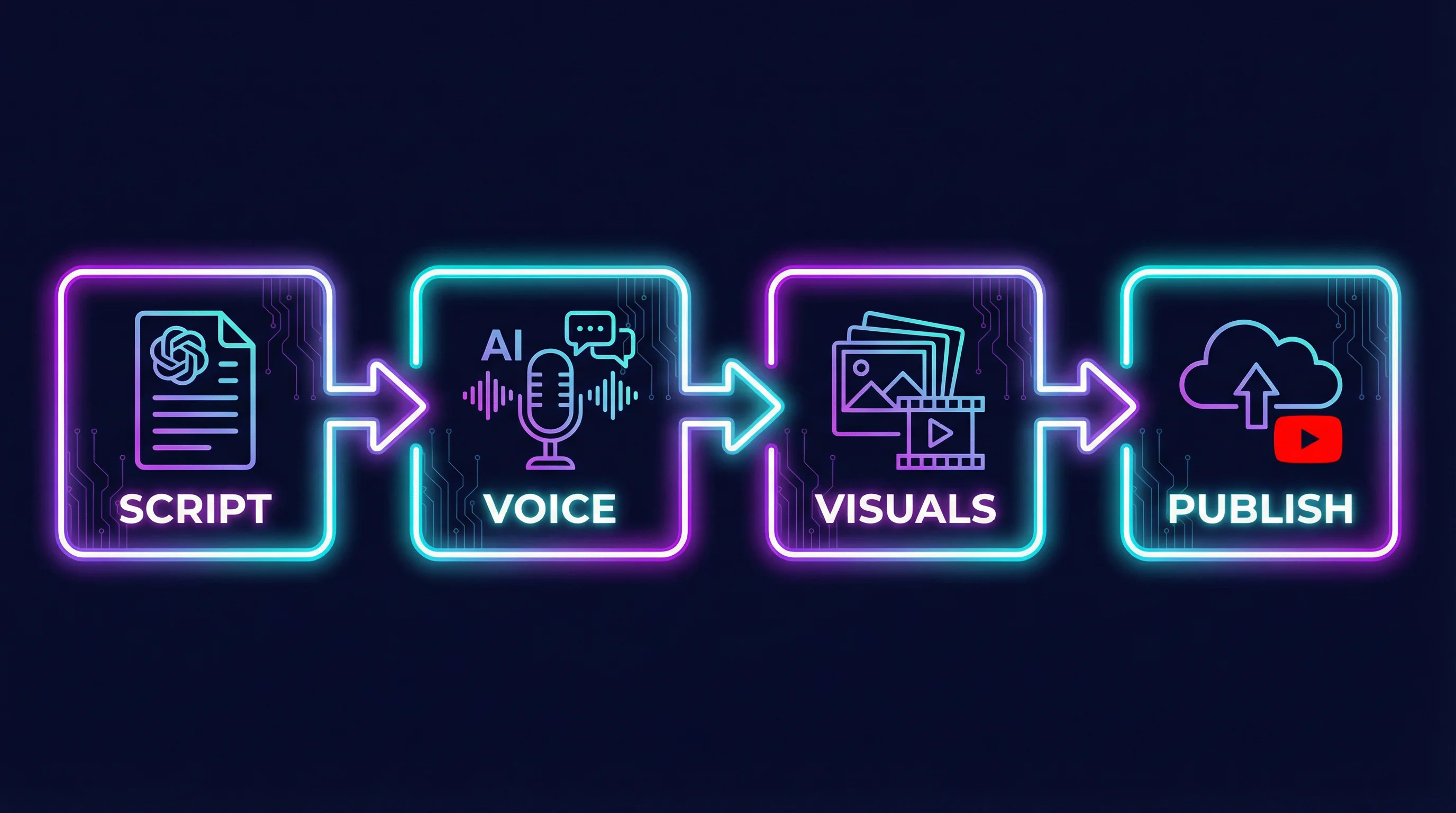
The old way of making a video is what burns most creators out: manually writing scripts, digging for clips, recording audio, and piecing it all together. An automated workflow, on the other hand, uses specialized AI tools to handle each stage, which then collaborate to build the final video.
Think of it like a digital assembly line. Each station performs a specific task, and out comes a polished video, ready to go.
- Script Generation: Forget staring at a blank page. You can feed a topic or keyword into an AI scriptwriter and get a script designed for high retention in minutes. It'll have a solid hook, a clear buildup, and a satisfying payoff, all optimized for short-form content.
- Voiceover Production: Recording voiceovers yourself is a huge time sink. Modern AI text-to-speech (TTS) technology now offers incredibly lifelike voices, so you don't need a pricey microphone or to hire voice actors.
- Visual Sourcing and Assembly: This is usually the most painful part. Automation platforms tap into massive libraries of royalty-free stock footage and images, automatically finding and selecting clips that fit the script's narrative.
- Editing and Finalization: The system handles the finishing touches. It perfectly syncs the voiceover with the visuals, adds dynamic captions (a must for mobile viewers), and even layers in background music to create the right mood.
A few years ago, this kind of production efficiency was only available to media companies with huge teams and even bigger budgets. Today, a single person can achieve the same output from their laptop.
This structured approach is the foundation for a sustainable content engine. It all starts with validating your ideas properly.

As you can see, a successful channel is built by first validating an idea's potential, checking out the competition, and making sure there are clear monetization paths—all before you dive into production.
Choosing Your Automation Platform
The right platform brings all these steps under one roof. Instead of juggling multiple subscriptions for scripting, voiceovers, and video editing, a unified solution like FlowShorts can manage the entire pipeline. You just set the niche and the schedule, and the platform’s AI does the rest.
If you want to see how this stacks up against other tools, you can check out our deep dive into the best AI faceless video generator options on the market. A centralized dashboard gives you a bird's-eye view of your content strategy and lets you manage auto-posting schedules for YouTube, TikTok, and Reels without ever leaving the platform.
Comparing Content Production Workflows
To really understand the impact of automation, it helps to see a direct comparison. Here's a look at the old, manual process versus a modern, automated one.
| Production Step | Traditional Manual Method | Automated FlowShorts Method |
|---|---|---|
| Scripting | 2-3 hours of research and writing | 5 minutes with AI topic input |
| Voiceover | 1 hour of recording and editing | 2 minutes with AI text-to-speech |
| Visual Sourcing | 2-4 hours searching stock sites | 5 minutes with AI visual matching |
| Editing | 3-5 hours syncing, captioning, adding music | 10 minutes for AI assembly & review |
| Total Time | 8-13 Hours per video | ~20 Minutes per video |
The difference is night and day. Automation doesn't just save you a bit of time; it completely changes the economics of content production, letting you scale in ways that were previously impossible for solo creators.
The Real-World Difference Automation Makes
Let’s put this into perspective. To create a single, one-minute Short by hand, you could easily spend half a day researching, writing, recording, and editing. It's a massive effort for 60 seconds of content.
Now, picture the automated workflow:
- Input: Give the AI a video topic.
- Generation: It writes the script, creates the voiceover, and pulls matching visuals.
- Assembly: The platform edits everything together, adding captions and music.
- Review: You give it a final look and hit approve.
Your time commitment plummets from hours to minutes per video. This is how top channels are able to post daily—or even multiple times a day—which is a huge signal to the algorithm. Your channel stops being a second job and starts becoming a digital asset that works for you 24/7. This fundamental shift from being just a content creator to becoming a system manager is the core of building a faceless YouTube channel that can truly scale.
Getting Your Videos Seen: Publishing and Optimization
So, you've automated a fantastic video. That's a huge step, but it's only half the journey. A brilliant video that nobody sees is just digital dust. This is where a smart publishing strategy comes in, turning your automated creations into actual views and real channel growth.
The YouTube algorithm isn't some mythical beast. It's a system designed to serve viewers what they want to see, and it rewards creators who make that job easy. Your mission is to send crystal-clear signals about what your video is and who it's for. For a faceless channel, this data-driven approach isn't just helpful—it's everything. You don't have a personal brand to lean on, so your metadata has to do the heavy lifting.
Nail Your YouTube SEO from the Start
Think of YouTube as the second-biggest search engine on the planet, because it is. Every single video is a piece of content that needs to be optimized for search. This isn't something you bolt on at the end; it’s a crucial part of your content strategy from the get-go, especially in crowded niches like finance or history.
Your title, description, and tags are the three pillars of your on-platform SEO. Getting these right consistently is how you start to win.
- Write Titles for Humans and Robots: Your title is your single most important piece of SEO real estate. It needs to grab a human's attention while clearly telling the algorithm what it's about. A generic title like "Cool History Facts" gets lost. "Mind-Blowing Facts About Ancient Rome You Never Knew" is specific, searchable, and way more compelling.
- Descriptions are More Than an Afterthought: That little description box is a goldmine. The first two sentences are vital because they show up in search results, so make them count. Hook the viewer and repeat your main keyword phrase naturally. After that, expand with a detailed paragraph or two explaining the value of the video, weaving in related keywords and phrases along the way.
- Tag Strategically: Tags might not have the same punch they used to, but they still help YouTube contextualize your content. Use a mix of broad terms ("History," "Documentary") and specific, long-tail phrases someone might actually search for ("daily life of roman soldiers," "what did gladiators eat").
Your video's metadata—the title, description, and tags—is basically a set of instructions for the YouTube algorithm. The clearer and more specific your instructions, the better it can deliver your video to the right audience.
The Unfair Advantage of a Consistent Schedule
YouTube's algorithm absolutely loves consistency. When you post on a predictable schedule, you're training your audience to come back for more, and you're signaling to YouTube that your channel is a reliable source of fresh content. For a faceless channel running on automation, this is your secret weapon.
Especially with Shorts, posting daily—or even multiple times a day—can be a massive growth lever. Each video is another lottery ticket, another chance to get picked up by the algorithm and go viral.
Trying to manage this manually is a direct path to burnout. This is where automation tools become non-negotiable. Platforms like FlowShorts don't just help create the content; they can handle the auto-posting for you. You can literally queue up weeks of content in advance, ensuring your channel is a buzzing hub of activity even when you’re not actively working on it. To really get into the weeds of timing your posts, you can learn more about how to post on YouTube for the best results.
Repurpose Everything for Explosive Reach
Don't let your hard work die on a single platform. Every YouTube Short you make is a potential hit on TikTok and Instagram Reels. Repurposing your content is one of the easiest, lowest-effort ways to triple your potential audience and funnel new subscribers back to your main YouTube channel.
The trick is to make the content feel native to each platform. The video itself can stay the same, but take a minute to tweak the captions, use relevant hashtags, and maybe jump on a trending sound. This multi-platform approach creates a powerful ecosystem where each channel feeds the others, helping you grow much faster than if you were just stuck on YouTube alone.
Real Ways to Monetize Your Faceless Brand

Let's talk about making money. While the idea of passive income from YouTube ads is what gets most people excited, it's just the starting line. Honestly, relying only on AdSense is a rookie mistake that leaves a ton of money on the table.
The most successful faceless channels I've seen don't just pump out videos; they build actual brands with several different, resilient income streams. This is how you shift your channel from a side hustle into a real digital business, protecting yourself from algorithm mood swings and unlocking earning potential that ads alone could never touch.
The YouTube Partner Program and Shorts
The first stop for nearly every creator is the YouTube Partner Program (YPP), which is what lets you run ads on your content. To get in, you have to hit certain benchmarks. The classic route is getting 1,000 subscribers and 4,000 hours of watch time. But for faceless channels, Shorts offer a much faster path.
Here’s the YPP requirement for Shorts:
- 1,000 subscribers
- 10 million valid public Shorts views within the last 90 days
For a faceless channel that’s built around high-volume, automated content, hitting 10 million views is often far more realistic than grinding out 4,000 watch hours. Once you’re in, ads run in the Shorts feed, and you get a cut of the revenue. It's a great first step, but the real money is made elsewhere.
Affiliate Marketing: Your Secret Weapon
This is where a faceless channel can truly dominate. Affiliate marketing is simple: you promote another company's products and earn a commission for any sales that come through your unique link. Since your content is designed to provide value and information, recommending relevant tools or products feels like a natural extension of your content, not a sleazy sales pitch.
Think about it. A faceless finance channel could easily become an affiliate for:
- Investing platforms like Wealthfront or trading apps
- Budgeting software like YNAB
- Top-selling books on personal finance or investing
The trick is to be authentic. Only promote products you genuinely believe will help your audience. You then place your affiliate links in your video descriptions and, more importantly, in a pinned comment so it’s easy to find. Over time, these commissions can easily blow past your ad revenue.
The real power of a faceless brand is that viewer trust is built on the quality of your content, not your personality. When you recommend a product, your audience sees it as a logical, helpful suggestion from a source they already rely on.
Selling Your Own Digital Products
Why send your audience to someone else's product when you can sell them your own? This is one of the most profitable moves you can make because you keep nearly 100% of the revenue. Your YouTube channel effectively becomes the perfect, automated marketing funnel for your own shop.
For instance, a history channel could create and sell:
- In-depth e-books that expand on the topics from your most popular videos.
- Printable timelines or beautifully designed infographics for history buffs or students.
- Exclusive audio guides or mini-documentaries for paying supporters.
The magic of digital products is that you build them once, and they can be sold forever. You’re not trading hours for dollars; you're building a digital asset that earns for you 24/7, which fits the automated spirit of a faceless channel perfectly.
Attracting Brand Deals and Sponsorships
A lot of creators think you need to show your face to land sponsorships. That's a total myth. Brands ultimately care about one thing: getting in front of their ideal customer. If your faceless channel has a highly engaged, niche-specific audience, you are an incredibly valuable partner.
A channel focused on psychology and self-improvement could be a goldmine for a meditation app or an online therapy service. Your videos are concrete proof that you can hold the attention of their target demographic.
To get on their radar, put together a professional media kit. This is usually a one-page PDF that shows off your channel's key stats, audience demographics, and engagement rates. Having this ready to go shows brands you're a serious business and makes it incredibly easy for them to say "yes."
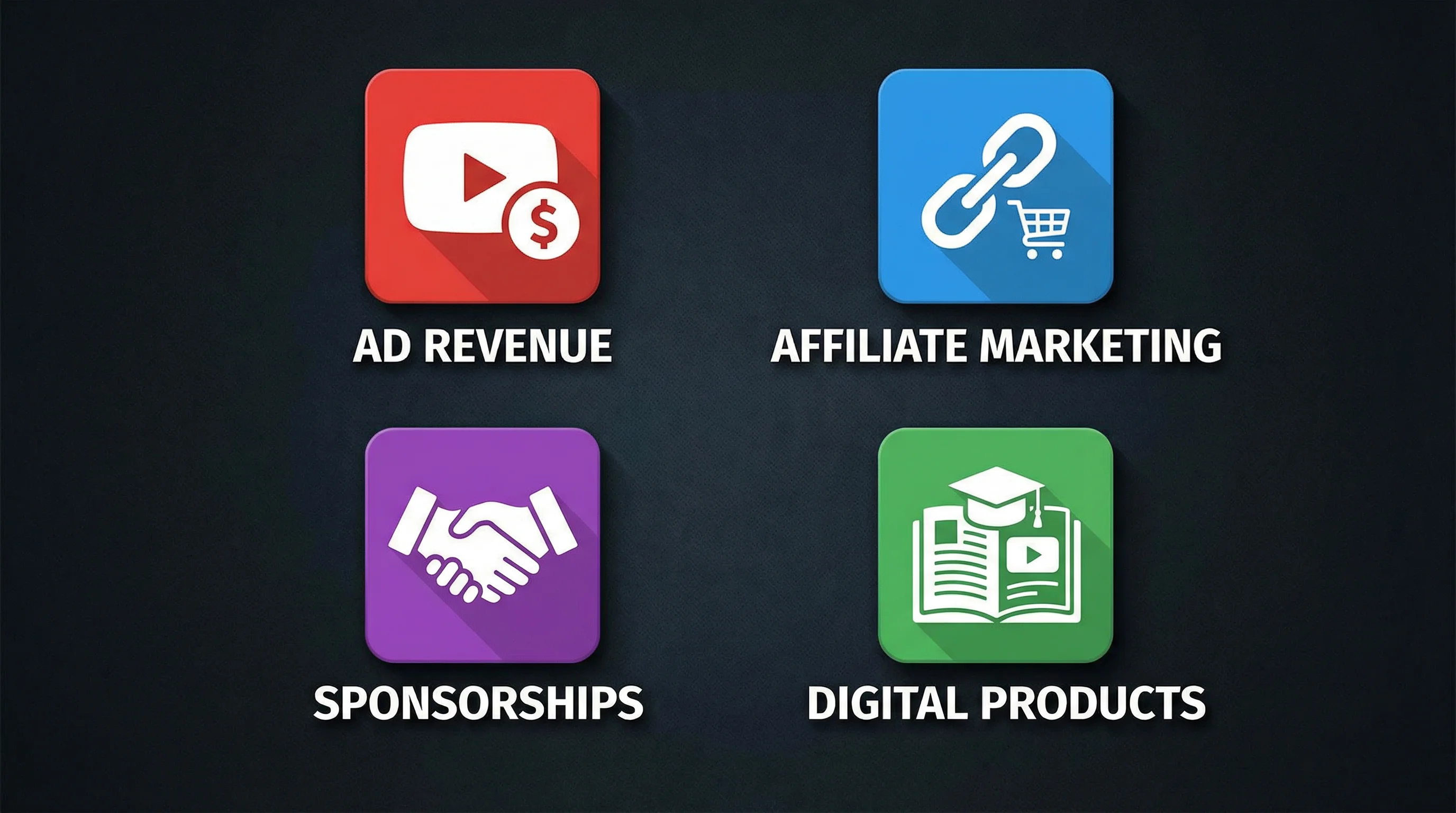
By combining these four pillars—AdSense, affiliate income, digital products, and sponsorships—you build a powerful monetization engine that turns your faceless channel into a durable, long-term business.
Common Questions About Faceless Channels
Even with the best roadmap in hand, taking the plunge into the world of faceless YouTube channels can feel a little daunting. It's totally normal to have some "what if" scenarios bouncing around in your head. Let's clear the air and tackle some of the most common questions I see crop up all the time.
These aren't just hypotheticals; they're the real-world concerns I hear from new creators every single day. Getting solid answers now will give you the confidence to push forward and focus on what really moves the needle: making great content.
Can I Use AI and Stock Footage Without Getting Sued?
This is, without a doubt, the number one fear for anyone starting out. And it's a good question to ask. The short answer is yes, you absolutely can, but you have to do it the right way. Your entire business model relies on using assets that you have the legal right to use for commercial projects.
Here’s how to stay on the right side of the law:
- Stick to Reputable Stock Sites: Always, and I mean always, use well-known platforms that have crystal-clear licensing agreements. A subscription to a service like Storyblocks or Envato Elements is your best friend here, giving you a commercial license for everything in their library.
- Know Your Licensing Terms: It's crucial to understand the difference between "royalty-free" and "Creative Commons." Royalty-free typically means you pay once (or through a subscription) for the right to use the clip in your projects. Creative Commons (CC) can be a minefield, as some licenses demand you give credit or even forbid commercial use entirely. To keep things simple and safe, stick with royalty-free.
- Understand YouTube's AI Policies: YouTube is still figuring out its long-term stance on AI, but for now, the rules are pretty straightforward. Their policy generally allows AI-generated content as long as it doesn't break other rules, like spreading misinformation or being spammy. It’s also a good practice to disclose that your video is AI-assisted to be transparent with your viewers.
The golden rule is to never, ever just rip content from other YouTube videos or a quick Google Images search. When you use properly licensed stock media and trusted AI tools, you’re not just avoiding copyright strikes—you're building a real, sustainable business on a solid legal foundation.
Is It Possible to Build a Real Community Without a Face?
A lot of people think a faceless channel is destined to be a cold, impersonal content factory. That's a complete myth. Your "face" simply becomes the brand itself—the consistent editing, the specific voiceover style, and, most importantly, the reliable value you deliver in every video.
A community doesn't rally around a person's face; it rallies around a shared passion. Your channel just needs to be the home for that passion.
You can absolutely build a thriving community by:
- Living in the Comments Section: Your comment section is your town square. Ask questions in your videos to get the conversation started, and then make a point to actually show up and reply.
- Developing a Recognizable Brand: Consistency is everything. Use a memorable logo, a distinct color scheme, and a consistent tone in your voiceovers. Over time, people will come to recognize and trust your channel's unique identity.
- Being a Problem-Solver: When your content consistently solves a problem, entertains, or tells a compelling story, viewers subscribe for the content, not the creator. That shared value is the glue that will hold your community together.
What Are the Biggest Mistakes New Creators Make?
Knowing what not to do is often just as valuable as knowing what to do. From my experience, I see new faceless creators fall into the same few traps over and over again—and these mistakes can be lethal to a channel's growth.
Here are the big ones to sidestep:
- Niche Hopping: One day it’s "unsolved mysteries," the next it's "crypto investing," and by Friday it’s "meditation guides." This kind of inconsistency confuses your audience and completely baffles the YouTube algorithm. Pick one lane and become the go-to source for it.
- Treating Thumbnails and SEO as an Afterthought: So many creators pour 100% of their energy into the video itself, only to slap on a generic title and a blurry, uninspired thumbnail. Your video's packaging is what earns the click in the first place. Don't neglect it.
- Quitting Before the Magic Happens: Your first 10, 20, or even 50 videos might feel like you're shouting into the void. That's normal. YouTube is a marathon, not a sprint. The algorithm needs a steady stream of data to figure out who your audience is. The only way to provide that data is to stay consistent.
Steering clear of these common blunders will immediately put you lightyears ahead of most beginners and keep you on track to building a successful channel.
Ready to stop dreaming and start building? With FlowShorts, you can put your entire content creation process on autopilot. Our AI platform generates scripts, finds visuals, adds voiceovers, and auto-posts to your channels, giving you a daily stream of high-quality content without the grind. Start automating your faceless channel today with FlowShorts.