Your Guide to Repurposing YouTube to Facebook Video Content
Learn how to effectively repurpose your YouTube to Facebook video content. This guide covers optimization, formatting, and automation for maximum engagement.
FlowShorts Team
Let's be honest—just dropping a YouTube link onto your Facebook page feels like a win. It's fast. It's easy. But what you're really doing is leaving a huge amount of reach and engagement on the table.
If you want people to actually see the great video content you're creating, you need to download the original file from YouTube and upload it natively to Facebook. It's a few extra clicks, but the payoff is massive.
Why Native Uploads Are a Non-Negotiable

It’s tempting to just copy and paste that YouTube link and call it a day. But doing so completely hobbles your video's potential on Facebook.
Think about it from Facebook's perspective. Their number one goal is to keep users on their platform for as long as possible. When you post a YouTube link, you're literally putting up a sign that says, "Hey, go hang out somewhere else!" The Facebook algorithm is designed to do the exact opposite.
Naturally, the algorithm rewards content that keeps people on site. That's why videos uploaded directly get preferential treatment, showing up far more often in your followers' feeds and getting significantly better organic reach.
Link Sharing vs Native Uploads: A Quick Comparison
To see the difference in black and white, here's a quick breakdown of what you're giving up by just sharing a link.
| Feature | Sharing YouTube Link | Uploading Native Video |
|---|---|---|
| Algorithm Priority | Low. Facebook penalizes external links. | High. The platform prioritizes its own content. |
| Autoplay in Feed | No. Users see a static thumbnail they must click. | Yes. Video plays silently, grabbing attention instantly. |
| User Experience | Clunky. Often opens a new tab or app, creating friction. | Seamless. Users watch directly in their feed without leaving. |
| Reach & Engagement | Significantly lower reach and fewer interactions. | Massively higher organic reach and engagement. |
| Customization | Limited. You're stuck with YouTube's thumbnail and title. | Full control over thumbnail, title, description, and tags. |
| Analytics | Basic metrics from Facebook (clicks, likes). | Detailed insights via Facebook Creator Studio. |
The choice becomes pretty clear, right? Native uploads are optimized for the way people actually use Facebook.
Thinking Like the Platform
It helps to remember the fundamental difference between the two platforms. YouTube is a search engine. People go there with a specific goal—to find a tutorial, watch a review, or catch up on a creator's series. They're ready and willing to commit to longer videos.
Facebook is a discovery platform. People are casually scrolling, catching up with friends and family. Their attention span is short, and they aren't actively looking for a 15-minute video. Your content needs to grab them immediately as they scroll.
A native video upload plays directly into this behavior. It autoplays silently in the feed, catching the eye with motion. A static YouTube link is just... a box. It forces the user to make a conscious decision to click, leave their feed, and wait for something to load. Most people just won't bother.
The Numbers Don't Lie
This isn't just a theory; the data backs it up completely. Studies consistently show that native Facebook videos get up to 10 times higher reach than posts sharing a YouTube link. That's a staggering difference.
During their Q1 2024 earnings call, Meta even pointed out that a whopping 60% of all user time on Facebook is now spent watching video, with Reels being a major driver. If you want a piece of that action, you have to play by their rules. You can dig deeper into the compelling statistics behind Facebook video performance for more proof.
Taking that extra step to upload directly isn't just about repurposing your content. It’s about adapting it to win in a different environment. You're not just throwing a video out there; you're setting it up for success on one of the biggest social platforms in the world.
Getting Your Hands on the Original Video File
Before you can work your magic and adapt a video for Facebook, you need the best possible source file. It might be tempting to grab a quick link and pop it into one of those third-party "YouTube downloader" websites, but I'm going to tell you right now: don't do it.
Seriously, that's the amateur move. Those sites often compress your video, stripping it of quality before you even start. Even worse, many are riddled with sketchy ads and potential security risks. You own the content, so there's absolutely no reason to expose yourself to malware just to get a copy of your own work.
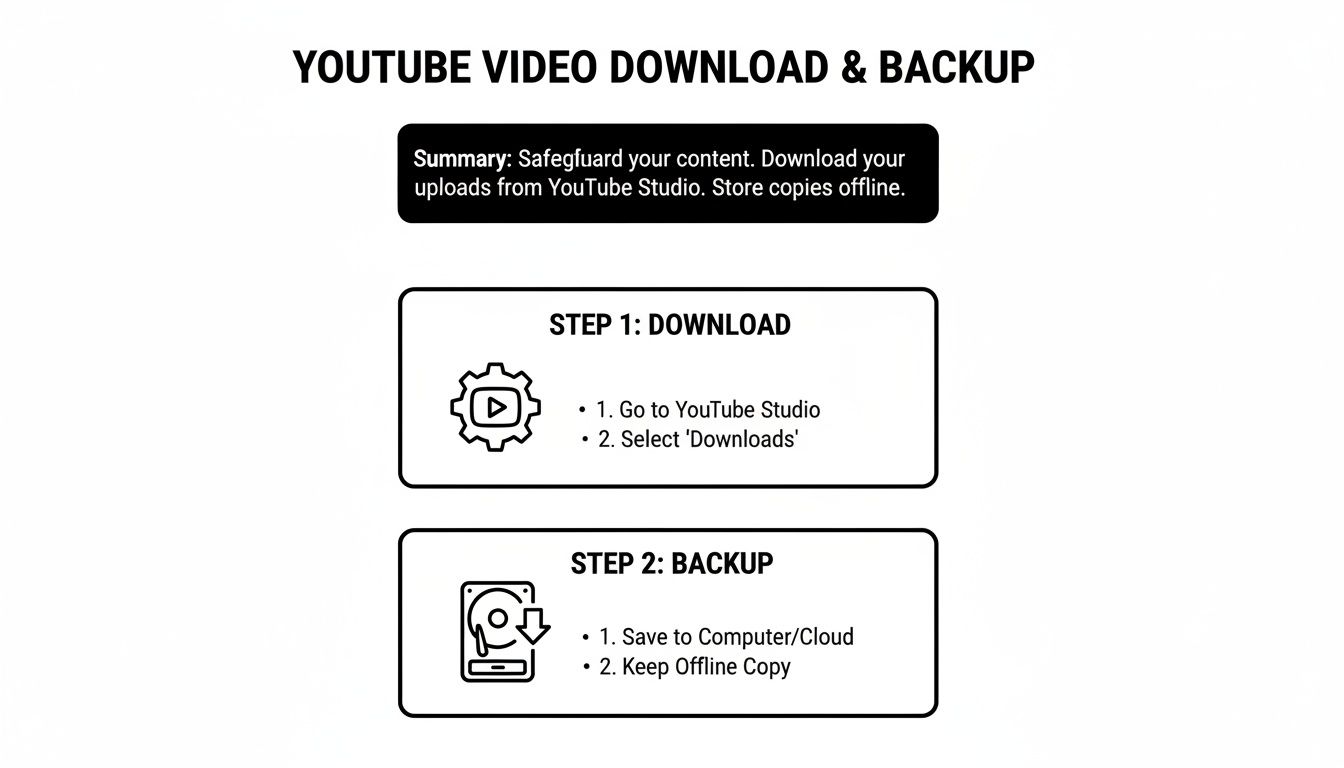
The only professional way to do this is to download the video directly from the source: your own YouTube Studio. This guarantees you get the original, high-resolution file you uploaded in the first place, with no weird watermarks or quality loss.
The Right Way: Use YouTube Studio
Grabbing your video from YouTube Studio is incredibly simple. It's the built-in feature for creators, and honestly, it's the only method you should be using.
Here’s the process:
- First, sign in to your YouTube account and head over to your YouTube Studio.
- Look for the "Content" tab in the menu on the left and click it. This brings up your entire video library.
- Find the video you want to repurpose and just hover your mouse over it. A few little icons will pop up.
- Click the three-dot menu icon (the "Options" button) and simply select "Download."
That's it. YouTube will package up your video and download it to your computer as an MP4 file, usually in the highest resolution you originally uploaded, like 1080p or 720p.
My Pro Tip: Don't even put yourself in a position where you have to download from YouTube. Get into the habit of saving your final, edited master file to a dedicated hard drive or cloud service like Google Drive before you upload it anywhere. Think of it as your personal content archive. This way, you always have the pristine original on hand.
Why This Is the Only Way to Go
Downloading directly from your Studio keeps you in complete control. You're not violating any terms of service by using sketchy third-party tools, and you're ensuring you have the highest-quality asset to work with. This is the foundation of a professional content strategy.
Starting with that original, crisp file is non-negotiable. It means you can crop, re-edit, and reformat your video for Facebook's various placements without starting from a fuzzy, low-quality copy. It’s a small step, but it’s what separates the pros from the people just winging it.
Fine-Tuning Your Video Specs for Facebook
So, you’ve got your high-quality video file from YouTube. Great start. But just tossing it onto Facebook and hoping for the best is a rookie mistake. To really get your video to perform, you need to dial in the technical settings for Facebook’s specific ecosystem.
Let's be honest, nothing kills engagement faster than a video that looks out of place. Think pixelated messes, awkward black bars, or choppy playback. Getting the specs right from the get-go ensures your content looks professional and gives it a fighting chance to stop someone mid-scroll.
The Nitty-Gritty Technical Details
Before you even think about aspect ratios, let's cover the foundational specs. Getting these right is non-negotiable for a clean, professional look.
- Video Format: Stick with MP4 or MOV. They’re the universal languages of online video, offering a solid balance of high quality and manageable file size. This means faster uploads for you and smoother streaming for your audience.
- Resolution: Always go for the highest resolution you can, with 1080p (1920x1080 pixels) being the sweet spot. It keeps your video looking crisp and clear, whether it's viewed on a tiny phone screen or a big monitor.
- Frame Rate: For most social media content, 30 frames per second (fps) is perfect. It gives you that smooth, natural motion without bloating your file size.
Having your original, high-quality video file is the first critical step. If you haven't already, make sure you're backing up your videos directly from YouTube Studio.

Starting with this master file gives you the most flexibility for editing and ensures you aren't losing quality by re-downloading a compressed version later.
Facebook Video Technical Specifications Cheat Sheet
To make things even easier, here's a quick cheat sheet for the most common video placements on Facebook. Getting these right will make your content feel native to the platform.
| Placement | Recommended Aspect Ratio | Resolution | Max Length |
|---|---|---|---|
| Feed Video | 1:1 (Square) or 4:5 (Vertical) | 1080x1080 or 1080x1350 | 240 minutes |
| Facebook Reels | 9:16 (Vertical) | 1080x1920 | 90 seconds |
| Facebook Stories | 9:16 (Vertical) | 1080x1920 | 60 seconds |
Keep this handy. It's a simple reference that can save you a ton of headaches and ensure your videos always look their best, no matter where they appear.
Why Aspect Ratio Is King
Of all the technical details, the aspect ratio—the literal shape of your video—is the most important one to get right. A wide, landscape (16:9) video designed for a TV screen just feels wrong in a vertical-first world like Facebook Reels.
When your video's aspect ratio matches the placement, it fills the entire screen. This creates a much more immersive and captivating experience. A mismatch leaves you with those dreaded black bars, which effectively shrink your video and just scream "lazy repost."
Here’s a simple breakdown of what to use where:
- For the Facebook Feed: A square 1:1 ratio is your best bet. It takes up significantly more screen real estate on a mobile device than a traditional landscape video. The slightly taller 4:5 vertical format is also a fantastic performer.
- For Facebook Reels & Stories: This is non-negotiable. You absolutely must use a vertical 9:16 aspect ratio. Anything else looks jarring and will get scrolled past in a heartbeat.
Don't underestimate how critical this is. With daily video watch time on Facebook growing by 25% year-over-year in late 2023, it's obvious that users are glued to video content. You can dive deeper into the growth of Facebook video and its algorithm to see just how big the opportunity is. Taking a few extra minutes to reframe your video isn't just a small tweak—it's a fundamental step toward earning more engagement.
Adapting Your Content for Different Placements
Your YouTube video is a fantastic starting point, but treating Facebook as just another place to dump your content is a surefire way to get ignored. To get real traction, you need to think of Facebook not as one platform, but as several distinct environments—the Feed, Reels, and Stories. Each one needs a slightly different touch.
The biggest giveaway of a lazy repost? A horizontal 16:9 video sitting awkwardly in a vertical-first feed. It immediately screams, "This wasn't made for you." To make your content feel native and stop the scroll, you have to start thinking vertically.
From Horizontal to Vertical
Don't worry, you don't need to re-shoot everything. Turning your landscape video into a vertical-friendly format is a simple edit that makes a world of difference.
Smart Cropping: The quickest fix is to crop into the most important part of your shot. If you're a talking head, that means framing yourself in the center. If you're showing a product, keep the product as the focal point. The idea is to make sure the core action is always in view within that new 9:16 aspect ratio.
Split-Screen Style: What if cropping cuts out crucial details? Try a split-screen or multi-panel layout. You can pop the main video in the top or middle and use the extra space for big, bold captions or a catchy headline. This keeps all the original context while perfectly fitting a phone screen.
These adjustments are critical. People live on their phones. Think about it: YouTube's app has been downloaded over 10 billion times from the Google Play store alone, and something like 63% of all YouTube views happen on mobile. That habit carries right over to Facebook, making vertical video an absolute must. For a deeper dive, check out the stats on the dominance of mobile video consumption at Ahrefs.
Captions Are No Longer Optional
Here's a hard truth: a huge chunk of your audience will watch your Facebook videos with the sound off. If your message relies on someone speaking, you absolutely need captions. Without them, you're invisible to a massive slice of your potential viewers.
You can either burn the captions directly onto the video file with an editor or upload a separate SRT (SubRip Subtitle) file when you post. Facebook's built-in tools can also auto-generate them, but always give them a once-over for accuracy before you hit publish. AI makes mistakes.
Craft a Custom Thumbnail
Finally, don't let Facebook pick a random, blurry frame as your thumbnail. It's the first thing people see, so make it count.
A great thumbnail is like a movie poster for your video. It should be bright, clear, and use a compelling image or bold text that sparks just enough curiosity to make someone stop scrolling and click play.
This simple step takes a basic repost and makes it look like it was created specifically for your Facebook audience. These adaptations are the key to a successful YouTube-to-Facebook strategy. And if you're looking to conquer other platforms, our guide on how to post videos from YouTube to Instagram has more specific tips for you.
Making Your Workflow Smarter with Automation

Let’s be honest: manually downloading, reformatting, and uploading every single video from YouTube to Facebook is a soul-crushing task. It's the kind of repetitive work that leads straight to creator burnout and pulls you away from what you should be doing—making great content and talking to your audience. This is exactly why automation is a game-changer.
Instead of getting bogged down in the busywork, you can use tools that do all the heavy lifting. Imagine a system that automatically grabs your latest YouTube video, tweaks it for every Facebook format, and schedules it to go live at the best possible time. This isn't about being lazy; it's about being efficient.
How Automation Gives You a Real-World Edge
Bringing automation into your process isn't just a time-saver; it’s a massive strategic advantage. It helps you keep a consistent posting schedule, which is a huge green flag for the Facebook algorithm. When your content is flowing out smoothly, you're free to think about the bigger picture.
Here’s what that actually looks like day-to-day:
- Unbreakable Consistency: You can set up your workflow to post fresh content daily or weekly, all without you having to lift a finger. This consistency keeps your audience coming back for more.
- Perfect Formatting, Every Time: Automation tools get the technical details right without you even thinking about it. That 16:9 YouTube video can be instantly cropped to 9:16 for Reels and 1:1 for the Feed, captions and all.
- One Dashboard to Rule Them All: Many tools let you manage your entire social media presence from a single hub. This gives you a bird's-eye view of your content calendar and helps you see what’s working where.
For any creator who's serious about scaling their youtube to facebook video efforts, automation isn't just a "nice-to-have." It's essential for growing without burning out.
When you automate the repetitive tasks, you get hours back in your week. This is more than just a time-saver—it’s a fundamental shift that lets you pour your energy into creative ideas and audience engagement, the things that actually drive growth.
Picking the Right Tools for Your Needs
A whole ecosystem of platforms has popped up to help creators repurpose and share their content. Tools like FlowShorts, for instance, are designed to manage the entire pipeline, from creating clips to auto-posting them across different social networks.
When you're looking at different options, think about how they'll fit into your current process. Does a tool just schedule posts, or can it also handle the reformatting and editing? The sweet spot is finding a solution that takes as much manual work off your plate as possible. If you're curious about setting up a robust system, our guide on how to automate social media posts is a great place to start.
Ultimately, automation turns content repurposing from a chore into a smooth, scalable part of your business. It's the secret to keeping your channels buzzing with activity, your audience hooked, and your own sanity in check.
Common Questions About Repurposing Videos
Jumping into repurposing your YouTube videos for Facebook can feel like navigating a new landscape. It's totally normal to have questions about the rules, best practices, and those tiny details that can make or break your strategy. Let's tackle some of the most common things that trip creators up, so you can start sharing your content with confidence.
Will I Get a Copyright Strike?
This is probably the number one fear I hear from creators. Let's clear the air right now: you will not get a copyright strike for uploading your own video to Facebook. You are the creator, you own the rights, and you can absolutely distribute your work on any platform you want.
Copyright systems are there to stop other people from stealing your work. As long as you own everything in the video—the footage, the audio, the graphics—you're good to go.
The only time this gets tricky is with music. If you grabbed a track from the YouTube Audio Library, you need to double-check the license agreement. Some of those tracks are licensed for use on YouTube only. Your safest bet is to always use royalty-free music that explicitly comes with a multi-platform license.
At the end of the day, it all comes down to ownership. If you made it or have a license to use it anywhere, you have nothing to worry about.
Does Video Length Matter?
Oh, absolutely. This is one of the biggest mental shifts you have to make. That 20-minute deep-dive that gets amazing watch time on YouTube? It’s probably going to flop as a Facebook Reel. Every format on Facebook has its own vibe and technical limits.
Think of it like this:
- Facebook Feed: You can technically upload a video up to 240 minutes long here. But let's be realistic—the sweet spot for grabbing attention in the feed is usually between 2-5 minutes. This is perfect for condensed tutorials, highlight reels, or short stories.
- Facebook Reels: This is fast-food content. You’ve got a hard cap of 90 seconds. The goal is to deliver a quick hit of value or entertainment and get out.
- Facebook Stories: Stories are even quicker, with a 60-second limit per slide. They're meant for candid, in-the-moment updates.
A great approach is to post your full-length (or slightly trimmed) video to your Facebook Feed. Then, chop up a super engaging, bite-sized clip from that same video and post it as a Reel or Story. That short clip acts as a fantastic teaser to drive people back to the main video on your page.
Scheduling vs. Manual Publishing
For anyone serious about growing on social media, scheduling is a non-negotiable. Using Facebook’s own scheduler or a third-party tool lets you build out your content calendar and stay consistent. The algorithm loves consistency.
Scheduling means your videos can go live during peak viewing hours for your audience, even if you’re asleep or on vacation. Manual posting is great for those spontaneous, "I just have to share this now" moments, but a solid video strategy is built on the predictable, efficient foundation that scheduling provides. This is a huge piece of learning how to manage multiple social media accounts without burning out.
How to Add Clickable Links
This is the easy part! Adding a clickable link to a Facebook video post is incredibly straightforward.
When you're writing the description for your video, just paste the full URL right into the text. Facebook handles the rest, automatically turning it into a clickable link.
There are no follower minimums or special account requirements. To make your link more powerful, give people a reason to click it. A strong call-to-action in your video and description works wonders. Try something like, "Grab the full template at the link in the description!"
Ready to stop the manual grind and put your content creation on autopilot? FlowShorts uses AI to create and post engaging short-form videos for you, keeping your channels active and growing around the clock. Get started today and see how effortless content scaling can be at https://flowshorts.app.