Instagram Engagement Rate: What's Good, How to Calculate, and How to Improve (2026)
Complete guide to Instagram engagement rate. How to calculate, benchmarks by follower count, why yours is low, how to fix it, and what brands look for in sponsorship deals.
FlowShorts Team
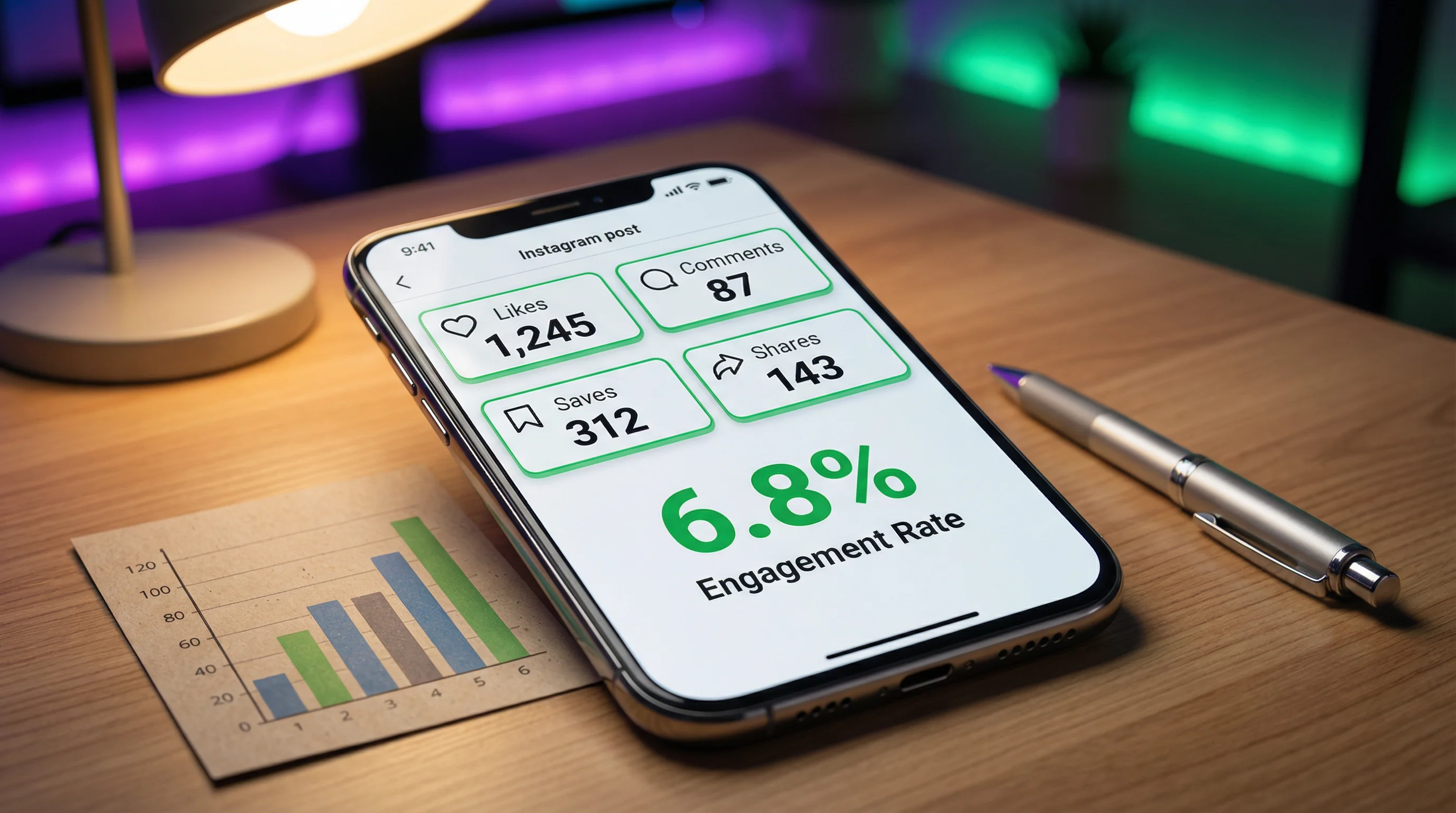
Your Instagram engagement rate is the single best measure of how compelling your content is. High follower counts mean nothing if nobody interacts. A 500-follower account with 8% engagement outperforms a 50,000-follower account with 0.5% — both in algorithmic distribution and in actual business value.
This guide covers how to calculate engagement rate, what's "good" at every follower level, why yours might be low, and exactly how to improve it.
How to Calculate Instagram Engagement Rate
The Standard Formula
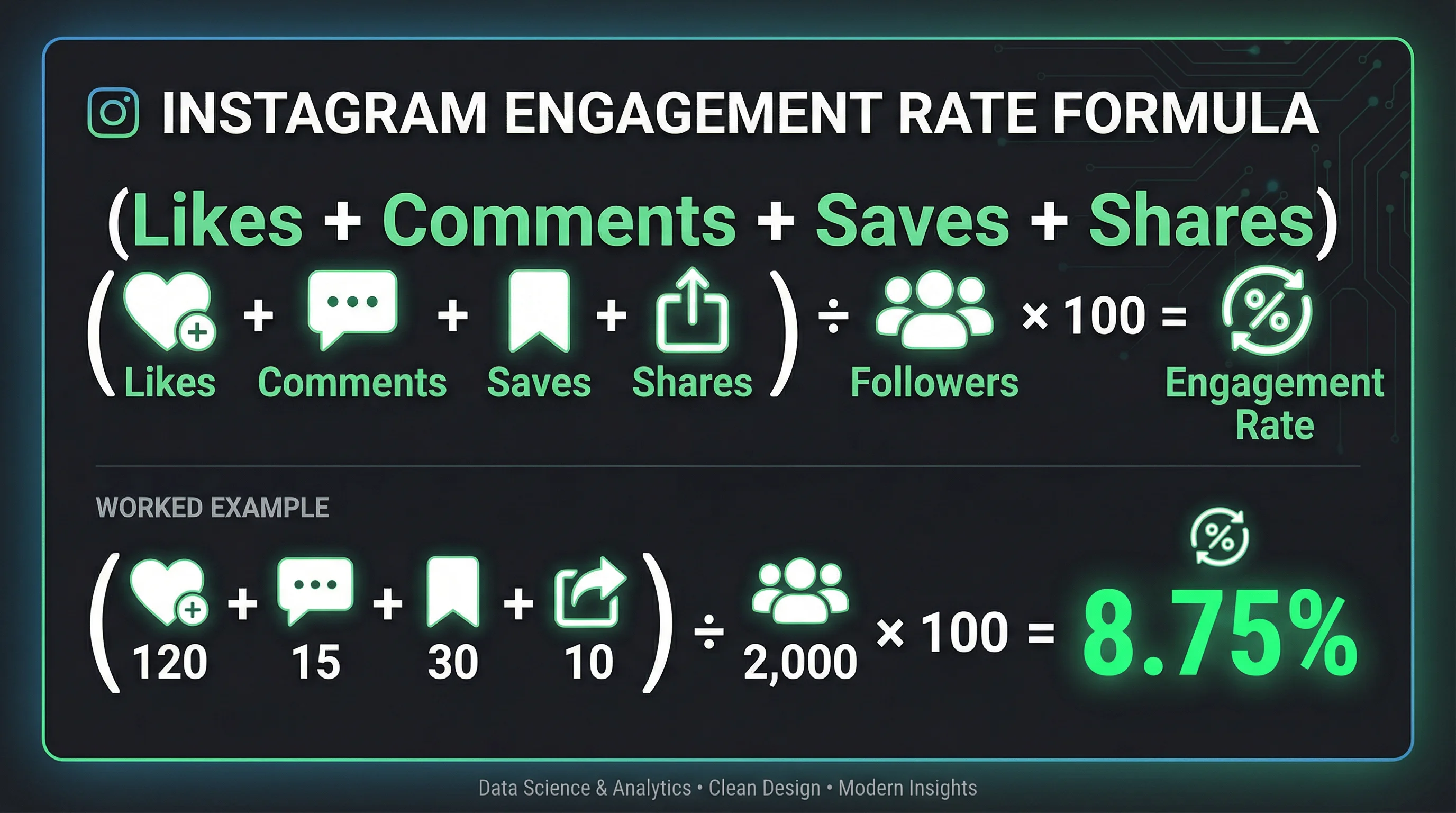
Engagement Rate = (Likes + Comments + Saves + Shares) ÷ Followers × 100
Example: A post gets 120 likes, 15 comments, 30 saves, and 10 shares. You have 2,000 followers.
(120 + 15 + 30 + 10) ÷ 2,000 × 100 = 8.75% engagement rate
Skip the manual math — use our free Instagram Engagement Rate Calculator to get your number instantly.
Alternative Formulas
| Formula | Calculation | Best For |
|---|---|---|
| By followers | (Engagements ÷ Followers) × 100 | Standard benchmark — comparing accounts |
| By reach | (Engagements ÷ Reach) × 100 | True content performance — accounts for non-follower views |
| By impressions | (Engagements ÷ Impressions) × 100 | Ad performance and content efficiency |
The by-followers formula is the industry standard and what brands use when evaluating creators for sponsorships. The by-reach formula is more accurate for measuring content quality because it accounts for how many people actually saw the post (not just how many follow you).
What Is a Good Instagram Engagement Rate?
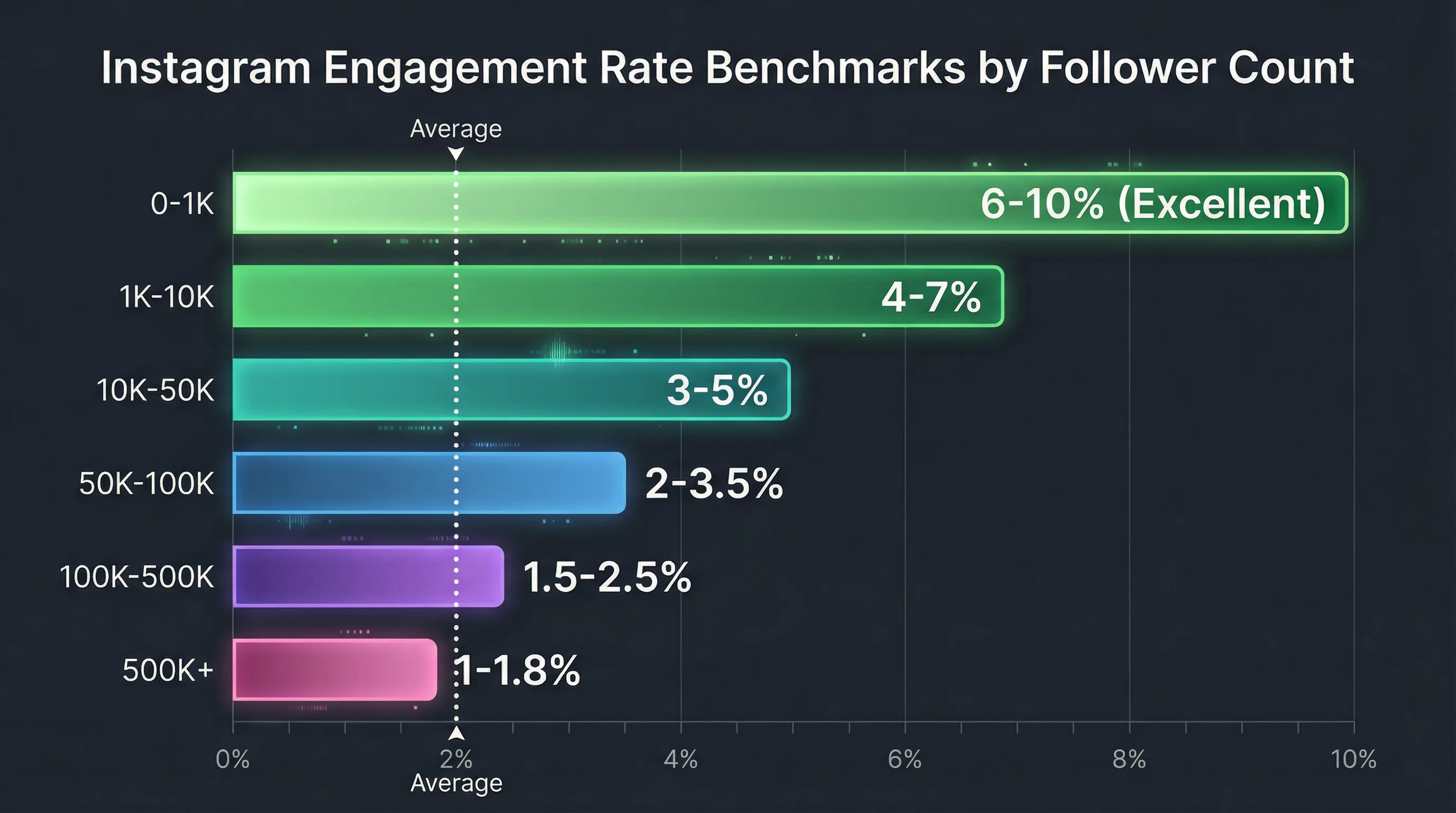
Engagement rate benchmarks vary significantly by follower count. Smaller accounts naturally have higher rates because their audience is more concentrated and personal.
| Follower Count | Low | Average | Good | Excellent |
|---|---|---|---|---|
| 0-1K | <3% | 3-6% | 6-10% | 10%+ |
| 1K-10K | <2% | 2-4% | 4-7% | 7%+ |
| 10K-50K | <1.5% | 1.5-3% | 3-5% | 5%+ |
| 50K-100K | <1% | 1-2% | 2-3.5% | 3.5%+ |
| 100K-500K | <0.8% | 0.8-1.5% | 1.5-2.5% | 2.5%+ |
| 500K+ | <0.5% | 0.5-1% | 1-1.8% | 1.8%+ |
The overall Instagram average in 2026 is approximately 1.5-2.5% across all account sizes. If you're above 3% at any follower count, your content is performing well. Below 1%, something needs fixing.
Engagement Rate by Content Format
| Format | Average Engagement Rate | Why |
|---|---|---|
| Carousels | 1.92% | Highest — swipes count as engagement, high save rate |
| Reels | 1.74% | High reach compensates for slightly lower per-view engagement |
| Single images | 1.22% | Lowest — no swipe mechanic, limited interaction options |
| Videos (non-Reel) | 1.45% | Moderate — watch time adds engagement but limited distribution |
Data source: Social Insider 2025 Instagram Study
Carousels and Reels consistently outperform single images. If your engagement rate is low, check your content mix — shifting toward more carousels and Reels often improves the number immediately.
Why Your Engagement Rate Is Low (And How to Fix It)
1. Ghost Followers
Problem: A large portion of your followers are inactive accounts, bots, or people who followed years ago and no longer use Instagram. They inflate your follower count without contributing engagement — dragging your rate down.
Create Faceless Videos on Autopilot
FlowShorts generates and posts AI videos to YouTube, TikTok & Instagram while you sleep.
Try FlowShorts Free →Fix: Periodically remove ghost followers. Go to your follower list, identify accounts with no profile picture, no posts, or clearly inactive accounts, and tap "Remove." Losing 500 ghost followers while keeping engagement constant increases your rate.
2. Inconsistent Posting
Problem: Posting 5 times one week, then nothing for two weeks. The algorithm deprioritizes inconsistent accounts, showing your content to fewer followers.
Fix: Post on a predictable schedule. 5-7 Reels per week, 2-3 carousels, daily Stories. For sustainable daily posting, FlowShorts auto-posts Reels on a schedule.
3. Wrong Content Format
Problem: Posting only single images. Single images have the lowest engagement rate (1.22%) of any format.
Fix: Shift to carousels (1.92% avg) and Reels (1.74% avg). A 40% Reels / 30% carousels / 20% Stories / 10% feed posts mix optimizes for engagement. See our Instagram marketing strategy for the full content mix breakdown.
4. No Call to Action
Problem: Posts that don't ask for engagement don't get it. Viewers consume passively and scroll on.
Fix: End every caption with a prompt: "Save this for later," "Tag someone who needs this," "Drop your take in the comments." Use our Instagram Caption Generator for captions with built-in CTAs.
5. Weak Hooks on Reels
Problem: Viewers swipe past in the first second. Low completion rate = low engagement = low algorithmic distribution.
Fix: Redesign your first frame. Use bold text, surprising visuals, or a curiosity-driven statement. Our Video Hook Generator creates scroll-stopping openers.
6. Niche Drift
Problem: You post about cooking one day, travel the next, and fitness the day after. Followers who followed for cooking skip your travel posts — and the algorithm notes the low engagement.
Fix: Stay in your lane. 80% of content should be your core niche. 20% can be adjacent or personal — but never random. See our Instagram algorithm guide for how niche consistency affects distribution.
How to Track Your Engagement Rate
Instagram Insights (Built-In)
- Go to your Profile → tap Professional dashboard or Insights
- Under Content you shared, tap any post
- View: likes, comments, shares, saves, reach, and impressions
- Calculate: (likes + comments + saves + shares) ÷ followers × 100
Our Free Calculator
Skip the manual math. Our Instagram Engagement Rate Calculator gives you your rate instantly — just enter your followers and engagement numbers.
Create Faceless Videos on Autopilot
FlowShorts generates and posts AI videos to YouTube, TikTok & Instagram while you sleep.
Try FlowShorts Free →What to Track Weekly
| Metric | What It Tells You | Target |
|---|---|---|
| Overall engagement rate | Content health across all posts | Above your follower-tier average (see table above) |
| Per-post engagement rate | Which individual posts resonate most | Identify top 20% — make more like them |
| Save rate | Content value (reference-worthy) | Higher is always better — saves are the strongest signal |
| Share rate | Content virality (worth telling others) | DM shares are weighted highest by the algorithm |
| Engagement rate trend | Are you improving or declining over time? | Stable or rising week-over-week |
Engagement Rate for Brand Deals
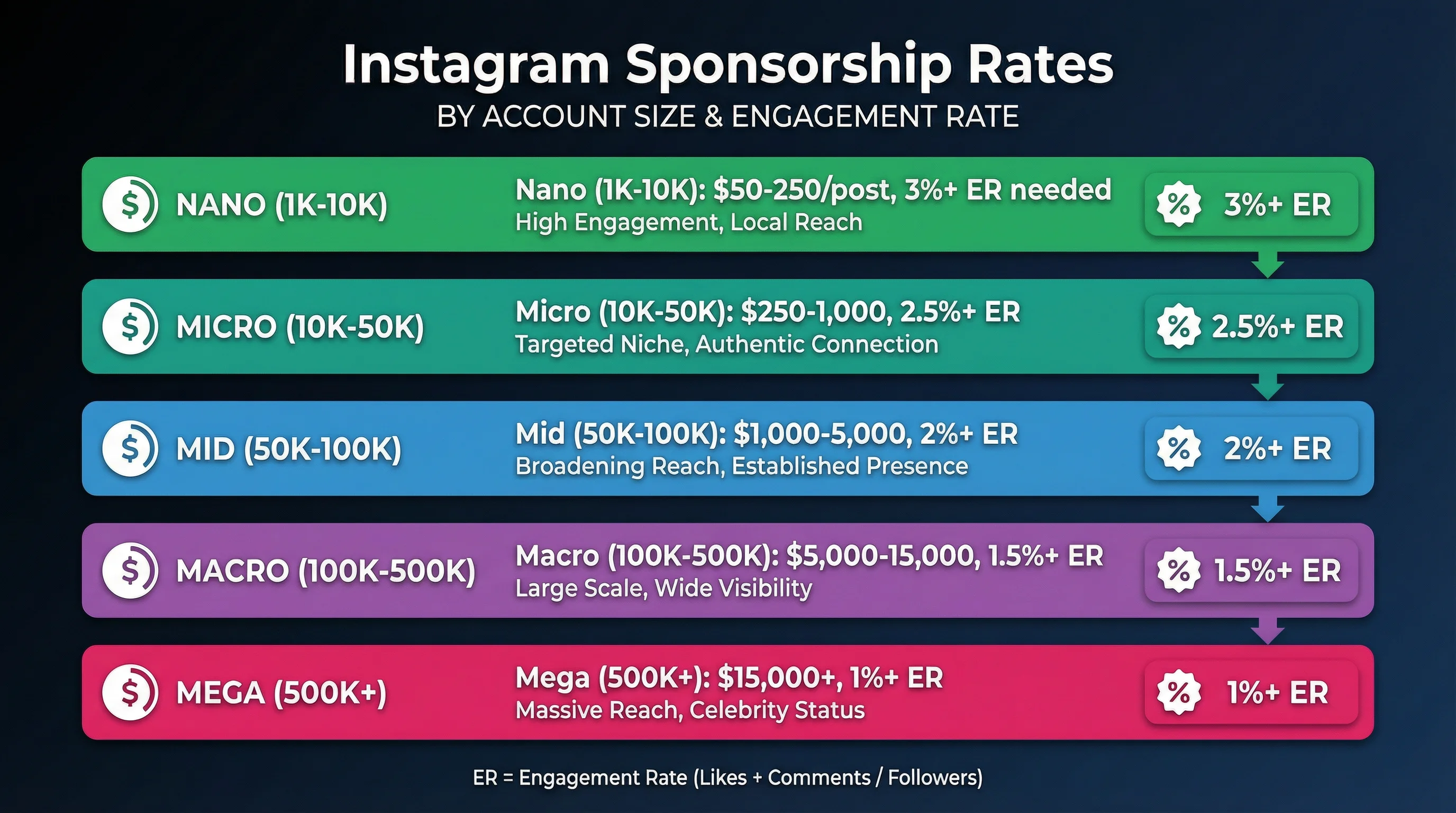
Brands evaluating creators for sponsorships look at engagement rate first — often before follower count. Here's what brands typically look for:
| Account Size | Minimum ER for Brand Interest | Typical Sponsorship Rate |
|---|---|---|
| 1K-10K (nano) | 3%+ | $50-$250 per post |
| 10K-50K (micro) | 2.5%+ | $250-$1,000 per post |
| 50K-100K (mid) | 2%+ | $1,000-$5,000 per post |
| 100K-500K (macro) | 1.5%+ | $5,000-$15,000 per post |
| 500K+ (mega) | 1%+ | $15,000+ per post |
A nano-influencer (1K-10K followers) with a 7% engagement rate is often more valuable to brands than a macro-influencer with 200K followers and 0.8% engagement. Higher engagement means the audience actually pays attention — and converts.
Quick Wins to Boost Engagement Rate This Week
- Post 2 carousels — highest engagement format. Educational tips or step-by-step tutorials. See carousel guide.
- Add a question to every caption — "What would you add to this list?" drives comments.
- Use 3 poll stickers in Stories today — every tap is an engagement signal that strengthens your algorithmic position with followers.
- Reply to every comment within 30 minutes — boosts post engagement and signals active conversation to the algorithm.
- Remove 50 ghost followers — instant rate improvement without changing content quality.
- Post a Reel under 20 seconds — high completion rate + replay = strong engagement signals.
Frequently Asked Questions
What is a good Instagram engagement rate?
The overall average is 1.5-2.5%. For accounts under 10K followers, 3-7% is good and above 7% is excellent. For accounts over 100K, above 1.5% is good. Engagement rate naturally decreases as follower count grows because audiences become less concentrated.
How do I calculate my Instagram engagement rate?
(Likes + Comments + Saves + Shares) ÷ Followers × 100. Calculate per-post, then average across your last 10-20 posts for a reliable account-level rate. Or use our free calculator for instant results.
Why is my engagement rate dropping?
Common causes: ghost followers diluting your rate, inconsistent posting (algorithm deprioritizes inactive accounts), niche drift (confusing the algorithm), over-reliance on single images (lowest engagement format), or no CTAs in captions. See the fixes section above for each cause.
Do saves count as engagement?
Yes — and saves are one of the most valuable engagement signals. Instagram interprets a save as "this content has lasting value worth revisiting." Posts with high save rates get boosted in Explore and recommendations. Carousels and educational content drive the highest save rates.
What engagement rate do brands look for?
Most brands want at least 2-3% for micro-influencers (10K-50K) and 1.5%+ for larger accounts. A nano-influencer with 5K followers and 7% engagement is often more attractive to brands than a 200K account with 0.8% — higher engagement means the audience actually converts.
Does posting more often increase engagement rate?
Consistent posting improves total engagement and algorithmic distribution. But engagement rate depends on content quality, not just quantity. Posting low-quality content frequently can actually lower your rate. Post consistently but maintain quality — aim for 5-7 quality Reels per week rather than 3 mediocre ones per day.
Related Guides
- Instagram Engagement Rate Calculator (Free Tool)
- Instagram Marketing Strategy Playbook
- How the Instagram Algorithm Works
- How to Get More Instagram Followers
- Instagram Carousel Posts Guide
- How to Grow on Instagram
Improve Engagement With Consistent Reels
Higher posting frequency means more engagement data and faster algorithmic learning. FlowShorts generates AI-powered Reels and auto-posts daily to Instagram, YouTube Shorts, and TikTok.