How to Make Faceless TikTok Videos with AI: Step-by-Step (2026)
The complete workflow for creating faceless TikTok videos with AI in 2026. Three methods compared — fully manual, semi-automated, and fully automated — with step-by-step instructions, tool recommendations, and time estimates.
FlowShorts Team
You don''t need a camera, editing skills, or even your own voice to create TikTok videos that actually get views. In 2026, AI handles the entire production pipeline — scripts, visuals, voiceover, captions. Thousands of creators are already running faceless TikTok accounts that generate consistent views, followers, and revenue without ever appearing on screen.
But there are three very different ways to do it, and each one comes with trade-offs in time, cost, and creative control. Some methods are free but eat up 30 minutes per video. Others cost money but run on complete autopilot.
This guide walks through all three methods step by step, so you can pick the workflow that fits your situation. If you''re starting from scratch, read our complete guide on how to start a faceless TikTok account first — then come back here for the video creation process.
3 Methods to Make Faceless TikToks with AI
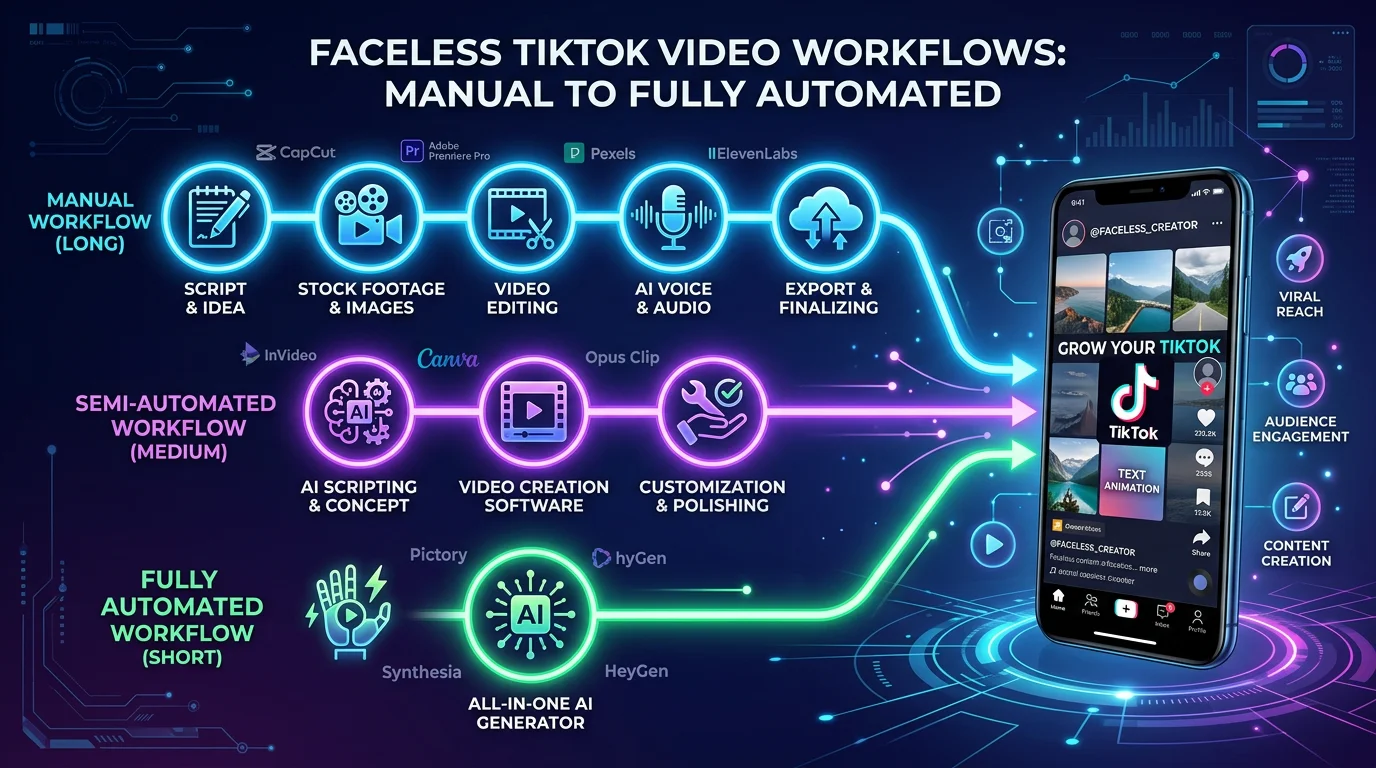
Every faceless TikTok video needs the same core ingredients: a script, voiceover, visuals, captions, and a way to get it posted. The difference between these three methods is how much of that process you handle yourself versus how much AI handles for you.
Method 1 — Fully Manual (Free, 20-30 Minutes per Video)
This method uses free AI tools for individual steps, but you assemble everything yourself. It''s the best option if you have more time than money and want full creative control over every video.
Step 1: Write Your Script with ChatGPT
Open ChatGPT (free tier works fine) and prompt it to write a short-form video script for your niche. Be specific about the topic, tone, and length. This is critical: your script must produce at least 1 minute of spoken content. TikTok''s Creator Rewards Program only pays out on videos longer than 1 minute, so anything shorter means you''re leaving money on the table. Aim for 150-180 words of narration to hit the 60-75 second mark. You can also use our free video script generator to get a structured script with scene breakdowns.
Structure your script with a strong hook in the first line, 4-6 body points, and a closing line with a call to action. The hook matters more than anything — check our guide on the best hooks for short-form videos for proven formulas.
Step 2: Generate Voiceover
You have two free options here. ElevenLabs offers a free tier with realistic AI voices — paste your script, pick a voice, and download the audio file. Alternatively, you can use TikTok''s built-in text-to-speech feature after uploading your video, though the voice quality is noticeably lower. For a deeper comparison of voice options, see our guide on AI voiceover for TikTok.
Step 3: Find or Generate Visuals
For stock footage, Pexels and Pixabay offer free vertical video clips you can layer behind your voiceover. Search for clips related to your script — nature shots, city timelapses, and abstract footage all work well for faceless content. Alternatively, use a free AI image generator like Bing Image Creator or Leonardo AI to create custom images for each scene in your script. AI-generated images tend to feel more unique and on-brand than generic stock footage.
Step 4: Edit Everything Together in CapCut
CapCut is the go-to free editor for TikTok creators. Import your visuals, layer in the voiceover audio, and use CapCut''s auto-caption feature to generate subtitles. Add transitions between scenes — simple fades or cuts work best. One tip that many creators miss: add a trending TikTok sound underneath your voiceover at very low volume (5-10%). This helps the TikTok algorithm surface your video to people browsing that sound. Make sure everything is in 9:16 vertical format at 1080x1920 resolution.
Step 5: Post to TikTok
Upload directly to TikTok, add relevant hashtags (3-5 targeted ones, not 30 generic ones), write a caption that encourages comments, and post. Check our guide on how often to post on TikTok to find the right schedule for your niche.
Pros: Completely free. Full creative control over every element. Good for learning the fundamentals.
Cons: Takes 20-30 minutes per video. No auto-posting. Difficult to maintain consistency at scale.
Method 2 — Semi-Automated ($5-25/month, 5-10 Minutes per Video)
This method uses prompt-to-video AI tools that handle most of the production in one step. You still post manually, but the creation process is dramatically faster.
Create Faceless Videos on Autopilot
FlowShorts generates and posts AI videos to YouTube, TikTok & Instagram while you sleep.
Try FlowShorts Free →Step 1: Enter a Topic Prompt
Tools like InVideo AI, Pictory, or Fliki let you type a topic or paste a script, and the AI generates a complete video — selecting stock footage, adding voiceover, and syncing everything together. For example, you might type: "Create a 75-second motivational video about building discipline, with a male voiceover and cinematic footage." The AI does the rest.
Step 2: Review the AI-Generated Video
The tool will produce a draft video in 1-3 minutes. Watch it through and check for awkward footage choices, pacing issues, or voiceover mispronunciations. Most tools let you swap individual clips, change the voice, or edit the script directly inside the platform. This review-and-tweak step usually takes 3-5 minutes.
Step 3: Download and Polish in CapCut (Optional)
If the video is close but not quite right, download it and make final adjustments in CapCut. You might want to restyle the captions, add a stronger text hook on the first frame, or layer in a trending TikTok sound underneath. Some creators skip this step entirely and post the AI output directly.
Step 4: Post to TikTok Manually
Upload the finished video to TikTok with your hashtags and caption. Since these tools don''t connect to TikTok directly, you''ll need to download and upload each video yourself.
Pros: Much faster than Method 1. Decent video quality. Low monthly cost. Good middle ground between control and automation.
Cons: Still uses generic stock footage (recognizable to viewers). No auto-posting — you still have to upload manually every day. Some tools add watermarks on free plans.
Method 3 — Fully Automated ($19-69/month, Hands-Free)
This method uses end-to-end platforms that handle everything from script generation to posting. You set it up once, and videos go out on autopilot.
Step 1: Pick Your Niche and Connect TikTok
Platforms like FlowShorts, AutoShorts, or BigMotion let you select a content category (motivation, finance, tech, fitness, etc.) and connect your TikTok account via OAuth. You choose your posting schedule and timezone, and the system takes over from there. Not sure which niche to pick? Check our list of the best faceless TikTok niches or browse TikTok content ideas by niche.
Step 2: AI Handles the Full Pipeline
The platform automatically generates a script from your niche''s topic bank, creates AI-generated images (not stock footage) for each scene, produces voiceover, adds animated captions, renders the final video in 9:16 format, and uploads it to your connected TikTok account. Each video is unique — different topic, different visuals, different voiceover. The entire pipeline runs without any input from you.
Step 3: Videos Auto-Post on Schedule
Videos are posted to TikTok automatically at your chosen time. Depending on the plan, you get anywhere from 2 videos per week to 2 per day. You can review videos before they go out or let them post automatically. The platform handles titles, descriptions, and hashtags.
Pros: Zero daily effort after setup. AI-generated images look more original than stock footage. Auto-posting eliminates the biggest consistency killer. Scales easily across multiple accounts.
Cons: Less control over individual videos. Monthly subscription cost. You''re trusting the AI''s creative judgment.
Method Comparison Table
Create Faceless Videos on Autopilot
FlowShorts generates and posts AI videos to YouTube, TikTok & Instagram while you sleep.
Try FlowShorts Free →| Method | Time per Video | Cost | Visual Quality | Auto-Post | Best For |
|---|---|---|---|---|---|
| Fully Manual | 20-30 min | Free | High (your edits) | No | Beginners learning the craft |
| Semi-Automated | 5-10 min | $5-25/mo | Medium (stock footage) | No | Creators who want speed + some control |
| Fully Automated | 0 min (after setup) | $19-69/mo | Medium-High (AI images) | Yes | Creators who want passive output |
TikTok-Specific Tips for AI Faceless Videos
Making faceless videos for TikTok is not the same as making them for YouTube Shorts or Instagram Reels. The algorithm works differently, the audience behaves differently, and the monetization rules are different. Here are the things that matter most on TikTok specifically.
Hit 1+ minute for Creator Rewards eligibility. This is the single most important rule if you want to earn money. TikTok''s Creator Rewards Program only counts videos that are at least 1 minute long. Shorter videos can still go viral, but they won''t generate any direct revenue. Every script you write or generate should target 60-90 seconds of spoken content. This is non-negotiable for monetization.
Use trending sounds underneath your voiceover. TikTok''s algorithm heavily favors videos that use trending audio. You can''t replace your voiceover with a trending sound, but you can layer a trending track underneath at low volume. This registers with the algorithm while keeping your narration clear. Browse TikTok''s sound library and pick tracks that are trending in your niche.
Vertical 9:16 format, always. Every video should be 1080x1920 pixels. Horizontal or square videos get crushed by the algorithm because they don''t fill the screen. If your AI tool outputs in any other format, resize before posting.
Hook viewers in the first 2 seconds. TikTok users scroll fast. You need a text overlay and voiceover hitting simultaneously in the first two seconds. Something like "Most people don''t know this about money..." displayed as text while the voiceover says the same words. The visual and audio hook working together stops the scroll. Study what works with our hooks guide.
Captions are mandatory, not optional. Over 80% of TikTok users watch with sound off at least some of the time. Animated captions — the TikTok-style word-by-word highlights — keep muted viewers engaged and dramatically increase watch time. Every method described above includes captions, but double-check that they''re readable, properly timed, and not blocked by TikTok''s UI elements at the bottom of the screen.
Post at peak times for your niche. Timing matters on TikTok more than most platforms. Finance content performs best in the morning. Entertainment peaks in the evening. Motivation does well early morning and late night. Test different posting times and track which ones get the most initial traction. See our full breakdown on when and how often to post on TikTok.
Best AI Tools for Faceless TikTok Videos
Here is a quick overview of the most popular tools for each method. For detailed reviews, pricing breakdowns, and head-to-head comparisons, read our full guide on the best AI TikTok video generators.
| Tool | Type | Starting Price | Auto-Post to TikTok | Best Feature |
|---|---|---|---|---|
| ChatGPT + CapCut | Manual | Free | No | Full creative control |
| InVideo AI | Semi-Auto | $25/mo | No | Prompt-to-video speed |
| Pictory | Semi-Auto | $19/mo | No | Script-to-video with stock |
| FlowShorts | Full Auto | $19/mo | Yes | End-to-end automation + AI images |
| AutoShorts | Full Auto | $29/mo | Yes | Multi-platform posting |
Frequently Asked Questions
Can I make faceless TikTok videos for free?
Yes. Method 1 above is entirely free. You use ChatGPT (free tier) for scripts, ElevenLabs (free tier) or TikTok''s built-in TTS for voiceover, free stock footage from Pexels, and CapCut (free) for editing. The trade-off is time — expect to spend 20-30 minutes per video, and you''ll need to post manually every time.
Do AI-generated TikTok videos get monetized?
Yes, AI-generated faceless videos are eligible for TikTok''s Creator Rewards Program as long as they meet the requirements: your account needs 10,000+ followers, 100,000+ views in the last 30 days, and each video must be at least 1 minute long. TikTok does not penalize AI-generated content — what matters is originality and engagement. Read our full breakdown of TikTok''s Creator Rewards Program for current payout rates and eligibility details.
How long should faceless TikTok videos be?
At least 1 minute if you want to earn from the Creator Rewards Program. The sweet spot for faceless content is 60-90 seconds. Going longer is fine if the content holds attention, but watch-through rate drops significantly after 90 seconds for most niches. Videos shorter than 1 minute can still grow your audience, but they won''t generate direct revenue.
Which method is best for beginners?
Start with Method 1 (fully manual) to understand how faceless videos work — scripting, pacing, visual selection, and caption placement. Once you''ve made 10-15 videos and understand what performs well, move to Method 2 or 3 to scale your output. Many successful creators started manually, learned what their audience responds to, and then automated the process. If you''re short on time from the start, Method 3 lets you skip directly to automated output, but you''ll learn the craft more slowly.
Start Creating Your First Faceless TikTok Video
The barrier to entry for faceless TikTok content has never been lower. Whether you choose the free manual route or a fully automated platform like FlowShorts, the most important thing is to start posting consistently. The TikTok algorithm rewards accounts that show up regularly — one video per day outperforms five videos in a single burst every time.
Pick the method that matches your budget and available time, create your first video today, and iterate from there. Need more inspiration? Browse our faceless TikTok video ideas for ready-to-use topics, or check out our guide on how to make faceless Reels if you want to cross-post to Instagram as well.