TikTok Voiceover: How to Add AI Voice to TikTok Videos (2026)
Master the tiktok voice over with in-app tools, AI voices, and automation to create engaging, share-worthy content in 2026.
FlowShorts Team

A good TikTok voice over is your secret weapon for stopping the scroll and keeping viewers glued to their screens. It’s what turns a simple clip into a compelling story, transforming casual scrollers into loyal followers and signaling to the algorithm that your content is top-tier.
Why a Great Voice Over Is Your Secret Growth Hack
Before we get into the nuts and bolts of creating a voice over, we need to talk about why it’s so critical. On a platform as crowded as TikTok, a strong voice over is one of the fastest ways to stand out. It’s not just about adding some narration; it’s about injecting personality, context, and a human element that visuals alone can’t always deliver.
Think of yourself as the guide holding the viewer's hand. In technical niches like finance or history, a confident, clear voice instantly builds authority and trust. In a more casual space like lifestyle or comedy, it’s the primary way you deliver your unique personality, making your videos instantly recognizable even before your face appears.
Boosting Watch Time and Completion Rates
If there's one metric the TikTok algorithm cares about above all else, it's watch time. A video that people watch all the way through—or better yet, re-watch—is a powerful signal that you’ve created something valuable. A well-crafted voice over is your best tool for getting them to stick around.
The difference is staggering. I've seen it time and time again: a video with a clear, engaging voice over will almost always outperform a silent one. The data backs this up, showing that a professional-sounding narration can dramatically lift video completion rates.
Take a look at the data below, which compares the average completion rates for different video formats.
Impact of Voice Overs on TikTok Video Completion Rates
This table compares the average completion rates of TikTok videos with and without voice overs, highlighting the significant boost narration provides across different video types.
| Video Type | Completion Rate (Without Voice Over) | Completion Rate (With Voice Over) |
|---|---|---|
| Educational/Tutorials | 45% | 70% |
| Storytelling/Narrative | 55% | 80% |
| Product Demos | 50% | 75% |
| General Entertainment | 48% | 68% |
As you can see, adding a voice over provides a consistent and substantial lift in viewer retention, no matter what kind of content you're creating.
The chart below visualizes this impact even more directly.

The numbers speak for themselves. Simply adding a quality voice can make the difference between a viewer swiping away or sticking around to the very end.
Building Authority and a Recognizable Brand
For faceless channels, a consistent voice isn't just a nice-to-have; it's the foundation of your brand. When viewers hear your distinct voice—or even a signature AI voice you’ve chosen—they immediately connect it to your content. This kind of audio branding is incredibly powerful for building a loyal audience.
Here’s how this plays out in the real world:
- Educational Content: A creator breaking down complex topics in science or tech might use a clear, steady AI voice. That consistency makes their channel a go-to, reliable source of information.
- Storytelling: A history account could use a dramatic, narrative voice to pull viewers into past events. This creates an immersive, almost cinematic experience that has people waiting for the next "episode."
- UGC and Demos: A creator reviewing products can use their own warm, friendly voice to build trust and feel more relatable, all without ever appearing on camera.
A strong voice, whether it's your own or a carefully chosen AI, is the thread that ties your content together. It turns a collection of disparate videos into a cohesive and authoritative channel.
Ultimately, getting your audio right is a fundamental part of a winning content strategy. It directly impacts your most important metrics and is a key piece of the puzzle in learning how to make your videos go viral. When you invest time in your voice overs, you're investing directly in your channel's growth.
Using TikTok’s Built-In Voice Tools Like a Pro

Before you even think about downloading fancy editing software, let's talk about the powerful tools TikTok puts right at your fingertips. You can create a surprisingly polished tiktok voice over directly in the app, whether you're narrating a story yourself or using those famous automated voices.
Getting comfortable with these native features is your fastest path to better content. It means you can jump on a trend and post a high-quality video in minutes, which is a massive advantage on a platform that moves as fast as TikTok.
Nailing the In-App Voice Over Recording
So you’ve shot your clips or uploaded your video. Now for the fun part: adding your voice to bring it all to life. Once you’re in the editing screen, look for the "Audio" option (it's the microphone icon) on the right-hand side. Tapping that brings up the "Record" button.
But hold on. Before you hit record and start talking, there’s a crucial step most people miss. Look for the "Keep original sound" checkbox at the bottom. I almost always uncheck this. Doing so strips out any distracting background noise from your original clips, giving your voice over a clean, studio-like quality.
My go-to trick is to record in small chunks instead of one long take. Narrate a clip or two, hit stop, then record the next part. It makes fixing a stumble or a misspoken word so much easier, saving you from having to re-do the entire thing.
When you are recording, lean in a bit. Get your mouth a little closer to your phone's microphone than you normally would. Smartphone mics have gotten pretty good, but they don't handle distance well. This small adjustment makes the difference between a muffled, hard-to-hear recording and a crisp narration that grabs a viewer's attention.
Making the Most of Text-to-Speech Voices
The text-to-speech (TTS) voices on TikTok are more than just a feature—they're part of the platform’s DNA. Using a familiar voice like "Jessie" or the other popular options can make your video feel instantly native to the For You Page. It’s a smart way to connect with the audience by speaking their language, literally.
It’s simple to use. Just add a text overlay to your video, tap on the text itself, and then select the "Text-to-speech" icon to pull up the voice library.
Don't just pick a voice at random, though. Think about how it fits your content:
- Your Brand's Vibe: Is your content serious and educational, or is it fun and lighthearted? A channel giving financial advice might benefit from a clear, authoritative voice, whereas a meme account would probably use one of the more animated, character-like voices.
- Pacing and Clarity: Some TTS voices talk faster than others. If you're packing a lot of information into a short video, preview a few to make sure your message is clear and easy to follow.
- Standing Out: While the popular voices are a safe bet, playing with some of the less-common ones can give your content a fresh, unique feel that helps it stand out from the crowd.
How to Balance Your Audio for a Professional Mix
Create Faceless Videos on Autopilot
FlowShorts generates and posts AI videos to YouTube, TikTok & Instagram while you sleep.
Try FlowShorts Free →All your hard work on a great voice over goes to waste if it’s drowned out by the trending song you added. Getting the audio mix right is what separates the pros from the amateurs, and thankfully, TikTok makes it easy.
Back in the editing screen, tap "Audio" again and find the "Volume" settings. You'll see two key sliders:
- Original sound: Adjusts the volume of the audio from your original video clips.
- Added sound: Controls the volume of any music or trending audio you've layered on top.
Since your voice over needs to be the star of the show, you'll want to dial back the music. As a rule of thumb, I set the "Added sound" volume somewhere between 5% and 15%. This turns the music into a background element that adds energy without competing with your narration. Play around with it until you find that perfect balance.
Recording High-Quality Voice Overs with External Tools
Look, TikTok's built-in tools are fine for quick, off-the-cuff videos. But when you want to level up your content, especially if you’re building a faceless brand, you're going to hit a wall. To get that signature, polished sound, you’ll need more control. This is where external tools come in, and it's the secret to achieving a level of audio clarity that’s almost impossible to get inside the app.
Taking your audio production outside of TikTok is how you create a truly professional tiktok voice over. It gives you the power to surgically remove background noise, cut out every little mistake, and apply effects that give your voice that rich, engaging quality. This is exactly how top-tier creators get that flawless, studio-like sound you hear on all the big educational and storytelling channels.
Setting Up Your Simple Home Studio
First things first: you don't need to rent a professional recording booth to get fantastic sound. A few smart moves can make a regular room work just fine. Your biggest enemy is echo—that hollow sound, also called "reverb," that happens when your voice bounces off hard surfaces like bare walls and floors.
To kill that echo, find a space with lots of soft stuff. There's a reason a walk-in closet packed with clothes is a classic go-to for home recording; all that fabric just soaks up the sound. If you don't have a closet handy, any room with a rug, curtains, and a few pillows propped around your microphone will do wonders.
The "blanket fort" method is surprisingly effective. Draping a thick blanket over your head and microphone creates a mini sound booth that deadens echo instantly. It might look silly, but the audio quality speaks for itself.
Your microphone makes a huge difference, too. Your phone’s built-in mic can get you by, but a dedicated USB microphone is an affordable upgrade that delivers a massive jump in quality. Models like the Blue Yeti or Rode NT-USB Mini are incredibly popular because they capture crisp, clear audio and are basically plug-and-play.
Recording and Editing with Audacity
With your space ready, you need some software. For this, my go-to recommendation is always Audacity. It's completely free, incredibly powerful, and used by everyone from beginner creators to seasoned podcasters. Don't be intimidated by the interface; the basics are very straightforward.
Here's a simple workflow I use for a clean voice over:
- Lay down the track. Open Audacity, hit that big red record button, and start talking. Try to stay a consistent distance from your mic, but don't stress about stumbles or pauses. We'll clean those up in a second.
- Snip out mistakes. Listen back to your recording. When you hear a cough, a long pause, or a flubbed line, just click and drag your mouse to highlight it, then hit the "Delete" key. It’s that easy to make your takes sound perfect.
- Add some polish with effects. Audacity’s “Effect” menu is where the magic happens. I always use "Noise Reduction" to get rid of any faint computer fan hum or room tone. Then, I apply the "Compressor" effect—this is a pro move that evens out your volume, making the quiet parts a bit louder and taming the loudest parts so the whole track is smooth and easy to listen to.
These few steps can take a raw, amateur recording and make it sound incredibly polished. If you want to explore even more advanced options for narration, our guide on the best AI voice over tools for content creation has some great recommendations.
Syncing Your Audio and Video in CapCut
Once you've exported your finished audio from Audacity (an MP3 or WAV file is perfect), it's time to marry it to your video. I recommend using CapCut for this, since it's free and tailor-made for editing social media videos.
Open up a new project in CapCut and import your video clips and your brand-new voice over file. Drag your video clips onto the main timeline first. Next, tap "Audio," choose "Sounds," and find the audio file you just exported. It will pop up on a separate track right below your video.
Now for the sync. You can see the audio's waveform—the little peaks and valleys—on the track. The key is to slide that audio track left or right until the words line up with the visuals on screen.
Want a pro tip for perfect sync every time? Before you start the actual content, clap your hands loudly once while recording both your video and your audio. This creates a huge, sharp spike in both the video's audio track and your external recording. In CapCut, you can just line up those two spikes perfectly, and you'll know your audio is synced. Then, just trim off the claps from the beginning, and you're good to go.
Want to Scale Your Content? Try AI Voice Overs

While recording your own voice gives your content a personal touch, let's be honest—it’s a massive time sink. For anyone trying to scale up, especially in the faceless content game, the hours spent recording, re-recording, and editing audio can bring your growth to a grinding halt. This is where AI voice generators completely change the game, giving you a way to produce consistent, high-quality audio without ever touching a microphone.
If you’re still picturing those old, robotic text-to-speech voices, you’re in for a surprise. Today’s AI tools can generate incredibly natural narrations, full of emotion, that are nearly impossible to distinguish from a human voice actor. Suddenly, creating a professional tiktok voice over becomes a task of minutes, not hours.
The biggest win here is pure efficiency. Forget setting up your mic, waiting for the house to get quiet, and doing take after take. You just paste your script into a generator, pick a voice you like, and hit render. This frees you up to focus on what actually grows your channel: creating more great content.
Finding an AI Voice That Fits Your Brand
The secret to making AI voices work is picking one that actually matches your content's vibe and niche. A generic, one-size-fits-all voice won’t do you any favors; you need a sound that helps you build authority and trust with your audience. Think of the voice as a fundamental part of your brand.
For example, your choice can dramatically change how your content is received:
- Finance and Tech Channels: A clear, confident, and steady voice makes you sound like an expert. When you're explaining complex topics, that sense of authority is crucial for building credibility.
- History and Storytelling Channels: A more dramatic, narrative-style voice with plenty of intonation can suck viewers right into the story, making events from centuries ago feel like they're happening now.
- Motivation and Wellness: A warm, calm, and reassuring voice creates a feeling of comfort. It makes your affirmations or advice feel more personal and land with greater impact.
Most AI voice platforms have huge libraries with dozens of options. Don’t just pick the first one you hear. Spend some time experimenting. Listen to a few different voices read a paragraph from one of your scripts to see which one truly captures the feeling you’re going for.
The goal isn't just to find a voice that sounds human; it's to find a voice that sounds like your brand. Consistency is key—using the same AI voice across all your videos creates a signature sound that makes your content instantly recognizable.
For faceless channels, this consistency is everything. The voice effectively becomes the "face" of your brand, establishing a reliable and professional presence that keeps people coming back.
How AI Voices Can Help You Win with the Algorithm
The TikTok algorithm is obsessed with high watch-time and replays, which makes a strong voice over non-negotiable. It’s what keeps your video’s pacing tight and your message clear, especially as the platform gets more crowded. With TikTok's monthly active users hitting 1.59 billion in early 2025 and projected to reach 1.9 billion by 2029, you can't afford to have viewers dropping off. AI voice tools are a fantastic way to automate the kind of engaging, faceless content that drives the metrics the algorithm loves. You can explore the latest TikTok statistics for more insights on this trend.
Create Faceless Videos on Autopilot
FlowShorts generates and posts AI videos to YouTube, TikTok & Instagram while you sleep.
Try FlowShorts Free →By pairing a compelling AI voice over with strong visuals and perfectly synced captions, you create a seamless viewing experience that keeps people watching. The crisp, clear audio ensures your message hits home, encouraging those valuable replays and boosting your video's overall reach.
Putting AI Voices Into Your Workflow
Getting an AI voice into your content creation process is surprisingly easy. It’s basically the same workflow as using an external recording, but you get to skip the most time-consuming step.
Here’s a typical way to do it:
- Script it out: First, write a solid script for your video.
- Generate the audio: Paste that script into your favorite AI voice generator and select your brand's voice.
- Export the file: Download the finished narration as an MP3 or WAV file.
- Put it all together: Import your video clips and the AI voice over into a video editor like CapCut.
- Add the final polish: Line up the audio with your visuals, add some quiet background music (around 5-10% volume is a good starting point), and use the auto-caption feature for accessibility.
This approach offers the best of both worlds—you get the control and quality of an external audio track but with the speed and scalability of AI. It completely removes the biggest bottleneck in voice over production, giving you the power to post daily and keep your channel growing.
Automating Your Content with Platforms Like FlowShorts
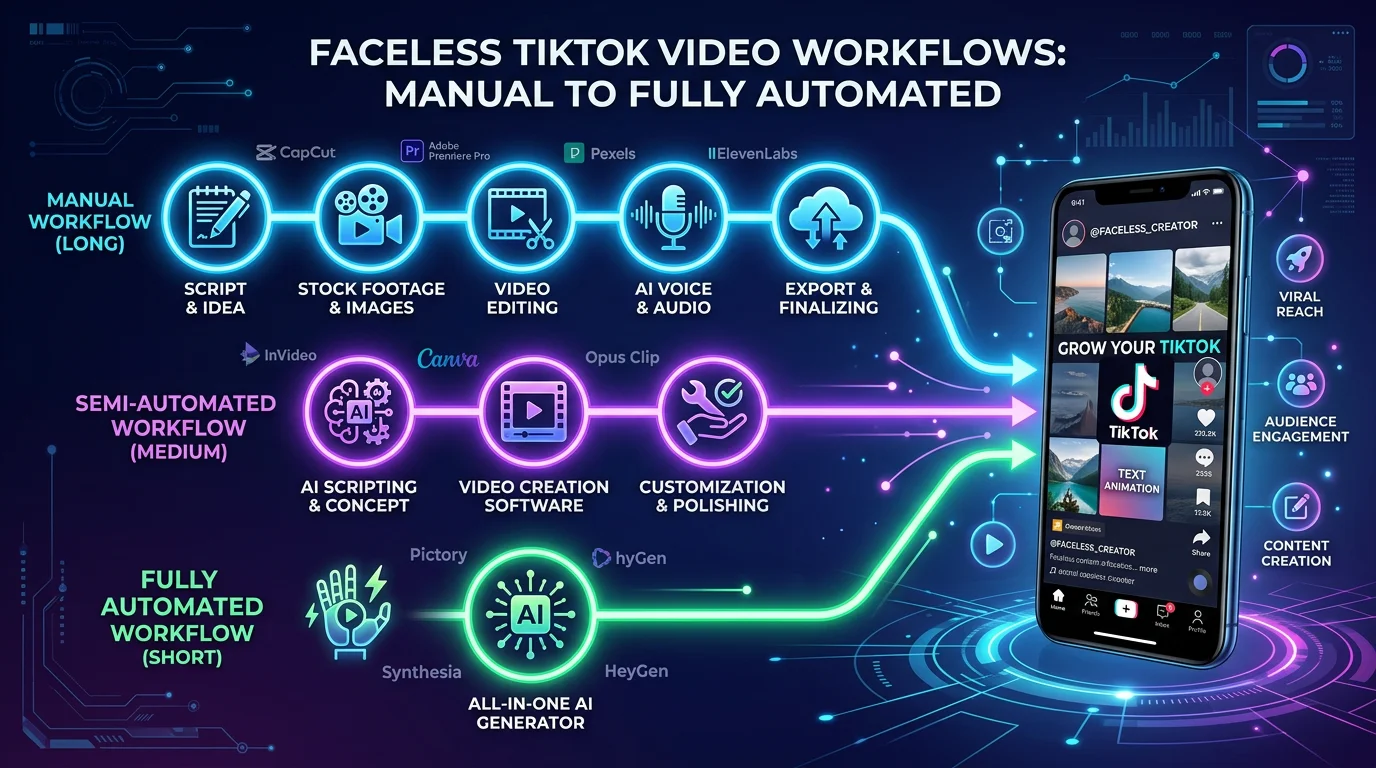
We’ve walked through recording your own voice and using AI to generate perfect narrations. But what if you could put the entire process on autopilot? Imagine publishing high-quality, voiceover-driven TikToks every single day without the grind of scripting, recording, editing, or even posting. This is exactly where full automation platforms enter the picture, connecting all those separate tasks into one smooth workflow.
Instead of juggling scriptwriting, voice generation, and video editing as separate jobs, a platform like FlowShorts brings them all under one roof. It’s a completely different way of thinking about content—moving from hands-on creation to hands-off management. This is the secret weapon for creators and business owners who want to build a serious presence on TikTok but just don’t have the dozens of hours it usually takes each week.
How a Fully Automated System Works
The concept behind full automation is refreshingly simple: you set the strategy, and the AI handles the execution. You make the big-picture decisions once—choosing your niche, for example—and the system takes over the day-to-day work of making and publishing the videos.
This hands-off approach transforms content creation from a daily chore into a genuine growth engine. Let's say you're running a channel about "amazing history facts." A platform like FlowShorts would take care of everything:
- Script Generation: The AI writes an engaging script about a specific historical event.
- AI Voice Generation: It then produces a professional tiktok voice over with a natural-sounding AI voice that’s perfect for storytelling.
- Visual Assembly: The system finds relevant, high-quality stock footage and images to bring the script to life.
- Caption Syncing: It automatically generates and perfectly syncs word-for-word captions with the voiceover.
- Auto-Posting: Finally, it publishes the finished video directly to your TikTok account, right on schedule.
This entire chain of events happens without you ever having to open an editor or even your phone. You just set it and let it run.
Your Content Machine Working 24/7
The real power of an automated workflow is its relentless consistency. We all know the TikTok algorithm rewards channels that post great content regularly. An automation platform ensures your channel stays active and keeps your audience engaged. Knowing how to schedule TikTok videos is a key part of this, even when you're busy, on vacation, or just asleep.
Here’s a look at the FlowShorts dashboard. You can see how you just select a niche and let the system get to work.
This interface shows just how simple the one-time setup is. After you pick your niche and connect your account, the AI starts working in the background to build a queue of ready-to-publish content for you.
This method is especially effective for anyone aiming to monetize their channel. Growing an account to the point where it can earn money from the Creator Fund, brand deals, or affiliate marketing requires a huge amount of content. Our guide on how to monetize TikTok covers all the options. Automation completely removes that barrier, making it possible to build an audience and a business without the daily burnout.
A faceless content strategy thrives on consistency and value, not on your on-camera presence. Automation is the ultimate tool for delivering both at scale, allowing you to build an asset that works for you around the clock.
This strategy is a game-changer for faceless content, where the value comes from the information and narration, not a person's face. If you want to see exactly how this is done, you can explore our full guide on TikTok automation for faceless channels. By automating your tiktok voice over and video production, you're doing more than just saving time; you're building a sustainable system for long-term growth.
Your Top TikTok Voice Over Questions, Answered

As you get deeper into creating TikToks, you’re bound to hit a few snags with your audio. It happens to everyone. Instead of getting frustrated, let's walk through the most common questions I hear from creators so you can get unstuck and back to making great content.
This is your go-to guide for quick fixes and smart workarounds, from trending AI voices to those maddening sync issues.
Can I Use Trending AI Voices Like the Jessie Voice?
Yes, and when you're just starting, you probably should. Voices like "Jessie" are part of TikTok’s native text-to-speech (TTS) library, and they’re instantly recognizable. Using them makes your video feel right at home on the For You Page because viewers are already used to hearing them.
To find them, just add text to your video, tap the text box, and pick the 'Text-to-speech' option. You'll see a whole list of voices you can use instantly.
But here’s a pro-tip: if your goal is to build a serious brand or a faceless channel with a memorable identity, you'll eventually want to stand out. Relying on the same default voices as everyone else makes it hard to be unique. That's when you should consider recording your own voice or using a high-quality external AI voice to develop a signature sound.
How Do I Fix a Voice Over That Is Out of Sync?
Nothing kills a video faster than an out-of-sync voice over. It’s incredibly common, but the good news is, it's almost always fixable.
If you recorded your voice over directly in TikTok, the issue often comes from one long, continuous take. Instead, try recording in shorter chunks. Say a few lines, stop, and then record the next segment. This gives you way more control for lining everything up perfectly.
For audio recorded on a separate device, you’ll fix the sync in a video editor like CapCut. Here’s the process:
- Zoom In on the Timeline: You can't sync audio accurately when you're zoomed all the way out. Get in close so you can see the details of the audio waveform.
- Drag to Align: Nudge the audio clip left or right until the spikes in the sound wave match the action on screen.
- Use a Sync Clap: This is a classic editor's trick. At the very beginning of your recording, clap your hands loudly once on camera. This creates a sharp spike in both the video's audio track and your separate voice over file. Just line up those two spikes in your editor, and the rest of the clip will be perfectly in sync. Trim the clap off before you export, and you’re golden.
Which Is Better for Engagement: A Human or AI Voice?
There's no magic bullet here. The right choice comes down to your content, your niche, and how much time you have. Both human and AI voices can get massive engagement if you know how to use them.
A human voice—especially your own—is incredible for building a real, personal connection. It’s perfect for storytelling, vlogs, and any content where your personality is the brand. The only catch is that recording, editing, and getting it right takes time.
The best strategy isn't about choosing human vs. AI. It's about choosing the method that allows you to post high-quality, valuable content consistently. Consistency will always win on TikTok.
AI voices, on the other hand, are all about efficiency and speed. Modern AI is so natural-sounding that it's fantastic for educational content, news-style updates, or faceless channels where the priority is clear, professional narration. It’s how many automated platforms can produce high-performing videos without a human ever speaking a word.
How Do I Add Captions That Match My Voice Over?
Captions aren't optional anymore. With so many people watching on mute, you need them to get your message across. Luckily, TikTok makes this incredibly simple.
After adding your voice over, look for the 'Auto captions' button on the final editing screen. Tap it, and TikTok will automatically transcribe your audio and generate perfectly timed captions.
Always take a second to review the captions for any mistakes—the AI is good, but not perfect. You can tap the text to edit words, change the style, or adjust the font. For even more control, an editor like CapCut also has great auto-captioning tools. And if you're looking for a totally hands-off process, content automation platforms will generate the voice over and sync word-for-word captions for you automatically.
Ready to stop spending hours on editing and start scaling your content? FlowShorts uses AI to completely automate your faceless video creation, from script to final post. Set your niche, connect your accounts, and let our platform build your audience on autopilot. See how it works at https://flowshorts.app.
Related: Best Audio Transcription Tools for Creators
Need TikTok content ideas? Browse TikTok Ideas by Niche — 30+ niches with proven hooks and concepts.
Free tools: TikTok Hashtag Generator · TikTok Username Generator