Opus Clip Review 2026: Features, Pricing, Pros & Cons (Honest Take)
Honest Opus Clip review for 2026. Covers AI clipping features, virality scoring, pricing (Starter $15, Pro $19.43), pros and cons, who it is best for, and how it compares to FlowShorts.
FlowShorts Team
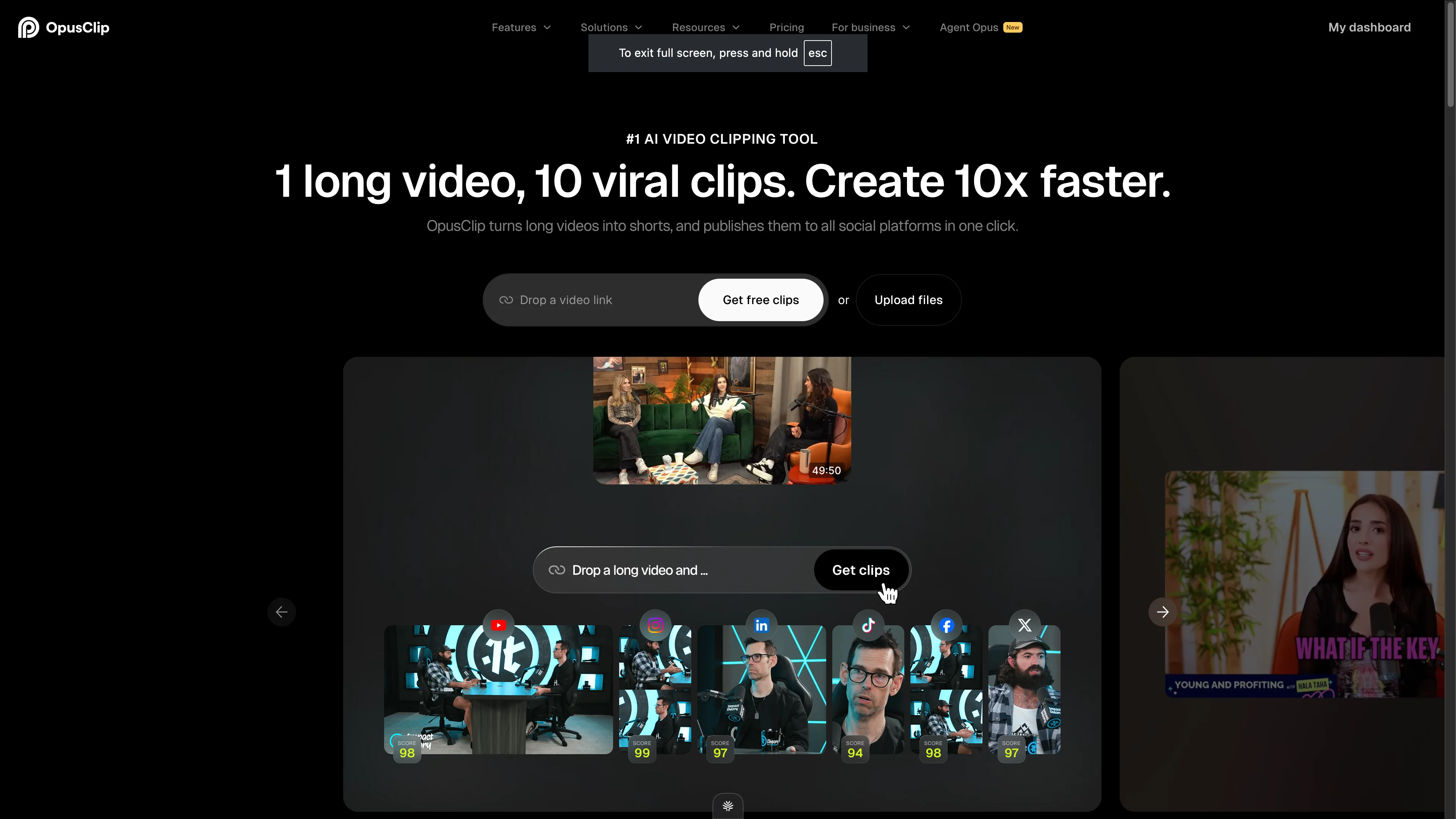
Opus Clip is an AI video clipping tool that takes long-form videos (podcasts, webinars, interviews, YouTube videos) and automatically extracts the best short clips for YouTube Shorts, TikTok, and Instagram Reels. Paste a link, and Opus Clip identifies the most engaging moments, reframes them vertically, adds captions, and gives you 10-30 ready-to-post clips.
This review covers what Opus Clip actually does well, where it falls short, its pricing in 2026, who it's best for, and how it compares to alternatives like FlowShorts for short-form content automation.
What Opus Clip Does
The core product is simple: turn one long video into multiple short clips. The AI analyzes your video for engaging moments — punchlines, emotional peaks, key insights, surprising statements — and extracts them as standalone Shorts/Reels/TikToks.
How It Works
- Input your video — Paste a YouTube, Vimeo, Google Drive, or Zoom link, or upload a file directly
- AI analyzes the content — Opus Clip's AI identifies the most "clipworthy" moments using a virality score algorithm
- Get multiple clips — You receive 10-30 short clips (15-60 seconds each) ranked by predicted engagement
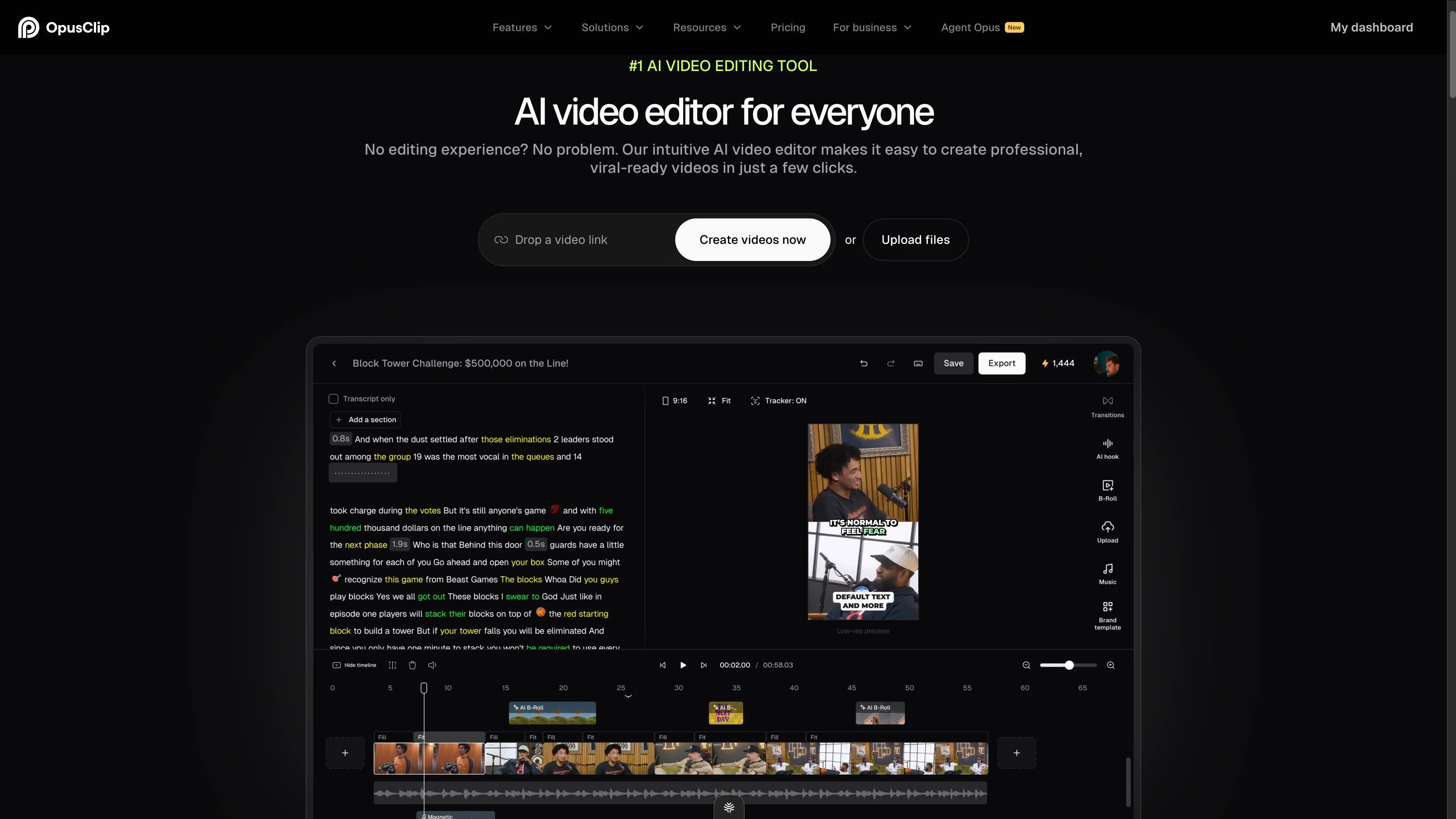
- Edit if needed — Adjust trim points, captions, layout, and branding in their built-in editor
- Export or publish — Download clips or post directly to social platforms
Key Features
- AI Virality Score — Each clip gets a score predicting how well it'll perform. Clips are ranked from highest to lowest potential.
- Auto-reframing — Automatically crops horizontal video to vertical 9:16, tracking the active speaker's face
- AI captions — Word-by-word animated captions in 20+ languages
- AI B-roll — Automatically inserts relevant stock footage or AI-generated visuals during pauses
- Brand templates — Custom colors, fonts, logos, and intro/outro slides
- 1080p export — Full HD output for all platforms
- Multi-platform posting — Direct publish to YouTube Shorts, TikTok, Instagram Reels, or download
Opus Clip Pricing (2026)
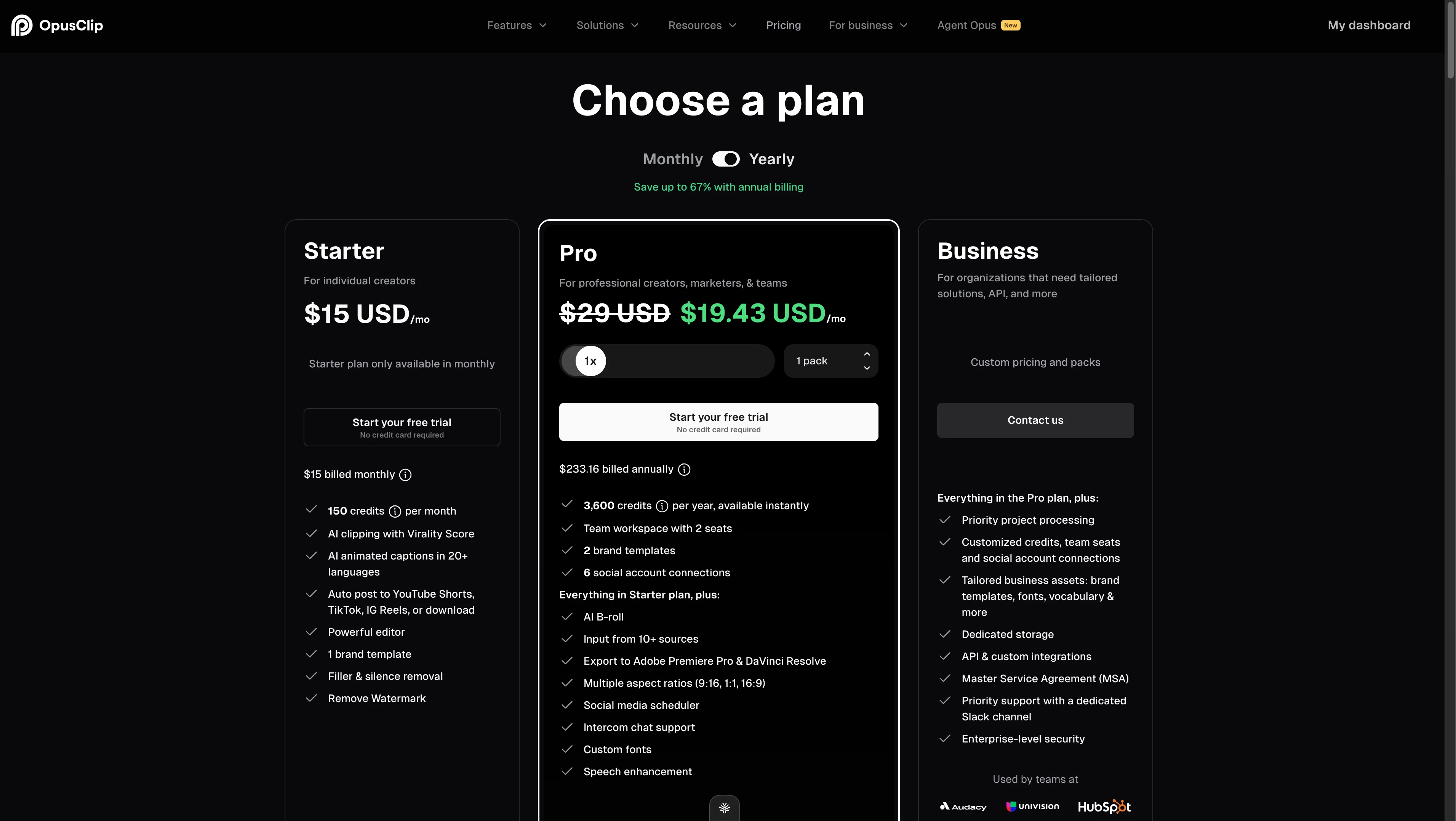
| Plan | Price | Credits | Key Features |
|---|---|---|---|
| Starter | $15/mo | 150 credits/mo | AI clipping, captions, basic editor, 1 brand template, watermark removal |
| Pro | $19.43/mo (annual) / $29/mo (monthly) | 3,600 credits/yr | Everything in Starter + AI B-roll, 2 brand templates, 2 team seats, 6 social connections, auto-post |
| Business | Custom pricing | Custom | Everything in Pro + API, priority processing, dedicated storage, enterprise security |
How Credits Work
Opus Clip uses a credit system. Processing a video costs credits based on its length — a 30-minute video costs more credits than a 5-minute one. The Starter plan's 150 credits translates to roughly 10-15 video processing runs per month depending on video length. Pro's 3,600 annual credits (300/month equivalent) handles higher-volume workflows.
Free Tier
Opus Clip offers a limited free trial — you can process a few videos to test the tool before committing to a paid plan. The free output includes a watermark.
What Opus Clip Does Well
1. The Virality Score Is Actually Useful
Most AI clipping tools just chop videos at arbitrary timestamps. Opus Clip's virality scoring analyzes speech patterns, emotional peaks, and topic completeness to identify genuinely engaging moments. In our testing, the top-scored clips were consistently better than mid-ranked ones. It's not perfect, but it saves significant time versus manually scrubbing through a 2-hour podcast.
2. Captions Are High Quality
The word-by-word animated captions look professional — comparable to what you'd create manually in CapCut. Multiple styles, colors, and positioning options. The transcription accuracy is strong in English (95%+ in our testing) and usable in the other 20 supported languages.
3. Speaker Tracking for Reframing Works Well
When converting horizontal talking-head or interview content to vertical, Opus Clip's auto-reframing follows the active speaker smoothly. Multi-speaker conversations are handled well — the frame shifts to whoever is talking. This alone saves hours of manual cropping.
Looking for the Best Faceless Video Tool?
See why creators are switching to FlowShorts — AI video generation + auto-posting to 3 platforms from $19/mo.
Compare Plans →4. Transcript-Based Editing Is Intuitive
Instead of dragging a timeline scrubber, you edit clips by selecting text in the transcript. Highlight the sentences you want to keep, delete the rest. This text-first approach makes it easy to tighten clips without precise timeline manipulation.
Where Opus Clip Falls Short
1. Only Works With Existing Long-Form Video
This is the fundamental limitation. Opus Clip requires a source video to clip from. If you don't have long-form content (a podcast, webinar, interview, or long YouTube video), Opus Clip has nothing to work with. It doesn't generate content — it only repurposes existing content.
For creators who don't film long-form video, this is a non-starter.
2. Clips Can Feel Repetitive
When you extract 20 clips from a single 30-minute video, many of them overlap in topic and tone. The variety is limited by the source material. If your source video covers 3 main points, you'll get 5-7 clips per point — and they'll feel similar.
3. Credit System Is Confusing
The credit-based pricing makes it hard to predict monthly costs. A 10-minute video costs fewer credits than a 60-minute one, but the exact formula isn't transparent upfront. Some users report running out of credits mid-month and needing to upgrade or wait.
4. Limited Customization for Short-Form
While the editor is functional, it's designed for clipping — not creation. You can't add custom images, AI-generated visuals, background music selection, or complex transitions. It's a clipping tool, not a video creation suite.
5. No Content Generation
Opus Clip doesn't write scripts, generate images, create voiceover, or produce original content. It exclusively repurposes existing video. If your strategy requires creating new short-form content (not clipping from long-form), you need a different tool.
Who Opus Clip Is Best For
| Great Fit | Not a Great Fit |
|---|---|
| Podcasters wanting to clip episodes into Shorts/Reels | Creators who don't produce long-form video |
| YouTubers repurposing long videos into Shorts | Faceless channel creators who need original content |
| Agencies managing multiple clients' video content | Creators who want fully automated daily posting |
| Conference/webinar organizers creating highlight reels | Creators on a tight budget (credits run out fast) |
| Interview-format shows with talking-head footage | Anyone wanting AI-generated (not clipped) content |
Opus Clip vs. FlowShorts
These tools solve fundamentally different problems:
| Feature | Opus Clip | FlowShorts |
|---|---|---|
| Input | Existing long-form video | Topic/niche selection (or custom script) |
| What it does | Clips best moments from source video | Generates complete videos from scratch |
| Content creation | No — repurposes only | Yes — AI scripts, images, voiceover, captions, music |
| Requires source video? | Yes — must have existing footage | No — creates everything from a topic |
| Best for | Podcasters, YouTubers with long-form content | Faceless channels, daily automated posting |
| Auto-posting | Yes (Pro plan) | Yes (all plans — YouTube, TikTok, Instagram) |
| Captions | Yes — word-by-word animated | Yes — TikTok-style animated captions |
| Pricing | From $15/mo (credit-based) | From $19/mo (video-count-based) |
| Output per month | Depends on credits and source video length | 8-60 videos depending on plan |
When to choose Opus Clip: You already produce long-form video (podcasts, YouTube, webinars) and want to extract short clips from it.
Looking for the Best Faceless Video Tool?
See why creators are switching to FlowShorts — AI video generation + auto-posting to 3 platforms from $19/mo.
Compare Plans →When to choose FlowShorts: You want to create new short-form content from scratch without filming — especially for faceless channels that need daily posting across YouTube Shorts, TikTok, and Instagram Reels.
Can you use both? Yes — some creators use FlowShorts for daily automated Shorts and Opus Clip to repurpose their podcast episodes. They solve different parts of the content pipeline.
Opus Clip vs. Other Alternatives
| Tool | Best For | Creates Content? | Starting Price |
|---|---|---|---|
| Opus Clip | AI clipping from long-form video | No — clips only | $15/mo |
| FlowShorts | Automated faceless short-form video | Yes — full pipeline | $19/mo |
| CapCut | Manual editing with templates | No — editor only | Free (Pro $8/mo) |
| Descript | Transcript-based editing | No — editor only | $24/mo |
| InVideo AI | Prompt-to-video with stock footage | Yes — from text prompts | $25/mo |
| Kapwing | Browser-based video editing | Partial — AI draft + manual editing | Free (Pro $16/mo) |
For our full comparison of AI video tools, see best AI video generators of 2026 and our alternatives comparison page.
The Verdict
Opus Clip is the best AI clipping tool available in 2026. If you produce podcasts, interviews, webinars, or long YouTube videos and want to repurpose them into Shorts and Reels, it's the right tool. The virality scoring, auto-reframing, and transcript-based editing genuinely save hours of work.
But it's not a content creation tool. It can't help you if you don't already have long-form video to clip from. If you need to create short-form content from scratch — especially for faceless channels, daily posting, or niche automation — you need a generative tool like FlowShorts that builds videos from topics rather than clipping from existing footage.
The best strategy for many creators: use both. FlowShorts for daily automated Shorts. Opus Clip for repurposing your podcast or YouTube long-form into additional clips.
Frequently Asked Questions
Is Opus Clip worth it?
Yes, if you produce long-form video. Podcasters and YouTubers save 5-10+ hours per month on clip extraction. The AI-selected clips are consistently better than random timestamp cuts. If you don't have long-form video to clip from, it's not useful — look at content generation tools instead.
Is there a free version of Opus Clip?
Opus Clip offers a limited free trial that lets you process a few videos with watermarked output. Paid plans start at $15/mo (Starter) with 150 credits. The Pro plan ($19.43/mo annual) includes 3,600 annual credits and AI B-roll.
How many clips can Opus Clip make from one video?
Typically 10-30 clips depending on the source video length and content density. A 30-minute podcast usually yields 15-25 clips. Each clip is ranked by a virality score so you can prioritize the best ones.
Does Opus Clip auto-post to social media?
Yes, on the Pro plan. You can publish directly to YouTube Shorts, TikTok, Instagram Reels, or download clips. The Starter plan requires manual download and upload.
What's the difference between Opus Clip and FlowShorts?
Opus Clip clips existing video — it requires source footage. FlowShorts creates new videos from scratch using AI scripts, images, voiceover, and captions. Opus Clip is for repurposing. FlowShorts is for generating. Many creators use both for different parts of their content strategy.
Related Guides
- FlowShorts vs Opus Clip Comparison
- Best AI Video Generators of 2026
- Text to Video AI Tools
- Image to Video AI Tools
- 50 Video Editing Tips
- All Alternatives Compared
Create Short-Form Videos Without Long-Form Source
Unlike clipping tools, FlowShorts generates complete videos from scratch — AI scripts, images, voiceover, captions, music — and auto-posts daily to YouTube Shorts, TikTok, and Instagram Reels. No source video needed.


