How to Make TikTok Videos: A Proven Guide to Boost Views
Learn how to make tiktok videos that engage audiences with ideas, editing tips, and algorithm tricks.
FlowShorts Team

If you want to create TikTok videos that consistently get views, you need a system. Forget about chasing one-off viral hits—that’s a recipe for burnout. The real secret is building a simple, repeatable process that works for you. It's about moving from hoping for a hit to manufacturing your own success.
A Reliable Workflow for TikTok Success
So, how do you get there? You build a reliable content engine. The TikTok algorithm favors consistency, and showing up with good content regularly is how you build momentum. Understanding how often to post on TikTok is a key part of that. This isn't about throwing spaghetti at the wall; it's about having a smart workflow that gets better over time.
Think of it as a continuous loop, not a one-and-done task. You brainstorm ideas, you create the video, and then—the most crucial part—you analyze the results. What you learn from your analytics feeds directly into your next batch of ideas. This is how you stop guessing and start creating with purpose.
The 3 Core Phases of Content Creation
To make this process stick, you just need to nail three distinct phases. Each one is a skill you can develop.
- Brainstorming: This is your research and discovery phase. You're not just waiting for a brilliant idea to strike; you're actively digging into what your ideal viewer actually wants to watch. What are their questions? What are they struggling with?
- Creating: Here's where you bring your idea to life. It’s all the hands-on work: scripting, filming, editing, and getting it ready to post. This is the execution that turns a great concept into a great video.
- Analyzing: After you post, it’s time to be a detective. You need to look at the numbers—views, watch time, shares, comments—to figure out why a video performed the way it did. This data is gold for your next brainstorming session.
This simple workflow creates a powerful feedback loop, ensuring your content strategy is always improving.

As you can see, every step feeds the next. Your analysis fuels better brainstorming, which leads to better content.
Setting Your Foundation Before You Film
Before you even think about hitting that record button, take a step back. What's the point of all this? Are you trying to build a personal brand? Drive sales for your e-commerce store? Get people to read your blog? Your end goal dictates every single content decision you’ll make.
I've learned that success on TikTok isn't about one viral video. It's about the compounding effect of dozens of good ones. A repeatable system is your most valuable asset.
Getting clear on your goals is the first step. From there, you can build an ultimate TikTok growth strategy that gives you a clear roadmap. Having a plan stops you from just making random videos and ensures your effort is focused where it will have the biggest impact.
Core Components of a High-Performing TikTok Video
To help you put this all into practice, it's useful to break down what actually makes a TikTok video work. From the first frame to the last, every element has a job to do.
This table outlines the essential pieces of a successful video.
| Element | Purpose | Best Practice Example |
|---|---|---|
| The Hook (0-3s) | Grab attention immediately and stop the scroll. | "Here are 3 mistakes you're making with your skincare that are causing acne." |
| Main Content | Deliver value, entertain, or educate. | A quick sequence showing the 3 mistakes with text overlays explaining each one. |
| Pacing & Editing | Maintain viewer interest with dynamic cuts and visuals. | Use quick cuts every 1-2 seconds, zoom effects, and engaging B-roll. |
| Captions & Text | Reinforce your message and improve accessibility. | Add bold, easy-to-read captions that summarize key points as you say them. |
| Sound & Music | Set the mood and leverage trends. | Use a trending audio clip that fits the video's theme, but keep the volume low under your voiceover. |
| Call to Action (CTA) | Tell viewers what to do next. | "Follow for more daily tips" or "Comment which mistake you've been making." |
Mastering these components within your brainstorm-create-analyze loop is what separates amateur content from videos that build a real, engaged community. Now, let's start by diving into the first phase: generating ideas that actually work.
Generating Ideas and Scripting for High Retention
Great TikToks aren't accidents. The creators you see consistently pulling in huge views aren't just waiting for inspiration to strike—they have a system. They’ve learned how to find ideas that people are already looking for. This is where you need to start if you want to make videos that people actually stick around to watch.
Think of yourself as an idea detective. Your first stop should be the TikTok app itself. Hop over to the search bar and type in keywords for your niche. The real magic is in the autocomplete suggestions that pop up. Those aren't just random guesses; they're what real people are searching for right now. If you type "easy dinner," you might see "easy dinner for one" or "easy dinner under 20 minutes." Just like that, you have a list of proven topics people want.
Finding Your Next Viral Idea
Once you've exhausted the app, it's time to zoom out and look at the bigger picture. I'm a big fan of using free tools like Google Trends to spot rising interest in a topic. It helps you get ahead of a trend instead of jumping on it when it's already saturated. Another absolute goldmine is AnswerThePublic. It shows you all the "how," "what," and "why" questions people are plugging into search engines, giving you a nearly endless supply of content ideas.
This research-first approach takes the guesswork out of creation. You’re no longer just throwing content at the wall and hoping it sticks; you’re making videos that serve a built-in demand.
Crafting a Script That Holds Attention
With a solid idea in hand, you need a script. For any video that aims to teach or solve a problem, the Problem, Agitate, Solve (PAS) framework is my go-to. It’s simple, powerful, and works like a charm.
- Problem: Call out a specific pain point. (e.g., "Are you tired of your videos getting no views?")
- Agitate: Pour a little salt in the wound by describing the frustration. (e.g., "You spend hours editing, and for what? 200 views. It feels like you're shouting into an empty room.")
- Solve: Be the hero and offer your clear, simple solution. (e.g., "Here's the exact script I use to get people to watch to the end.")
This structure works because it taps into basic human psychology. You show you understand the viewer's struggle, which builds an instant connection, and then you promise them a way out, which keeps them glued to the screen.
The real secret to high retention isn't a fancy camera or complicated editing. It's a script that creates tension and delivers a payoff. If you can make someone feel seen and give them a clear solution in under a minute, you've won.
Getting this right is critical. We know that the TikTok recommendation system drives an incredible 85% of all video views. This means the algorithm, not your follower count, has the final say. It rewards videos that grab and hold attention from the very first second.
Mastering the First Three Seconds
Your hook is everything. You could have the most life-changing advice in your video, but if the first three seconds don't stop the scroll, it's all for nothing. Ditch the "Hey guys!" and get straight to the point with an opening that sparks curiosity.
A few formulas I’ve seen work again and again:
- The "Mistake" Hook: "Stop making these three mistakes with [your topic]."
- The "Secret" Hook: "Here's the secret to [achieving a goal] without [doing the hard thing]."
- The "You're Doing It Wrong" Hook: "If you're still doing [a common action], you need to watch this."
These hooks immediately signal value and create a knowledge gap the viewer wants to fill. They feel like they're about to get an insider tip. To really nail this, check out our guide on the best hooks for short-form videos. Perfecting your hook is the single most effective thing you can do to boost your watch time.
How to Film and Edit Videos That Actually Look Professional
Create Faceless Videos on Autopilot
FlowShorts generates and posts AI videos to YouTube, TikTok & Instagram while you sleep.
Try FlowShorts Free →You don’t need a Hollywood budget to create polished TikToks that get noticed. Forget the professional studio—your most powerful tools are good lighting, stable footage, and clean audio. Honestly, just mastering these three things will put you leagues ahead of most creators.

When you nail your setup, you can stop worrying about the tech and start focusing on what really matters: your message.
Nailing Your On-Camera Setup
If you're going to be on camera, a few simple tweaks make a world of difference. First off, and I can't stress this enough, natural light is your best friend. Filming while facing a window is free, and it gives you that soft, flattering light that even expensive gear struggles to replicate. If you're a night owl, a basic ring light is a fantastic investment to keep your videos from looking grainy and dark.
Next, get a tripod. Seriously. Shaky, handheld footage just screams amateur. A cheap phone tripod keeps your shots steady and frees up your hands so you can be more expressive.
Finally, let's talk angles. A slightly high camera angle, shooting down at you, is almost universally more flattering than shooting from below. Play around with it, but always make sure your phone is filming vertically in the 9:16 aspect ratio. To get all the specifics right, our guide on the TikTok aspect ratio will make sure your videos are perfectly framed every single time.
The Power of Going Faceless
Not everyone wants their face to be their brand, and the good news is, you don't have to. "Faceless" videos are blowing up right now because they focus entirely on the value you're delivering.
A super effective and popular route is to pair high-quality stock footage with bold text overlays. This is perfect for motivational content, history explainers, or educational tidbits.
- Find Your Visuals: Websites like Pexels and Pixabay have massive libraries of free, professional-looking video clips. You can find anything from bustling cityscapes to calming nature scenes to match your topic.
- Tell a Story with Text: Use your script to create text overlays that guide the viewer. Keep the text punchy, easy to read, and on-screen just long enough to be read.
- Add a Human Touch with a Voiceover: Recording your script as a voiceover adds personality and helps connect the visuals into a cohesive story.
Screen recordings are another goldmine, especially for tutorials, app demos, or software walkthroughs. You can provide incredible value just by recording your screen and explaining what you're doing, no camera needed.
To really craft compelling visuals, it pays to use the best social media content creation tools available to make your workflow smoother.
Putting Your Faceless Workflow on Autopilot
Even with great stock footage, creating faceless content can be a grind. This is where automation tools like FlowShorts completely change the game by handling the heavy lifting for you.
The real magic of automating your faceless content isn't just saving time—it's achieving relentless consistency. The TikTok algorithm rewards channels that post daily, and automation is what makes that pace possible without burning out.
With a tool like FlowShorts, you can pick a niche (like finance, history, or luxury), and its AI handles the rest. It generates a script, sources relevant stock footage, adds a surprisingly natural AI voiceover, and even syncs animated captions. It's a system for building an entire channel with minimal daily effort.
Editing for Maximum Viewer Retention
Once you have your footage, the real work begins. Editing is where you turn raw clips into a fast-paced, thumb-stopping video. CapCut is the go-to editor for most, but these principles work in any app.
If there’s one editing rule to live by, it’s dynamic pacing. Viewers get bored fast. You need to change something on the screen every 1-3 seconds. This could be a new clip, a quick zoom, or a text overlay popping in. This rapid pace keeps the brain hooked and stops the swipe.
Next, get your audio right.
- Clear Voiceovers: Record in a quiet space without echo. Your phone’s voice recorder works, but you can also record directly in CapCut or TikTok. Speak with energy!
- Smart Sound Effects: Don't underestimate the power of a subtle "whoosh" for a transition or a "ding" when you make a key point. These small touches make your video feel more polished and alive.
- Visible Captions: Always, always add captions. A huge number of people watch with the sound off. Use your editor’s auto-caption feature, then proofread and style them to be big, bold, and easily readable against your video.
Getting Your Video Seen by the TikTok Algorithm

You’ve poured your heart into creating an awesome video. The editing is sharp, the hook is perfect. But your job isn’t done. Far from it.
The difference between a video that gets a few hundred views and one that goes viral often comes down to what happens in the few minutes before you hit "Post." This is where you give the algorithm all the right signals to get your work in front of the right people.
Identifying Your Golden Posting Hours
One of the first questions every new creator asks is, "When should I post?" The truth is, there's no magic, universal answer. The best time to post is simply when your audience is most active, and thankfully, TikTok tells you this for free.
To find these "golden hours," you'll need a Pro or Business account. From there, pop over to your Profile, tap the three-line menu in the corner, and find Creator Tools. Head into Analytics and tap the Followers tab.
Scroll down until you see the Follower activity chart. This is your goldmine. It shows you the exact days and hours your followers are scrolling. If you see big spikes at 8 PM on weekdays, that’s your cue. Posting right as your audience is logging on gives your video an instant jolt of engagement, which tells the algorithm, "Hey, people like this!"
The Modern 3x3x3 Hashtag Method
The old strategy of just dropping #fyp and #viral into your caption is dead. Today, you need a more sophisticated approach. I'm a big fan of the 3x3x3 method, which is all about layering your hashtags to hit different audience groups.
Here’s how you break it down:
Three Broad Hashtags: Think big. These are high-traffic tags that introduce your video to a massive audience. If you make finance content, this could be
#financeor#money. For history buffs, it might be#historyor#learning.Three Niche Hashtags: Now, get more specific. These tags target a dedicated community within that broad topic. Your finance video might get
#investingforbeginners, and your history video could use#romanempire. This is where you find more qualified viewers.Three Hyper-Specific Hashtags: Get granular. These tags should describe the exact content of your video, like
#rothiratipsor#juliuscaesarfacts. These attract your perfect-fit audience—the people most likely to watch, comment, and follow.
This mix gives your video multiple chances to find its footing. The broad tags cast a wide net for initial views, while the niche and specific ones reel in the highly engaged superfans.
Create Faceless Videos on Autopilot
FlowShorts generates and posts AI videos to YouTube, TikTok & Instagram while you sleep.
Try FlowShorts Free →Writing Captions That Fuel Engagement
Your caption is prime real estate. Don't waste it just describing what’s in the video—use it to start a conversation. The algorithm absolutely loves comments because they signal that a video is making people stop and engage.
Think of your caption less as a description and more as a conversation starter. A simple question can transform passive viewers into active participants, which is one of the strongest signals of a high-quality video.
Instead of a boring summary, try prompting a response. It’s surprisingly effective.
- Ask a direct question: "What's the one history fact that still blows your mind?"
- Create a fill-in-the-blank: "My biggest money mistake was _____."
- Encourage a tag: "Tag a friend who needs to hear this."
These simple tricks work wonders for getting the comment section buzzing, which is exactly what you want.
Using Trends for an Initial Boost
Finally, don't sleep on trending sounds and filters. When a sound is popular, the algorithm is actively looking for more videos that use it. Hopping on a relevant trend can be like a cheat code for getting an initial burst of visibility.
The key word here is relevant. Don't force your niche into a weird dancing trend if it doesn't fit. Spend some time on your "For You" page and save sounds that you see repeatedly. When you find one that could genuinely work for your content, you can use it to give a great video idea that extra push it needs to find a whole new audience.
Automating Content to Scale Your Growth
Let's be honest: consistency is everything on TikTok. The algorithm loves accounts that post regularly, but the pressure to churn out new content every single day is a surefire recipe for burnout. Learning how to schedule TikTok videos can ease that pressure. Trying to manually brainstorm, script, film, and edit a video from scratch daily just isn't sustainable for most creators, especially if you're doing this solo.
This is where automation completely changes the game. By setting up a system to handle the repetitive, time-sucking parts of video creation, you can keep up a steady posting schedule without the daily grind. It's a strategy that works incredibly well for "faceless" channels, where the value comes from the information itself, not from seeing a person on camera.
Think of it as having a content team working for you around the clock. You do the strategic setup once, and the system takes care of producing and publishing videos, feeding the algorithm the daily fuel it needs. You get to graduate from being a day-to-day creator to a high-level content strategist, focusing on the big picture while a machine nails the execution.
The Automated Workflow Advantage
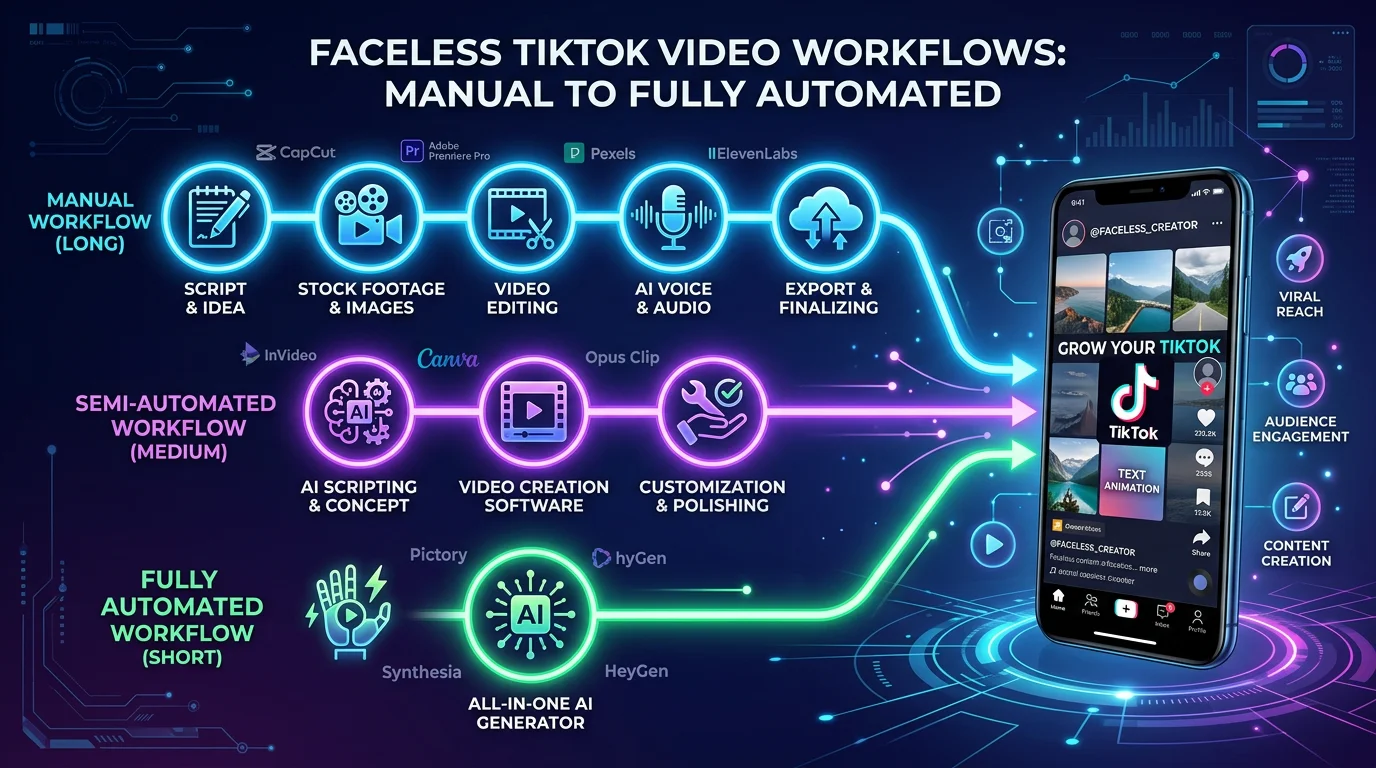
So, what does this look like in practice? The difference is stark when you compare the old way to an automated approach. Making a single TikTok video manually involves a long, tedious checklist: find an idea, write a script, source B-roll footage, piece it all together in an editor, add captions, write a description, and finally hit publish.
Now, let's look at a modern, automated workflow using a platform like FlowShorts. This tool was built from the ground up to create high-quality, faceless short-form videos at scale.
Instead of a daily to-do list, your involvement looks more like this:
- One-Time Setup: You pick a popular and proven niche, like history, finance, science facts, or motivational content.
- AI-Driven Creation: The AI engine handles the creative heavy lifting, generating a unique script for every video.
- Automatic Assembly: It then automatically sources premium stock footage, lays down a natural-sounding voiceover, and animates engaging captions that are perfectly synced.
- Hands-Off Publishing: The finished video is then posted directly to your TikTok, Reels, and Shorts accounts based on the schedule you defined.
This isn't about killing creativity. It's about automating the grunt work. To see just how powerful this can be, our guide on automatic content creation breaks down how these systems can completely reshape your social media strategy.
The table below really drives home the difference in effort and output.
Manual Creation vs Automated Workflow with FlowShorts
| Task | Manual Process (per video) | Automated with FlowShorts |
|---|---|---|
| Ideation | 15-30 minutes of research | 0 minutes (AI generates topics) |
| Scripting | 30-60 minutes of writing | 0 minutes (AI writes the script) |
| Visuals | 30-60 minutes sourcing B-roll | 0 minutes (AI finds premium footage) |
| Voiceover | 15 minutes recording/editing | 0 minutes (AI generates voiceover) |
| Editing & Captions | 60-120 minutes of editing | 0 minutes (Fully automated assembly) |
| Posting | 10 minutes per platform | 0 minutes (Scheduled & posted for you) |
| Total Time/Video | ~2.5 - 4 hours | ~5 minutes (initial setup) |
As you can see, automation allows you to reclaim hours of your day, giving you the freedom to manage multiple channels or simply focus on what matters most.
Real-World Scenario: A Luxury Lifestyle Channel
Let's make this tangible. Imagine you want to tap into the massively popular "luxury lifestyle" niche. You see those motivational clips with incredible visuals pulling in millions of views, but you simply don't have the time to create one every day.
With an automation tool, your process is radically different.
First, you'd select the "Luxury & Motivation" category inside the platform. Next, you'd set your schedule—for instance, telling it to post one new video daily at 7 PM, when your target audience is most active.
Then, you just let the AI take over. The system will start creating a full month's worth of content. It writes scripts about the habits of successful people, finds incredible footage of yachts and supercars, generates an inspiring voiceover, and schedules every single video for you.
You’ve just built a fully autonomous content engine. While you’re at your day job or even sleeping, your channel is consistently publishing high-quality videos, growing an audience, and racking up views completely on its own. This is what true scale looks like.
With just a few minutes of one-time setup, you could publish 30 unique, high-quality videos every single month. This hands-off system turns your TikTok account from a demanding chore into a self-growing asset. You’re no longer just learning how to make videos; you’re building a machine that makes them for you.
Frequently Asked Questions About Making TikToks

Once you get past the initial learning curve, you’ll probably find yourself asking the same questions every creator runs into. Nailing the answers to these early on can make a huge difference in building a content strategy that actually works. Let's dig into a couple of the most common ones I hear.
Probably the biggest question on everyone's mind is about video length. It's tempting to use every second TikTok gives you, but user behavior tells a different story. It’s all about being concise.
The real sweet spot for viewer retention isn't about making the longest video possible, but the tightest. A well-paced 40-second video that holds attention is far more powerful to the algorithm than a 3-minute video that people swipe away from after 30 seconds.
When you create content that people actually finish watching, you're sending a massive quality signal to the algorithm.
What Is the Best Length for a TikTok Video?
So, what does the data say? Research from Sprout Social on TikTok user behavior reveals that about 60% of users engage most with videos under a minute long.
If you want to get even more specific, the average length for a high-performing video is right around 42.7 seconds. For a deeper dive, read our full guide on how long a TikTok can be. My advice? Aim for that 21-to-45-second window. It's just enough time to provide real value without overstaying your welcome.
How Do You Make TikToks Without Showing Your Face?
Not everyone is comfortable on camera, and that’s perfectly fine. Faceless videos are a hugely popular and effective way to build an audience. Check out our faceless TikTok ideas for inspiration, shifting the entire focus onto the value and story you're telling.
Most successful faceless accounts rely on a simple but effective formula. They combine elements like:
- High-quality stock footage from sites like Pexels or Pixabay.
- Clean screen recordings that are perfect for tutorials.
- Bold, easy-to-read text overlays to guide the viewer and tell the story.
Of course, if you really want to scale this approach, automation is the way to go. A platform like FlowShorts is built for this. After a simple one-time setup, it can generate and publish these types of faceless videos for you automatically, which is a massive time-saver.
Ready to grow your channel on autopilot? With FlowShorts, you can generate and schedule an entire month of high-quality, faceless videos in minutes. Stop the daily content grind and start building a self-growing asset at https://flowshorts.app.
Need TikTok content ideas? Browse TikTok Ideas by Niche — 30+ niches with proven hooks and concepts.
Free tools: TikTok Hashtag Generator · TikTok Username Generator