YouTube Thumbnail Size Guide: Dimensions, Templates & Best Practices (2026)
The ideal YouTube thumbnail size is 1280x720 pixels (16:9). Complete guide covering specs, safe zones, design best practices, A/B testing, tools, and common mistakes.
FlowShorts Team
The ideal YouTube thumbnail size is 1280 × 720 pixels with a 16:9 aspect ratio. That's the resolution YouTube recommends, and it's the standard every creator should use — whether you're uploading long-form videos, Shorts, or livestreams.
But dimensions alone don't make a good thumbnail. This guide covers the exact specs, file requirements, safe zones for text, design best practices, and common mistakes that kill click-through rates.
YouTube Thumbnail Dimensions (2026)
| Specification | Requirement |
|---|---|
| Resolution | 1280 × 720 pixels (minimum 640px wide) |
| Aspect ratio | 16:9 |
| File size | Under 2 MB |
| File formats | JPG, GIF, PNG (JPG recommended for smallest file size) |
| Minimum width | 640 pixels |
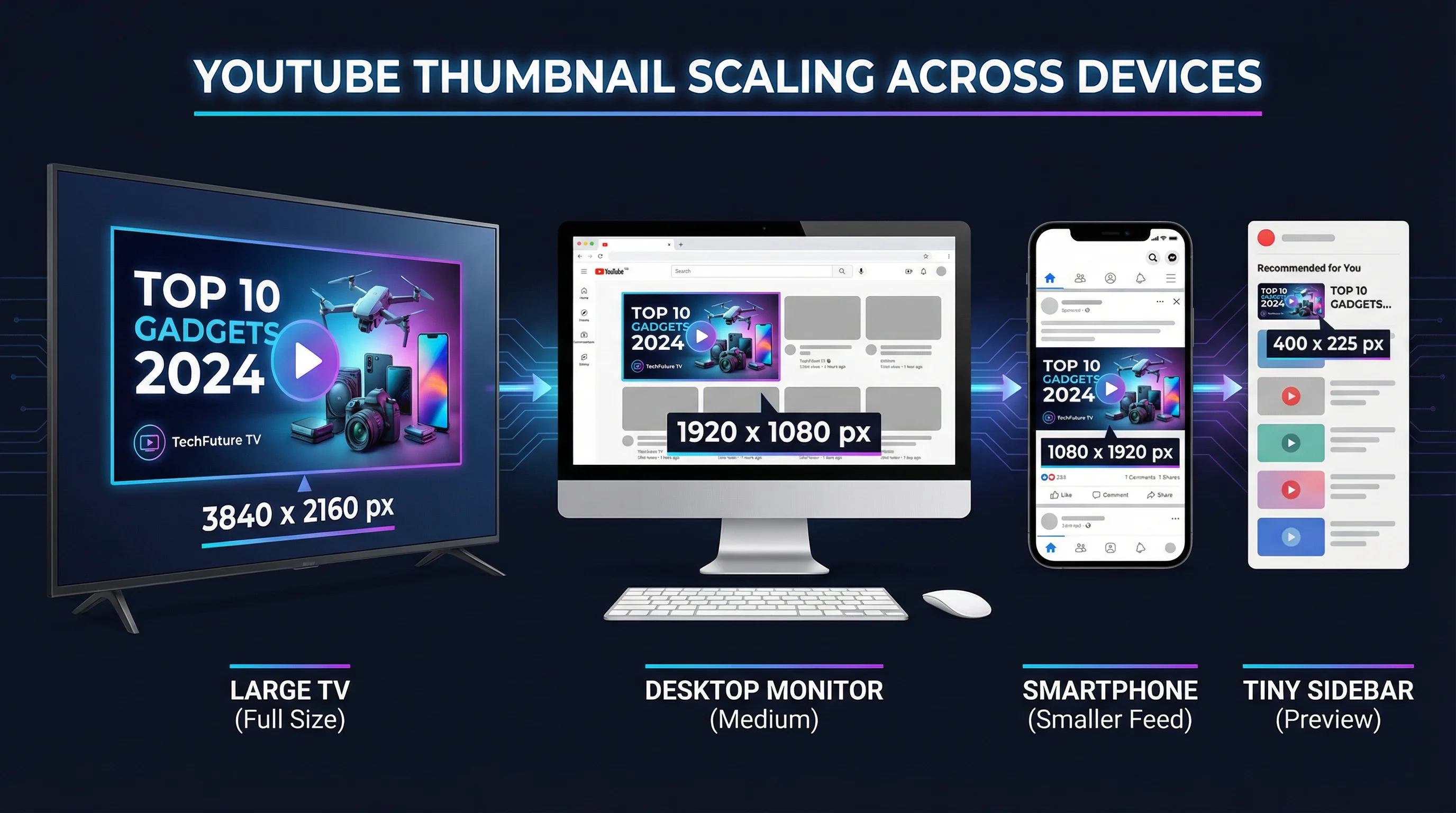
YouTube displays thumbnails at different sizes depending on the device and context — from tiny 120×68 pixel sidebar suggestions on desktop to large 640×360 hero cards on TV apps. Designing at 1280×720 ensures your thumbnail looks sharp at every size.
Why 1280 × 720 Specifically?
1280×720 is 720p resolution in a 16:9 ratio — the same aspect ratio as standard YouTube videos. This means your thumbnail fills the preview space without cropping or black bars. YouTube's official creator guidelines have recommended this size since 2015, and it remains the standard in 2026.
You can upload larger thumbnails (1920×1080, for example), and YouTube will scale them down. But there's no visual benefit — YouTube compresses all thumbnails to the same display resolution — and larger files risk hitting the 2 MB limit.
How YouTube Displays Thumbnails Across Devices
Your thumbnail appears at wildly different sizes depending on where a viewer sees it. Designing for the smallest display size ensures readability everywhere.
| Context | Display Size (approx.) | What to Optimize |
|---|---|---|
| Search results (desktop) | 360 × 202 px | Text readability, face visibility |
| Suggested sidebar (desktop) | 168 × 94 px | Contrast, simplicity — text barely readable at this size |
| Homepage feed (mobile) | Full width (~360 × 202 px) | Bold text, strong colors, clear subject |
| Shorts shelf | Varies (9:16 crop preview) | Center-weighted composition |
| YouTube TV app | 640 × 360 px | Looks great at this size — your largest display |
| Embedded players | Varies with player size | Contrast and color separation |
The critical insight: your thumbnail needs to communicate its message at 168 × 94 pixels (the suggested sidebar). If the text is illegible or the subject is unclear at that size, you're losing clicks from one of YouTube's biggest traffic sources.
Thumbnail Safe Zones
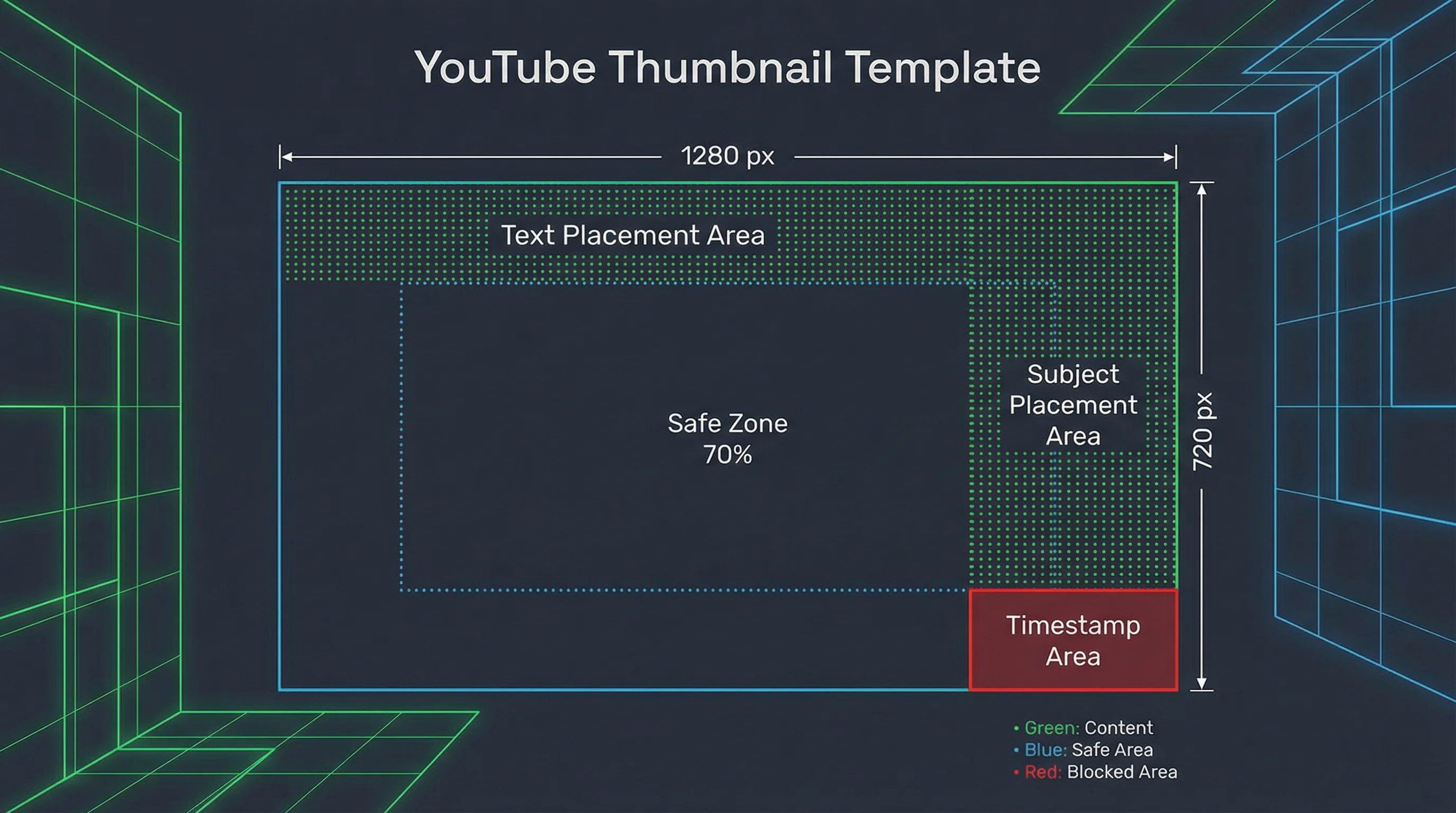
YouTube overlays UI elements on top of your thumbnail in certain contexts. Design around these zones:
- Bottom-right corner: Video duration timestamp (e.g., "12:34"). Keep critical elements out of the bottom-right 15%.
- Bottom-left corner: "Watch later" and queue icons on hover. Less critical since it's hover-only, but avoid placing small text there.
- Top-right corner: On some layouts, the three-dot menu appears here. Keep it clear.
- Center: The play button overlay appears on hover. Your subject should still be identifiable with the play button in the center.
The safe zone for text and key visuals: The center 70% of the thumbnail. Keep your main subject and any text within this zone, and it will be visible in every context and at every display size.
YouTube Thumbnail Design Best Practices
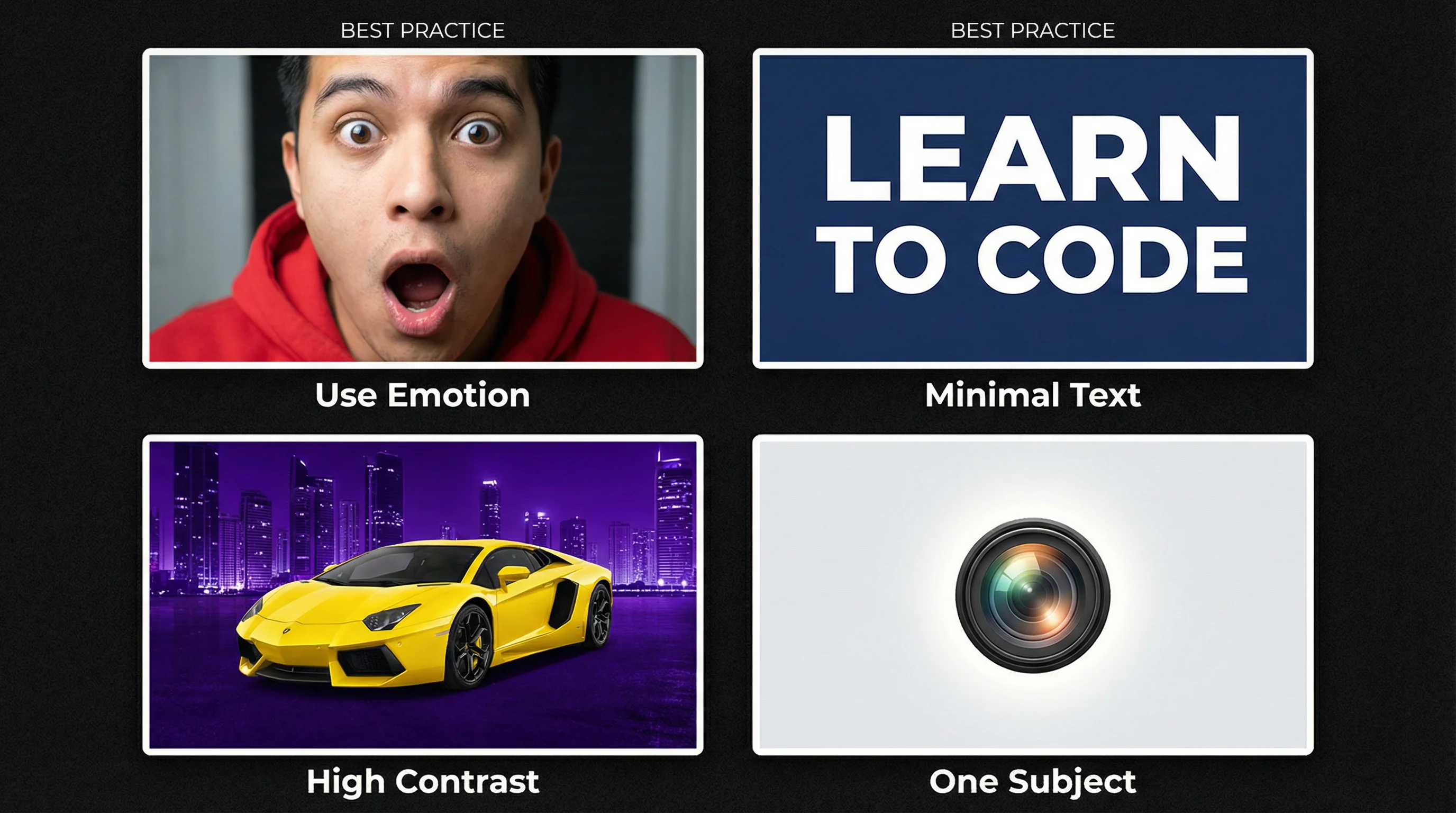
1. Use Faces With Emotion
Thumbnails with human faces showing strong emotion consistently outperform thumbnails without faces. Surprised expressions, wide eyes, open mouths, and exaggerated reactions trigger curiosity. This is backed by YouTube's own research — faces with emotion have higher CTR across nearly every niche.
For faceless channels, use bold text, high-contrast graphics, or compelling imagery to replace the emotional trigger that faces provide.
2. Maximum 4-5 Words of Text
Text on thumbnails should be large, bold, and minimal. Four to five words maximum. The text should add context the image alone can't provide — a surprising number, a provocative claim, or a key benefit.
Bad: "How I Made $10,000 Per Month With My YouTube Channel Using These Tips"
Good: "$10K/MONTH"
Create Faceless Videos on Autopilot
FlowShorts generates and posts AI videos to YouTube, TikTok & Instagram while you sleep.
Try FlowShorts Free →For generating click-worthy titles that pair with your thumbnails, try our YouTube Title Generator.
3. High Contrast Colors
YouTube's interface is mostly white (light mode) or dark gray (dark mode). Thumbnails need to pop against both backgrounds. Bright colors — red, yellow, blue, green — on a contrasting background get noticed. Avoid:
- White backgrounds (disappear in light mode)
- Dark gray/black backgrounds (disappear in dark mode)
- Muted, desaturated colors (blend into the page)
The most-clicked thumbnails use saturated colors with strong contrast between the subject and background.
4. One Clear Subject
A thumbnail should communicate one thing at a glance. One person, one product, one concept. Cluttered thumbnails with multiple subjects, busy backgrounds, and overlapping text elements confuse the viewer in the 0.5 seconds they spend scanning.
Test: shrink your thumbnail to the size of a postage stamp. Can you still tell what it's about? If not, simplify.
5. Consistent Branding Across Videos
Use a consistent color scheme, font, and layout style across your thumbnails. This builds visual recognition — viewers who enjoyed one of your videos can spot your content in their feed without reading the title. Think of your thumbnails as a series, not individual designs.
6. Create Curiosity Without Clickbait
The best thumbnails create an information gap — the viewer can tell what the video is about but needs to click to get the full answer. A before-and-after with the "after" partially hidden. A surprising number with no context. A reaction face that makes you wonder "what happened?"
Avoid misleading thumbnails that don't match the video content. YouTube tracks CTR and watch time — a clickbait thumbnail with high CTR but low retention signals the algorithm that your video disappoints viewers, and distribution drops.
YouTube Shorts Thumbnails
Shorts thumbnails work differently from long-form:
- YouTube auto-selects a frame from your Short as the thumbnail. You cannot upload a custom thumbnail for Shorts (as of 2026).
- The Shorts shelf displays in 9:16 (vertical) — your 16:9 thumbnail isn't used. Instead, a frame from the video is shown in vertical format.
- Shorts appearing in search or the main feed may use a 16:9 crop of the video frame, cutting off the top and bottom.
To control your Shorts "thumbnail," design your first and most visually striking frame to be attention-grabbing when cropped both vertically and horizontally. Place key text in the center third of the frame.
For exact Shorts specs, see our YouTube Shorts dimensions and specs guide.
Best Free Thumbnail Makers
| Tool | Best For | Key Feature | Price |
|---|---|---|---|
| Canva | Beginners, templates | 1000+ YouTube thumbnail templates, drag-and-drop | Free (Pro $13/mo) |
| Adobe Express | Quick professional designs | AI-powered design suggestions, brand kit | Free (Premium $10/mo) |
| Photopea | Photoshop alternative (free) | Full Photoshop-like editor in the browser, no account needed | Free |
| Figma | Designers, teams | Collaborative design, component reuse | Free tier |
| Snappa | Quick social graphics | Pre-sized YouTube thumbnail templates | Free (Pro $10/mo) |
How to Upload a Custom Thumbnail
- Go to YouTube Studio
- Click Content in the left sidebar
- Click the video you want to edit
- Under the "Thumbnail" section, click Upload thumbnail
- Select your 1280×720 image file (JPG, PNG, or GIF under 2 MB)
- Click Save
Note: Custom thumbnails require a verified YouTube account. If you haven't verified, go to youtube.com/verify and confirm with a phone number. Verification is free and takes under a minute.
Create Faceless Videos on Autopilot
FlowShorts generates and posts AI videos to YouTube, TikTok & Instagram while you sleep.
Try FlowShorts Free →Thumbnail Mistakes That Kill CTR
- Too much text. If your thumbnail looks like a paragraph, nobody reads it at sidebar size. Keep it to 4-5 words max.
- Low contrast. Light text on light backgrounds. Dark subjects on dark backgrounds. If it doesn't pop, it doesn't get clicked.
- Small faces. If you're using a face, make it large — at least 40% of the thumbnail area. A tiny face in the corner doesn't create emotional connection.
- Inconsistent style. Random fonts, colors, and layouts across videos make your channel look unprofessional and unsearchable in a feed.
- Misleading thumbnails. High initial CTR, but terrible retention. YouTube's algorithm learns quickly that your thumbnails don't match your content and reduces distribution.
- Ignoring mobile. Designing on a large monitor and never checking how the thumbnail looks on a phone at feed size.
- Using the auto-generated options. YouTube's auto-generated thumbnails are almost always worse than a custom design. Always upload a custom thumbnail.
A/B Testing Thumbnails
YouTube rolled out thumbnail A/B testing (called "Test & Compare") for eligible creators. This lets you upload three thumbnail options for a single video, and YouTube shows each to a portion of your audience, then tells you which performed best based on watch time share.
If you have access to Test & Compare:
- Test one variable at a time (change the expression, or the text, or the color — not all three)
- Let tests run for at least 7 days before drawing conclusions
- Apply winning patterns to future thumbnails
If you don't have access yet, manually test by uploading a video with one thumbnail, tracking CTR in YouTube Analytics for a week, then swapping to a different thumbnail and comparing.
Thumbnail Template for Consistency
Create a reusable template with these elements locked in:
- Canvas size: 1280 × 720 px
- Brand colors: 2-3 colors used consistently
- Font: One bold sans-serif font (Montserrat, Inter, Oswald, or Bebas Neue work well)
- Text position: Upper-left or lower-left (away from the timestamp corner)
- Subject position: Right side or center (face/product)
- Background treatment: Blurred, gradient, or solid color behind the subject
With a template, creating a new thumbnail takes 5 minutes instead of 30. The consistency also builds a recognizable visual brand on your channel page.
Frequently Asked Questions
What is the best YouTube thumbnail size?
1280 × 720 pixels with a 16:9 aspect ratio. This is YouTube's official recommended size. Keep the file under 2 MB in JPG, PNG, or GIF format.
Can I upload custom thumbnails for YouTube Shorts?
No (as of 2026). YouTube auto-selects a frame from your Short as the thumbnail. You can influence this by designing an attention-grabbing opening frame. For long-form videos, custom thumbnails are available to all verified accounts.
What file format should I use for YouTube thumbnails?
JPG for most thumbnails — it produces the smallest file size while maintaining visual quality. Use PNG only if your thumbnail has text that needs pixel-perfect sharpness or transparent elements (though YouTube doesn't support transparent thumbnails).
How do I get custom thumbnails on YouTube?
You need a verified YouTube account. Go to youtube.com/verify, confirm with a phone number, and custom thumbnail upload becomes available. Then in YouTube Studio, click any video, and look for the "Upload thumbnail" option under the Thumbnail section.
What makes a good YouTube thumbnail?
The best thumbnails have: (1) a human face with emotion or a clear single subject, (2) 4-5 words of bold, readable text, (3) high-contrast colors that pop on both light and dark backgrounds, and (4) a composition that's readable even at small sidebar sizes (168×94 pixels).
What is YouTube's thumbnail A/B testing?
YouTube's "Test & Compare" feature lets eligible creators upload three thumbnail options for a video. YouTube shows each to a portion of your audience and reports which generated the highest watch time share. It's the most reliable way to optimize thumbnails with real data.
Related Guides
- YouTube Shorts Dimensions & Specs Guide
- How to Get More Views on YouTube Shorts
- YouTube Partner Program Guide
- Best Time to Post YouTube Shorts
- 50 Video Editing Tips for Beginners & Pros
Skip Thumbnails — FlowShorts Creates Complete Videos
For faceless short-form content, FlowShorts handles everything: AI scripts, image generation, voiceover, captions, music, rendering, and auto-posting to YouTube Shorts, TikTok, and Instagram Reels. No thumbnails to design — the system handles it.


