How to Start a YouTube Channel From Scratch: Step-by-Step Guide (2026)
Step-by-step guide to starting a YouTube channel in 2026. Covers channel setup, niche selection, first video, growth strategies, and monetization — including faceless and AI-automated options.
FlowShorts Team
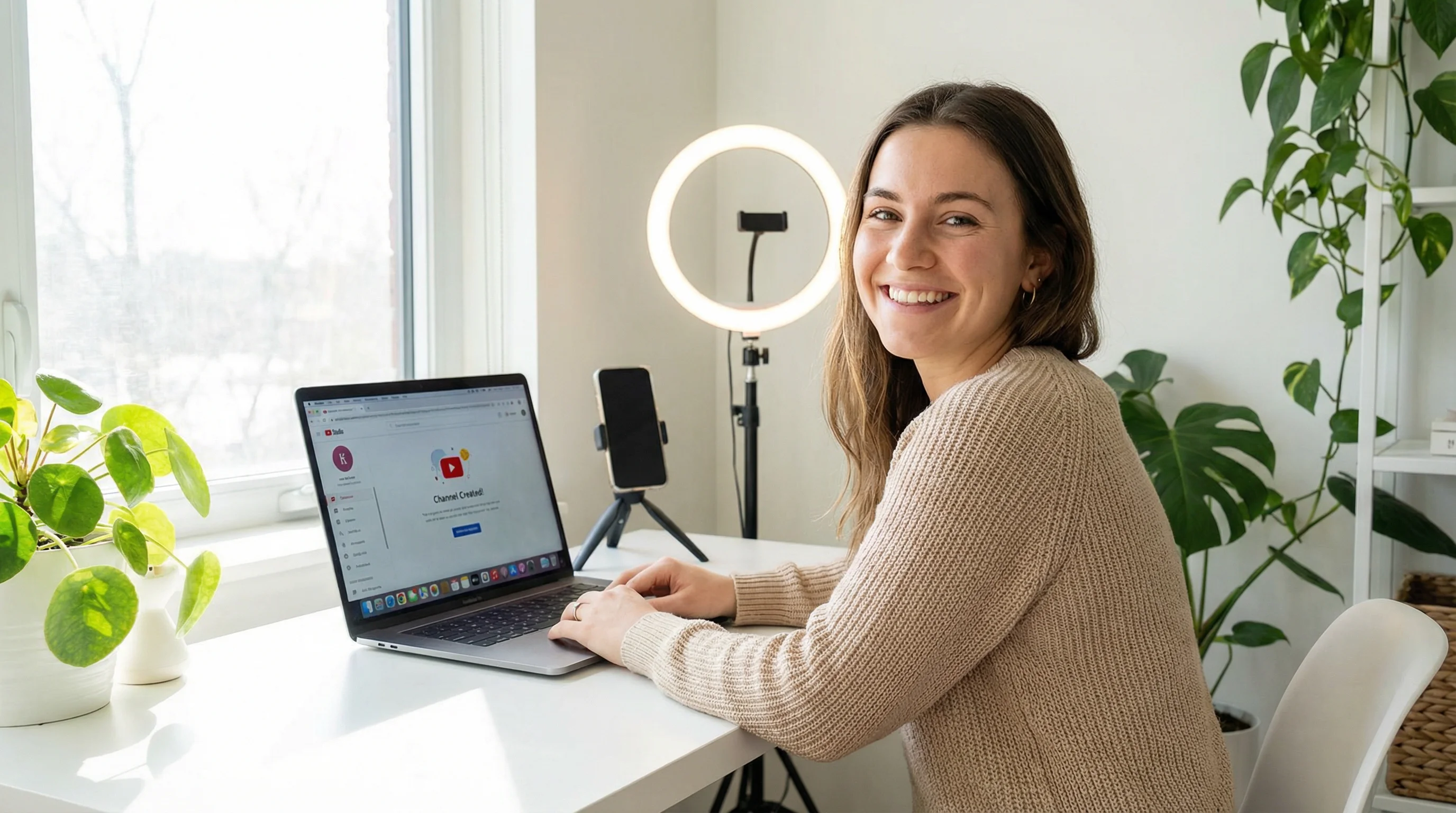
Starting a YouTube channel in 2026 is simpler than most guides make it sound. You need a Google account, a niche, and your first video. Everything else — fancy equipment, perfect branding, a detailed content strategy — can come later.
This guide walks you through every step from creating your channel to uploading your first video, growing your audience, and getting monetized. Whether you want to appear on camera or run a faceless channel, the process starts the same way.
Step 1: Create Your YouTube Channel
- Go to youtube.com and sign in with your Google account
- Click your profile icon in the top-right corner
- Click Create a channel
- Enter your channel name (you can change this later)
- Upload a profile picture and click Create channel
That's it — your channel exists. The entire setup takes under 2 minutes. Don't overthink the name at this stage. You can rebrand later once you've found your footing. If you need inspiration, our YouTube Name Generator creates channel name ideas based on your niche.
Step 2: Choose Your Niche
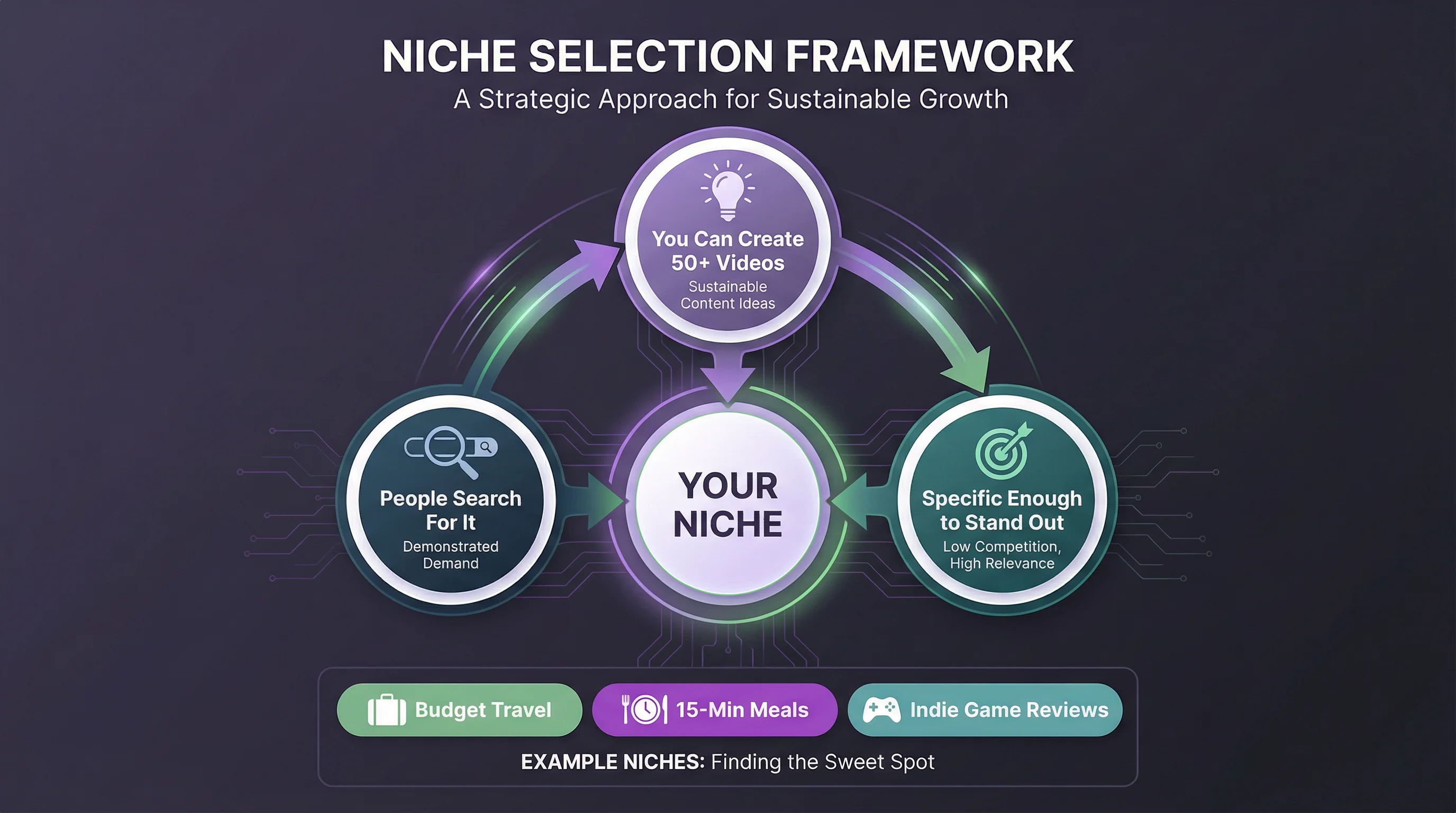
Your niche is the specific topic or category your channel focuses on. "Gaming" is too broad. "Indie horror game reviews" is a niche. "Cooking" is too broad. "15-minute meals for college students" is a niche.
A good niche has three qualities:
- You can produce content consistently. Can you make 50+ videos on this topic without running out of ideas? If not, it's too narrow.
- People are searching for it. Use YouTube search autocomplete — type your topic and see what suggestions appear. Those suggestions represent real search demand.
- It's specific enough to stand out. New channels struggle in broad niches because they compete with established creators. Specific niches have less competition and more dedicated audiences.
Highest-Earning YouTube Niches (by CPM)
| Niche | Estimated RPM | Competition | Faceless Friendly? |
|---|---|---|---|
| Finance & Investing | $15–$30 | High | Yes |
| Business & Entrepreneurship | $12–$25 | High | Yes |
| Technology & Software | $8–$15 | Medium | Yes |
| Real Estate | $8–$18 | Medium | Partially |
| Education & Tutorials | $5–$10 | Medium | Yes |
| Health & Fitness | $4–$8 | High | Partially |
| Travel & Lifestyle | $3–$7 | High | No |
| Gaming | $2–$5 | Very High | Partially |
| Entertainment & Comedy | $1–$4 | Very High | Yes |
For detailed niche analysis, see our guide to top faceless YouTube niches by CPM and use the Faceless Niche Finder tool to discover profitable niches with low competition.
Step 3: Set Up Your Channel
Before uploading your first video, complete these basics:
Profile Picture
Use a clear photo of yourself (if on-camera) or a simple logo/icon (if faceless). 800×800 pixels, displayed as a circle. Keep it readable at small sizes — it appears as a tiny icon next to every comment and video.
Channel Banner
Upload a banner at 2560×1440 pixels with your key info (channel name, tagline, upload schedule) in the center safe zone. For exact specs and templates, see our YouTube banner size guide.
Channel Description
Write 2-3 sentences describing what your channel is about and who it's for. Include your primary keyword naturally. This appears in YouTube search results and on your About page. Example: "Quick, practical investing tips for beginners. New videos every Tuesday and Friday covering index funds, budgeting, and building wealth in your 20s."
Channel Keywords
In YouTube Studio → Settings → Channel → Basic info, add 5-10 keywords related to your niche. These help YouTube understand what your channel is about and recommend it to the right viewers.
Verify Your Account
Go to youtube.com/verify and confirm with a phone number. This unlocks custom thumbnails, videos longer than 15 minutes, and live streaming. Takes 30 seconds, costs nothing.
Step 4: Plan Your First Videos
Don't spend weeks planning. Your first videos won't be your best — and that's fine. The goal is to start publishing and learn from real feedback.
Start With 5-10 Video Ideas
Automate Your Entire Video Workflow
FlowShorts generates scripts, creates videos, and posts to YouTube, TikTok & Instagram on autopilot.
Start Automating Free →Use these sources to generate your first batch of topics:
- YouTube autocomplete: Type your niche topic and see what YouTube suggests. Each suggestion is a real search query with demand.
- Competitor channels: Find 3-5 channels in your niche. Sort their videos by "Most popular." Their top videos reveal what the audience wants.
- Our tools: The Video Topic Generator and YouTube Shorts Ideas Generator create niche-specific video ideas instantly.
Script or Outline — Pick One
Some creators script every word. Others use bullet-point outlines and speak naturally. Both work. For beginners, a detailed outline (key points per section, not word-for-word) usually produces the most natural-sounding delivery while keeping the video structured.
For faceless channels where the narration is the content, full scripts work better because they can be used for AI voiceover generation. Our AI Video Script Generator creates structured scripts with scene breakdowns.
Step 5: Create Your First Video
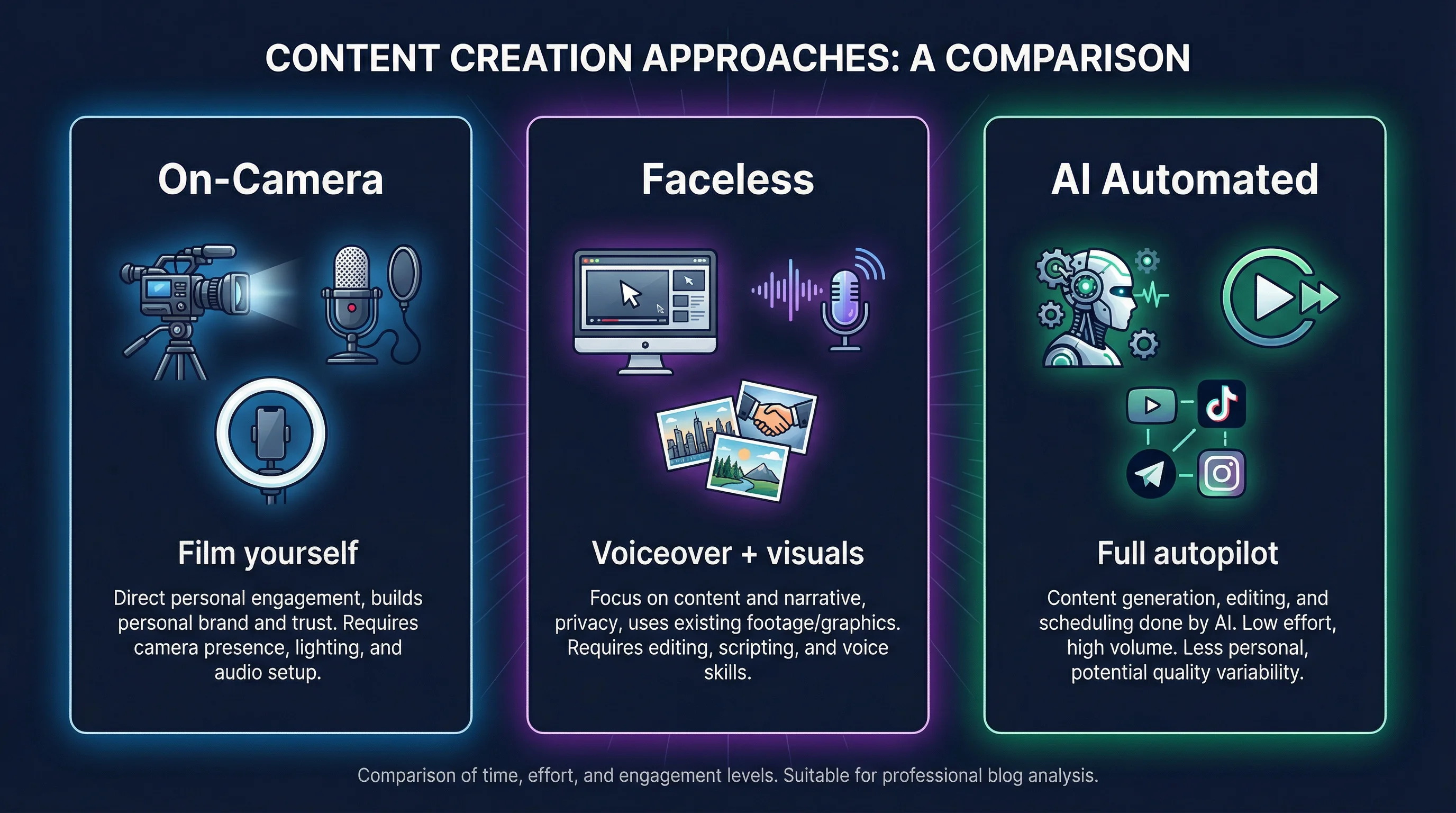
Option A: On-Camera Videos
You don't need expensive equipment to start. A modern smartphone shoots 1080p or 4K video that's perfectly adequate for YouTube. The minimum setup:
- Camera: Your smartphone (front-facing camera works)
- Audio: A $15-30 lavalier mic clips to your shirt and dramatically improves sound quality. Bad audio loses viewers faster than bad video.
- Lighting: Face a window for natural light, or get a $25 ring light. Avoid overhead fluorescent lighting.
- Editing: CapCut (free), DaVinci Resolve (free), or iMovie (free on Mac). See our 50 video editing tips for beginner techniques.
Option B: Faceless Videos (No Camera Needed)
Faceless YouTube channels produce content without ever appearing on camera. Instead of filming, you use a combination of:
- AI or stock visuals — Generated images, animations, or stock footage as the visual layer
- Voiceover — Your own voice recorded over the visuals, or AI text-to-speech narration
- Captions and text overlays — TikTok-style animated captions for engagement
- Background music — Royalty-free tracks that match your content's energy
This approach is popular in niches like motivation, history, science explainers, true crime, finance education, and story-driven content. For a full walkthrough, see our guide on how to make faceless YouTube videos.
Option C: Fully Automated With AI
Tools like FlowShorts automate the entire video production pipeline — script, images, voiceover, captions, music, rendering — and auto-post to YouTube Shorts, TikTok, and Instagram Reels. You pick a niche and schedule; the system produces and publishes daily.
This works best for Shorts and short-form content. It's the lowest-barrier way to start a YouTube channel — no filming, editing, or manual uploading required. Explore faceless YouTube channel ideas to find a niche that works with automation.
Step 6: Upload and Optimize
When your first video is ready:
- Go to YouTube Studio and click Create → Upload videos
- Select your video file — 1080p MP4 is the standard format
- Write a keyword-rich title — Include your primary search term naturally. Our YouTube Title Generator helps create click-worthy titles optimized for search.
- Write a detailed description — 200+ words. Include your target keywords in the first 2 sentences. Add timestamps, links, and a brief summary. Use our YouTube Description Generator for SEO-optimized descriptions.
- Add relevant tags — 5-15 tags related to your video topic. Include your niche keyword, video-specific keywords, and a few broader terms.
- Upload a custom thumbnail — 1280×720 pixels. See our YouTube thumbnail size guide for design best practices.
- Set the visibility — Public, Unlisted, or Scheduled. For your first video, publish immediately as Public.
Step 7: Grow Your Channel
Publishing is step one. Growth requires consistency and strategy.
Post Consistently
YouTube's algorithm favors channels that upload regularly. For long-form, aim for 1-2 videos per week. For Shorts, 1-3 per day is the sweet spot. Consistency matters more than volume — pick a schedule you can sustain for 6+ months.
For Shorts posting frequency data, see our guide on how many Shorts to post per day and how often to post on YouTube.
Use YouTube Shorts for Fast Growth
Shorts are the fastest way to gain subscribers on a new channel. They get distributed through the Shorts shelf to viewers who don't follow you yet — essentially free exposure. Many channels in 2026 grow their subscriber base primarily through Shorts, then convert those subscribers into long-form viewers.
Automate Your Entire Video Workflow
FlowShorts generates scripts, creates videos, and posts to YouTube, TikTok & Instagram on autopilot.
Start Automating Free →Automate Shorts production with YouTube Shorts automation to maintain a daily posting schedule without burning out.
Optimize for Search (YouTube SEO)
- Research keywords before creating videos. Use YouTube autocomplete and filter by "most recent" to find topics with demand but limited recent coverage.
- Put your target keyword in the title, description (first 2 sentences), and tags.
- Create eye-catching thumbnails. CTR (click-through rate) is the most important metric for YouTube distribution.
- Write timestamps in your description. YouTube uses these for "key moments" in search results, which increases visibility.
Engage Your Audience
- Reply to every comment in the first hour after posting — this boosts engagement signals
- Ask a question at the end of each video to encourage comments
- Use community posts to poll your audience on what they want to see next
- Create playlists to keep viewers watching multiple videos in a session
Step 8: Get Monetized
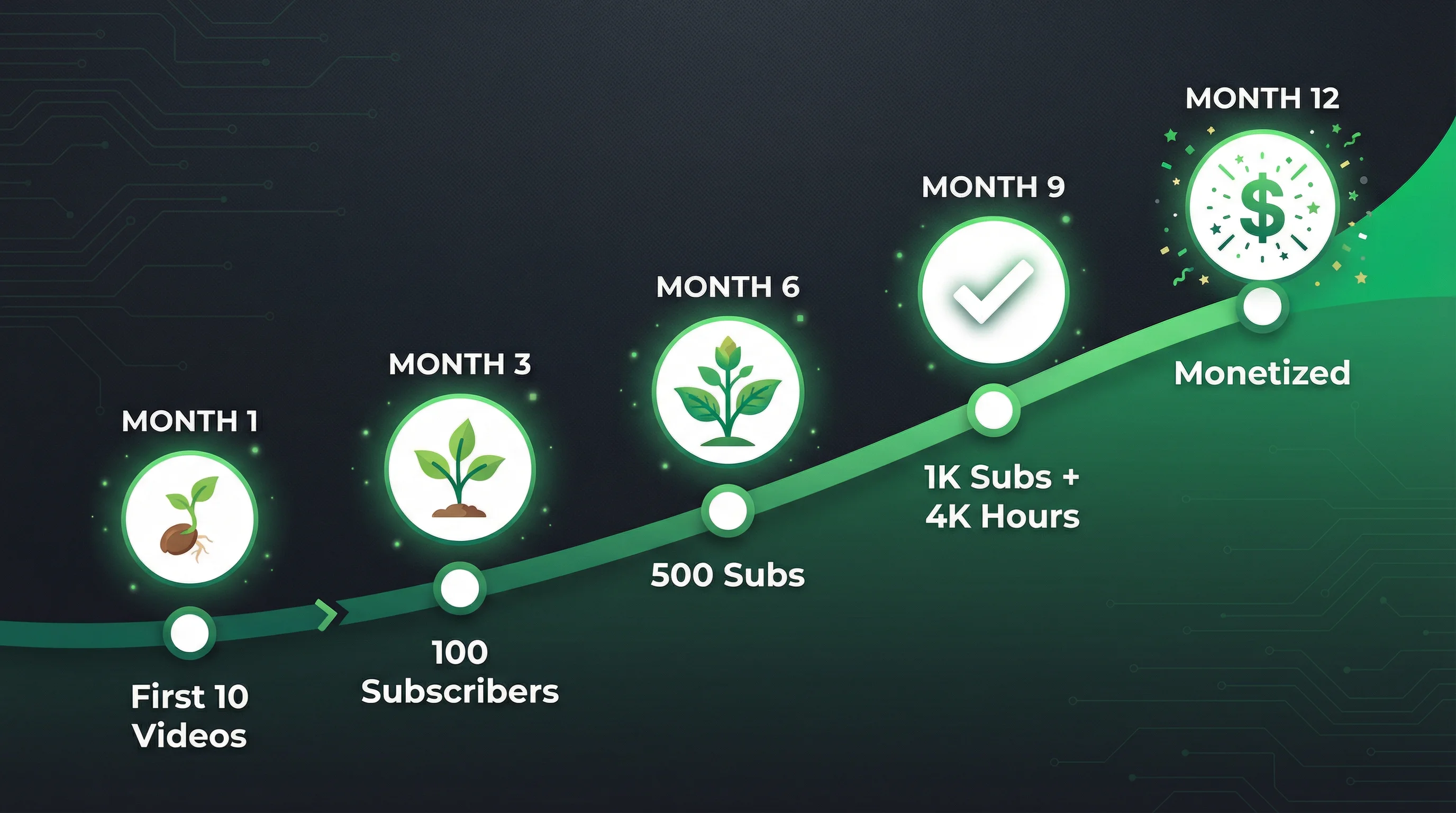
Once your channel reaches 1,000 subscribers and 4,000 watch hours (or 10 million Shorts views in 90 days), you can apply for the YouTube Partner Program. This unlocks ad revenue, memberships, Super Chat, and merchandise.
Check your eligibility instantly with our YouTube Partner Program Checker and estimate your potential earnings with the YouTube Money Calculator.
How Long Does It Take?
It depends on your niche, content quality, and posting frequency. Typical timelines:
| Strategy | Time to 1K Subs | Time to YPP |
|---|---|---|
| Long-form only (2/week) | 6–12 months | 8–14 months |
| Shorts only (daily) | 2–6 months | 3–8 months (via 10M Shorts views) |
| Combined (2 long + daily Shorts) | 2–4 months | 3–6 months |
| Automated Shorts (FlowShorts) | 3–6 months | 4–8 months |
The combined strategy (long-form for watch hours + Shorts for subscribers) is typically the fastest path to monetization.
Common Mistakes New YouTubers Make
- Waiting for perfect equipment. Your smartphone is enough. Start now, upgrade later.
- Not picking a niche. "A little bit of everything" channels don't grow because YouTube can't figure out who to recommend them to.
- Uploading once and quitting. YouTube is a long game. Most successful channels published 50-100 videos before getting meaningful traction.
- Ignoring thumbnails and titles. Your video can be amazing, but if the thumbnail doesn't get clicked, nobody sees it. Thumbnails are the most important skill in YouTube.
- Chasing trends outside your niche. A finance channel making a random gaming video confuses the algorithm and your audience. Stay in your lane.
- Not making Shorts. In 2026, ignoring Shorts means leaving the fastest subscriber growth lever on the table.
Frequently Asked Questions
How much does it cost to start a YouTube channel?
Nothing. Creating a YouTube channel is free. You can film with your phone, edit with free software (CapCut, DaVinci Resolve, iMovie), and upload at no cost. Optional upgrades — a $20 microphone, $25 ring light — improve quality but aren't required to start.
Do I need to show my face on YouTube?
No. Faceless YouTube channels are a legitimate and growing category. Many top-earning channels never show a person on camera. Niches like motivation, history, science, and finance work especially well as faceless content.
How often should I upload?
For long-form: 1-2 videos per week minimum. For Shorts: 1-3 per day. Consistency matters more than volume. A channel posting one video per week for a year outperforms a channel that posts 10 videos in the first month and then stops.
How long does it take to make money on YouTube?
Most channels reach YPP monetization requirements (1,000 subs + 4,000 watch hours) in 6-12 months with consistent posting. Channels using Shorts can hit the Shorts path (10M views in 90 days) faster. First earnings typically range from $100-$500/month depending on niche and view count.
What equipment do I need?
Minimum: a smartphone with a camera. Recommended additions: a lavalier microphone ($15-30), a ring light or desk lamp ($25), and free editing software. For faceless channels, you need none of this — just a computer and an internet connection.
Should I start with Shorts or long-form videos?
Start with both if possible. Shorts grow your subscriber count fast. Long-form accumulates watch hours and generates higher ad revenue. The combined strategy is the fastest path to monetization. If you can only pick one, start with Shorts — they're faster to produce and have higher discovery potential for new channels.
Can I start a YouTube channel as a side project?
Absolutely. Most successful YouTubers started as a side project. With AI tools like FlowShorts handling daily Shorts production automatically, you can run a growing channel with minimal daily time investment — the system generates and posts content on autopilot while you focus on strategy.
Related Guides
- 50 Faceless YouTube Channel Ideas
- Top Faceless YouTube Niches by CPM
- How to Start a Faceless YouTube Channel
- YouTube Partner Program Guide
- YouTube Thumbnail Size Guide
- YouTube Banner Size Guide
Start Your YouTube Channel on Autopilot
FlowShorts creates AI-powered YouTube Shorts daily — scripts, voiceover, visuals, captions, and music — then auto-posts to YouTube, TikTok, and Instagram Reels. Pick a niche and start growing without filming or editing.


