YouTube Automation Tool: 10 Best Options for Creators (2026)
The 10 best YouTube automation tools compared by category — content creation, SEO, distribution, and analytics. Includes recommended tool stacks for faceless channels, long-form creators, and scaling operations, plus a buyer's evaluation framework.
FlowShorts Team
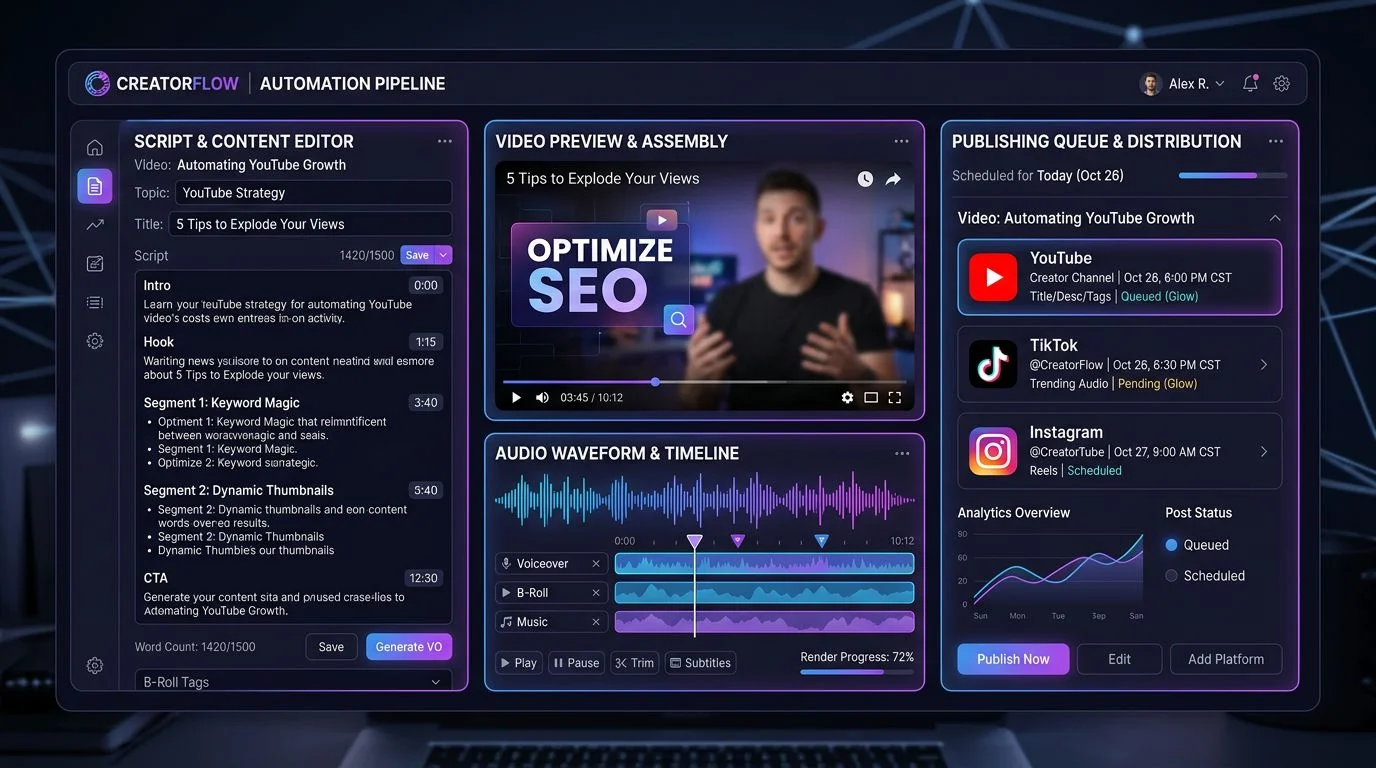
According to a 2026 Colossyan creator survey, 72% of YouTube creators cite video editing and post-production as their biggest time sink — not ideation or strategy. The average Short takes 45 minutes to produce manually; the average long-form video takes 6-8 hours. A YouTube automation tool cuts that production time by automating the repetitive stages: scripting, voiceover, editing, captioning, and publishing.
This guide covers the 10 best YouTube automation tools in 2026 — organized by what they actually automate — so you can pick the right AI tool for YouTube automation based on your workflow. Whether you run a faceless YouTube channel or a camera-on brand, there's a stack here for you.
What Does a YouTube Automation Tool Actually Do?
A YouTube automation tool is any software that handles a repeatable part of the YouTube content workflow without manual intervention. The term covers a wide range — from browser extensions that bulk-update video tags to AI platforms that generate entire videos from a topic prompt.
There are four categories of YouTube automation:
- Content creation tools — Generate scripts, voiceovers, visuals, and render finished videos. These save the most time per video.
- SEO and optimization tools — Automate keyword research, title testing, tag suggestions, and thumbnail A/B testing.
- Scheduling and distribution tools — Handle upload timing, cross-posting to other platforms, and bulk publishing.
- Analytics and research tools — Aggregate performance data, surface trends, and recommend content topics.
Most creators need tools from at least two categories. The highest-leverage combination is a content creation tool paired with an SEO tool — that covers both the production bottleneck and the discoverability problem. For a deeper look at what can and can't be automated, see our guide on what content automation actually means.
The 10 Best YouTube Automation Tools (2026)
Below is a comparison table, followed by in-depth breakdowns of each tool organized by category.
| Tool | Category | Best For | Auto-Posting | Free Tier? | Starting Price |
|---|---|---|---|---|---|
| FlowShorts | Content creation | Faceless Shorts, end-to-end automation | Yes (YouTube, TikTok, Instagram) | Free trial | $19/mo |
| TubeBuddy | SEO & optimization | Bulk SEO, A/B thumbnail testing | No | Yes | Free / $7.50/mo |
| vidIQ | SEO & analytics | Keyword research, AI title suggestions | No | Yes | Free / $16.50/mo |
| InVideo AI | Content creation | Long-form AI video creation | No | Limited | $25/mo |
| Opus Clip | Repurposing | Clipping long videos into Shorts | No | Limited | $19/mo |
| ElevenLabs | Voice generation | AI voiceover and voice cloning | No | Yes (10 min/mo) | Free / $5/mo |
| Fliki | Content creation | Text-to-video with AI voices | No | Limited | $28/mo |
| Repurpose.io | Distribution | Cross-platform auto-posting | Yes | No | $25/mo |
| Hootsuite | Scheduling | Multi-platform scheduling | Yes | No | $99/mo |
| Morningfame | Analytics | Simplified YouTube analytics | No | No | $4.90/mo |
Content Creation Tools
1. FlowShorts — Best AI Tool for YouTube Automation (End-to-End)
FlowShorts is the only YouTube automation tool that handles the entire video pipeline — from topic to published video — without requiring you to touch an editor. You select a niche, connect your social accounts, and set a posting schedule. FlowShorts generates the script, AI voiceover (ElevenLabs), scene-by-scene visuals, animated captions, and background music, then auto-posts directly to YouTube, TikTok, and Instagram.
What it automates:
- Script generation with hook optimization for short-form retention
- AI voiceover using ElevenLabs (primary) or OpenAI TTS (fallback)
- AI-generated scene visuals across 26 visual styles
- Word-level animated captions via Whisper
- Auto-posting to YouTube Shorts, TikTok, and Instagram Reels on schedule
Pricing: Starter at $19/month (8 videos), Creator at $39/month (30 videos), Pro at $69/month (60 videos).
Best for: Creators running faceless YouTube channels who want to publish daily Shorts without spending hours on production. Also useful for creators who want to automate social media posts across all three short-form platforms simultaneously.
2. InVideo AI — Best for Long-Form AI Videos
InVideo AI generates full-length videos from a text prompt. Type a description of what you want, and it produces a video with stock footage, voiceover, and transitions. The AI handles clip selection, pacing, and basic editing. You can refine the output through conversational editing — asking it to change specific scenes, swap music, or adjust the narration tone.
What it automates: Script-to-video conversion, stock footage selection, voiceover, and basic editing.
Limitations: No auto-posting. Output requires manual uploading to YouTube. Better suited for long-form (5-15 minute) videos than Shorts.
Pricing: Starts at $25/month.
Best for: Creators who want AI-assisted long-form video production but still want to handle distribution themselves.
3. Fliki — Best for Text-to-Video with Voice Variety
Fliki converts blog posts, articles, or scripts into videos with AI-generated voiceover. Its voice library includes 2,000+ voices across 80 languages, making it strong for multilingual channels. The text-to-video pipeline is straightforward: paste your script, pick a voice, and Fliki matches visuals to each sentence.
What it automates: Text-to-video conversion, voiceover generation, subtitle creation.
Limitations: No auto-posting. Visual matching can be generic — you'll often need to swap clips manually for better relevance.
Pricing: Starts at $28/month.
Best for: Creators who already have written content (blogs, newsletters) and want to repurpose it into YouTube videos.
SEO and Optimization Tools
4. TubeBuddy — Best for Bulk SEO and A/B Testing
TubeBuddy is a browser extension that integrates directly into the YouTube Studio interface. Its core strength is automating SEO tasks at scale — bulk-updating tags, descriptions, and end screens across hundreds of videos. The "Click Magnet" A/B testing feature tests different thumbnails on the same video and reports which version gets more clicks, removing guesswork from thumbnail design.
What it automates: Keyword research, tag suggestions, bulk metadata updates, thumbnail A/B testing, best time to publish analysis.
Pricing: Free tier available. Paid plans from $7.50/month.
Best for: Channels with 50+ videos that need to retroactively optimize existing content and test new thumbnails systematically. Pairs well with a content creation tool like FlowShorts — let AI make the video, then use TubeBuddy to optimize its discoverability.
5. vidIQ — Best for Keyword Research and Trending Topics
vidIQ combines channel analytics with AI-powered content recommendations. Its keyword research tool shows search volume, competition scores, and related terms — similar to Ahrefs but built specifically for YouTube. The AI Coach feature suggests video topics based on your channel's existing performance and trending searches in your niche.
What it automates: Keyword research, competitor tracking, trending topic alerts, AI title generation, channel audit reports.
Pricing: Free tier available. Pro starts at $16.50/month.
Best for: Creators who want data-driven topic selection. Use vidIQ to find what to make, then use a video creation tool to produce it. For a deeper dive into optimizing discoverability, see our guide on how to grow a YouTube channel fast.
Repurposing Tools
6. Opus Clip — Best for Turning Long Videos into Shorts
Opus Clip uses AI to identify the most engaging moments in a long-form video and clip them into vertical Shorts. It analyzes hooks, punchlines, and high-retention segments, then adds captions and reframes the footage for 9:16. This is useful if you already produce long-form content and want to extract Shorts without editing them manually.
What it automates: Long-to-short video clipping, auto-captioning, vertical reframing, virality scoring.
Limitations: Requires existing long-form video as input. Doesn't create original content — it repurposes what you've already made.
Pricing: Starts at $19/month.
Best for: Podcast hosts and long-form creators who want to extract clips from YouTube videos for Shorts and social distribution.
Voice and Audio Tools
7. ElevenLabs — Best for AI Voiceover Quality
ElevenLabs is the industry standard for AI text-to-speech. Its voices are near-indistinguishable from human narration in short-form content. Key features include voice cloning (upload samples of your own voice and generate new audio in your style), 30+ language support, and fine-grained control over pacing, emphasis, and emotion.
What it automates: Voiceover generation, voice cloning, multilingual narration.
Pricing: Free tier (10 minutes/month). Plans from $5/month.
Best for: Creators who need broadcast-quality narration without recording. FlowShorts uses ElevenLabs as its primary TTS engine, so if you use FlowShorts, ElevenLabs voiceover is built in. For more on writing scripts that complement AI voiceover, see our YouTube video scripting guide.
Distribution and Scheduling Tools
8. Repurpose.io — Best for Automated Cross-Posting
Repurpose.io connects your YouTube channel to TikTok, Instagram, Facebook, LinkedIn, and Twitter. When you upload a video to YouTube, it automatically reformats and publishes to your other connected platforms. You set the rules once — platform, format, caption template — and it runs in the background.
What it automates: Cross-platform video distribution, format conversion, caption templating.
Pricing: Starts at $25/month.
Best for: Creators who publish on YouTube first and want automatic distribution to other platforms. Less relevant if your tool already handles multi-platform posting (FlowShorts posts to all three platforms natively). See our comparison of content marketing automation tools for more distribution options.
9. Hootsuite — Best for Multi-Channel Scheduling
Hootsuite is a social media management platform that supports YouTube video scheduling alongside all other social platforms. Its YouTube integration lets you upload videos, write descriptions, add tags, and schedule publish times from a single dashboard. The "Best Time to Publish" feature analyzes your audience activity patterns to recommend optimal posting windows.
What it automates: Upload scheduling, cross-platform content calendar, team collaboration, best-time analysis.
Pricing: Starts at $99/month — designed for teams and agencies rather than solo creators.
Best for: Agencies and multi-brand operations managing 5+ social accounts. Overkill for solo creators focused on YouTube Shorts — consider a more focused tool instead.
Analytics Tools
10. Morningfame — Best for Simple, Actionable YouTube Analytics
Morningfame translates complex YouTube analytics into plain-language recommendations. Instead of showing raw data dashboards, it grades each video and tells you specifically what to improve. The keyword tool evaluates your chances of ranking for a given search term based on your channel's current authority.
What it automates: Video performance grading, keyword opportunity scoring, growth tracking.
Pricing: Starts at $4.90/month (invite-only).
Best for: Newer creators who find YouTube Studio analytics overwhelming and want clear, prioritized action items.
How to Build a YouTube Automation Stack
No single tool does everything well. The most effective approach is combining two to three tools that cover your biggest bottlenecks. Here are three proven stacks based on different creator types.
Stack 1: Faceless Shorts Channel (Lowest Effort)
FlowShorts + vidIQ
- FlowShorts handles the entire production and posting pipeline
- vidIQ identifies trending topics and high-opportunity keywords for your niche
- Total cost: $35-$85/month depending on plan
This is the minimum viable stack for someone starting a faceless YouTube channel. FlowShorts creates and publishes the videos; vidIQ tells you what topics to create them about.
Stack 2: Long-Form Creator Going Multi-Platform
InVideo AI + Opus Clip + TubeBuddy
- InVideo AI creates long-form videos from scripts
- Opus Clip extracts the best clips for Shorts distribution
- TubeBuddy optimizes SEO and tests thumbnails
- Total cost: ~$52/month
Stack 3: Established Channel Scaling Output
FlowShorts + TubeBuddy + Repurpose.io
- FlowShorts generates daily Shorts for your channel
- TubeBuddy handles bulk SEO optimization across your library
- Repurpose.io distributes long-form content to other platforms
- Total cost: ~$63-$101/month
For a deeper dive into building automated publishing workflows, see our guide on how to automate your YouTube channel.
What to Look for in a YouTube Automation Tool
With dozens of tools available, here's a framework for evaluating which ones are worth your money.
1. Does it automate your actual bottleneck? If you spend 4 hours editing but 10 minutes on SEO, an SEO tool won't move the needle. Identify where your time goes, then pick the tool that addresses that specific stage.
2. Does it support auto-posting? Tools that create videos but leave uploading to you still require daily manual work. True automation means the video goes from creation to published without you touching it. For YouTube Shorts automation specifically, this is the most important feature to evaluate. See our guide on how to post YouTube Shorts for manual and automated approaches.
3. What's the per-video cost? A $39/month tool that produces 30 videos costs $1.30 per video. A $25/month tool that produces 5 costs $5.00 per video. Always calculate the per-unit cost, especially if you're publishing daily.
4. Does it integrate with your other tools? A standalone tool that can't connect to your existing workflow creates friction. Look for API access, Zapier integrations, or native connections to platforms you already use.
5. Does the output quality pass the human test? Generate a sample video and watch it the way a viewer would — on your phone, sound off, while scrolling. If you'd swipe past it in under 2 seconds, the tool's output quality isn't good enough regardless of how much time it saves.
YouTube Automation and YouTube's Policies
YouTube updated its content policies in 2025, renaming "Repetitious Content" to "Inauthentic Content." Here's what this means for automation:
- Automation itself is not against policy. YouTube evaluates content quality, not production method.
- Mass-produced, identical content is penalized. If every video follows the exact same template with no variation, YouTube may flag the channel.
- Human oversight is expected. YouTube's policy specifically targets content published with "no human oversight." Reviewing AI output before it posts keeps you compliant.
- Disclosure is required for realistic AI content. If your AI-generated content could be mistaken for real footage of real events, YouTube requires a disclosure label.
The practical takeaway: use automation tools to handle production, but review the output and maintain variety in your content. For more on YouTube's policies around automated content, see our guide on YouTube channel automation.
Frequently Asked Questions
What is a YouTube automation tool?
A YouTube automation tool is software that handles repetitive parts of running a YouTube channel — including video creation, editing, SEO optimization, scheduling, or analytics — so creators can publish consistently without doing every task manually.
What are the best tools used for YouTube automation?
The best YouTube automation tools depend on your workflow. For end-to-end Shorts creation and auto-posting, FlowShorts handles the full pipeline. For SEO, TubeBuddy and vidIQ are industry standards. For voiceover, ElevenLabs leads on quality. For repurposing long-form into Shorts, Opus Clip is the strongest option. Most successful automated channels combine 2-3 tools from different categories.
Is it legal to use automation tools for YouTube?
Yes. YouTube's policies focus on content quality, not production method. As long as your videos are original, follow community guidelines, and include human oversight, using automation tools is acceptable.
What are the best free YouTube automation tools?
TubeBuddy and vidIQ both offer free tiers with solid keyword research and SEO features. ElevenLabs provides 10 free minutes of AI voiceover per month. InVideo AI and Opus Clip have limited free tiers for testing. For video creation specifically, no free tool matches the output quality of paid options — the free tiers are useful for evaluation but limited for consistent daily publishing.
Can I automate YouTube Shorts specifically?
Yes — Shorts are the most automatable YouTube format due to their short length and repeatable structure. FlowShorts is purpose-built for Shorts automation, handling script generation, voiceover, visuals, captions, and auto-posting. For more details, see our guide on how to make AI YouTube Shorts.
Can you actually make money with YouTube automation?
Yes, but it's not passive income. Automated YouTube channels earn through AdSense (once you hit 1,000 subscribers + 10 million Shorts views in 90 days), affiliate marketing, and sponsorships. Channels in high-CPM niches like personal finance and tech can earn $12-15 per thousand views. The key is choosing a profitable niche, maintaining content quality, and staying consistent. For monetization specifics, see our guide on how to monetize YouTube Shorts.
How much do YouTube automation tools cost?
Prices range from free (TubeBuddy, vidIQ free tiers) to $99+/month (Hootsuite). A practical automation stack for a solo creator runs $35-$70/month. The key metric is cost per video — a tool that costs $39/month and produces 30 videos ($1.30 each) delivers more value than one at $25/month producing 5 videos ($5.00 each).
How many videos should I post per day with automation tools?
For YouTube Shorts, 1-2 per day is optimal. Going above 3 per day risks triggering YouTube's spam detection. Consistency matters more than volume — publishing daily for a month then stopping is worse than posting 3-4 times per week indefinitely. For the full breakdown, see our guide on how many Shorts to post per day.
Conclusion
The right YouTube automation tool depends on what's actually slowing you down. If it's video production, an AI tool for YouTube automation like FlowShorts eliminates the most hours per week. If it's discoverability, an SEO tool like TubeBuddy or vidIQ will have more impact. If it's distribution, a cross-posting tool like Repurpose.io removes the manual upload step.
The best approach is to start with one tool that addresses your biggest bottleneck, measure the time saved, then add a second tool only when the first has proven its value. Most successful automated channels run on a lean stack of two to three tools — not ten.
Ready to automate your YouTube Shorts workflow? FlowShorts handles everything from script to published video across YouTube, TikTok, and Instagram Reels. Start with the free trial and see the output quality before committing.




