YouTube Analytics Explained: Every Metric Creators Need to Understand (2026)
Complete guide to YouTube Analytics. Understand impressions, CTR, watch time, AVD, retention curves, traffic sources, Shorts analytics, and revenue metrics with actionable benchmarks.
FlowShorts Team

YouTube Analytics is the dashboard where you learn why some videos succeed and others don't. But most creators only check views and subscribers — missing the 80% of insights that actually drive growth.
This guide covers every metric that matters, what the numbers mean, and how to use them to make content decisions that move your channel forward.
The Analytics Tab Overview
YouTube Studio Analytics has four main sections:
- Overview — Summary of views, watch time, subscribers, and revenue for a selected period
- Content — Performance broken down by individual video, including impressions, CTR, and reach
- Audience — Who is watching: demographics, geography, returning vs. new viewers
- Revenue — AdSense earnings broken down by CPM, RPM, estimated revenue (requires YPP)
The default date range is 28 days. Always compare periods to spot trends — looking at the current 28 days against the prior 28 days reveals whether your channel is growing or slipping.
Impressions and Click-Through Rate (CTR)
Impressions measures how many times your thumbnail was shown to users. CTR measures what percentage clicked through to watch.
CTR is the most actionable early signal for a new video. A low CTR means your thumbnail or title isn't compelling enough to win the click against competing content in the viewer's feed.
| CTR Range | Interpretation | Action |
|---|---|---|
| < 2% | Underperforming thumbnail/title | Test a new thumbnail immediately |
| 2-4% | Below average | Iterate title/thumbnail; check if topic interest is lower than expected |
| 4-7% | Average | Maintain — improve retention instead |
| 7-10% | Above average | Replicate what's working (thumbnail style, topic type) |
| > 10% | Exceptional | This is a proven format — prioritize repeating it |
Important caveat: CTR naturally declines over time. A video published yesterday gets shown to your most-engaged subscribers first (who click at high rates). After a week, YouTube broadens distribution to colder audiences with lower click rates. Compare CTR within the first 48-72 hours, not total lifetime CTR, when evaluating a new video's thumbnail performance.
Average View Duration (AVD) and Audience Retention
AVD tells you how many minutes people watch on average. Audience retention shows the percentage retained at each point in the video as a curve.
Retention percentage is the more useful metric for comparing videos of different lengths:
| Retention Rate | Interpretation |
|---|---|
| < 25% | Significant pacing or content relevance problem — most viewers leave early |
| 25-40% | Below average — hook or content structure needs work |
| 40-55% | Average for most long-form content |
| 55-70% | Above average — strong pacing and content delivery |
| > 70% | Exceptional — high distribution signal to YouTube's algorithm |
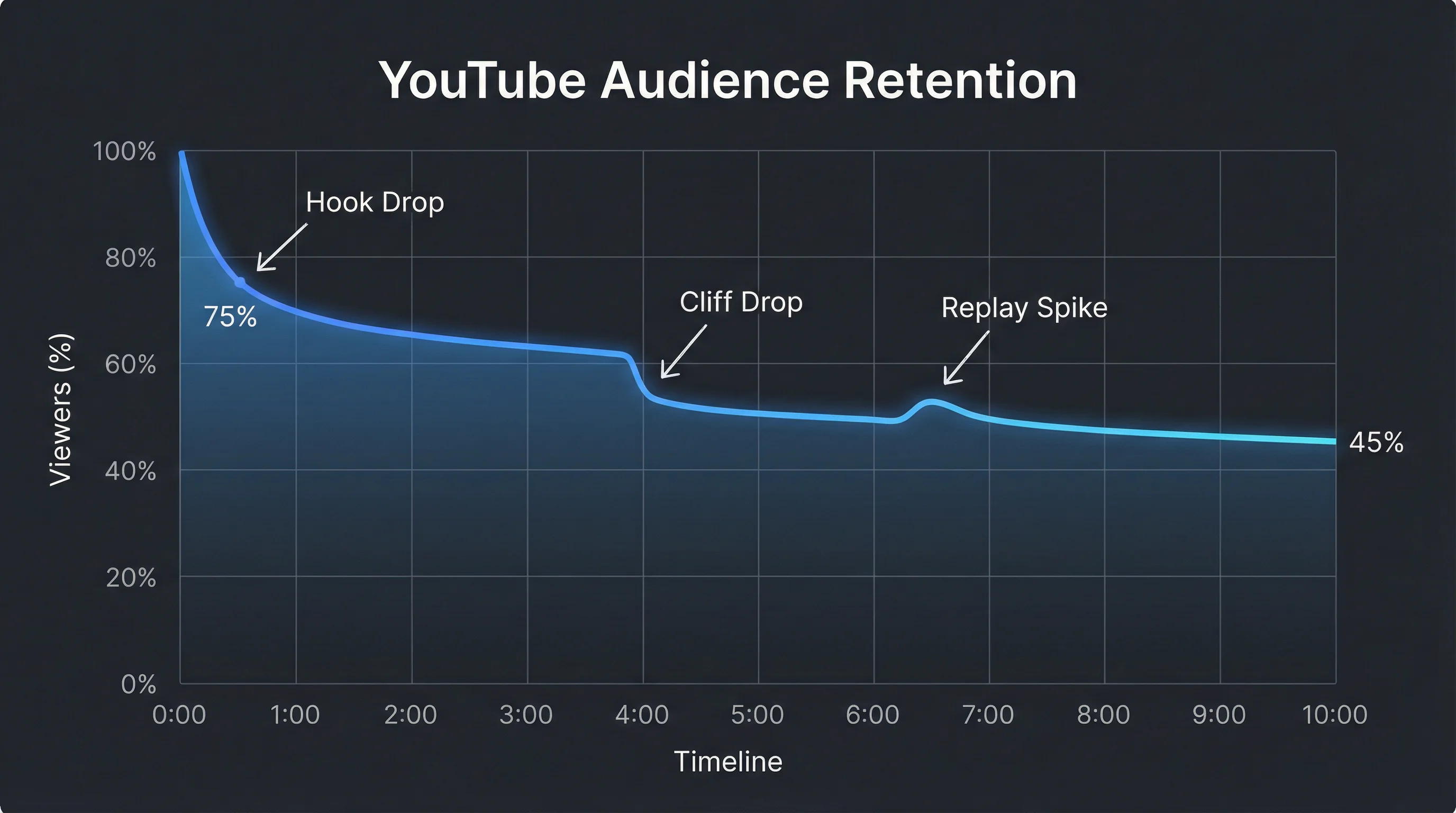
Reading the retention curve:
- Steep drop in the first 30 seconds: Hook isn't working — viewers aren't convinced to stay
- Cliff at a specific timestamp: That moment is boring, too complex, or a natural exit point (conclusion reached, question answered)
- Gradual smooth decline: Normal and acceptable — indicates consistent engagement throughout
- Bump at a specific timestamp: That section is so good viewers rewound to rewatch it — replicate this format
Watch Time
Total watch time in hours is YouTube's primary channel-health metric. Watch time determines YPP eligibility (4,000 hours required) and factors into algorithmic distribution. A video that generates high watch time relative to its impressions signals YouTube that it satisfies viewer intent — triggering broader distribution.
Create Faceless Videos on Autopilot
FlowShorts generates and posts AI videos to YouTube, TikTok & Instagram while you sleep.
Try FlowShorts Free →Watch time per impression is a derived metric worth calculating: Total Watch Time ÷ Total Impressions. This tells you how much watch time your thumbnail generates per impression, combining CTR and retention into a single number. High-CTR + low-retention videos often lose to lower-CTR + high-retention videos on this metric — and YouTube's algorithm uses a similar signal.
Subscribers
The Subscribers report in Analytics shows where subscribers came from — which video drove them to subscribe. This is often surprising: channels frequently gain the most subscribers from videos that aren't their highest-viewed. If a specific video has an unusually high subscribe rate, it's signaling that this content type attracts long-term fans, not just casual viewers. Create more of it.
Watch for the subscribe/unsubscribe balance. Net subscriber gain is the real number — a video getting 500 subscribes and 400 unsubscribes is disappointing despite the raw subscribe count.
Traffic Sources
Where viewers are coming from determines how to grow each traffic stream:
| Traffic Source | What It Means | How to Grow It |
|---|---|---|
| YouTube Search | Viewers searched a term and clicked your video | SEO: title, description, tags. Target low-competition keywords |
| Suggested Videos | YouTube recommended your video next to another | High retention signals push suggested placement. Watch similar channels |
| Browse Features | Homepage, subscriptions feed, trending | High CTR + retention drives homepage distribution — the algorithmic reward |
| External | Links from outside YouTube (Reddit, blogs, social) | Share videos strategically; build backlinks to video pages |
| Shorts Feed | Shorts watched in the Shorts feed | Post consistently; high completion rate drives feed distribution |
| Channel Pages | Viewers visiting your channel directly | Channel art, featured video, playlists improve conversion from channel visits |
Benchmark to watch: If Browse Features is growing as a percentage of total traffic, your channel is getting algorithmic momentum. If YouTube Search dominates, your channel depends on SEO and is more stable but slower to scale. Most successful channels end up with 50-60% Browse/Suggested traffic once established.
Shorts Analytics Metrics
Shorts have a separate analytics view with different metrics:
| Shorts Metric | What to Track | Benchmark |
|---|---|---|
| Views | Total Shorts plays (different from impressions) | Compare week-over-week, not absolute |
| View Completion % | Percentage who watched to the end | Target >70% — this is the primary Shorts algorithm signal |
| Like rate | Likes ÷ views | 2-5%+ indicates strong content; <0.5% suggests low resonance |
| Subscribe rate from Shorts | New subscribers from this Short | Shorts with high subscribe rates → make more of that format |
| Swipe-away rate | % who swiped before finishing | Lower is better — address early in the hook |
For Shorts strategy, see our guides on how many Shorts to post per day and how to schedule Shorts automatically.
Revenue Analytics
Once monetized, two metrics define your earnings:
- CPM (Cost Per Mille): What advertisers pay YouTube per 1,000 ad impressions. This is gross — YouTube keeps 45%. CPM is higher in Q4 (November-December) and lower in Q1 (January-February), driven by advertiser spending cycles.
- RPM (Revenue Per Mille): What you receive per 1,000 video views after YouTube's cut. RPM = CPM × 55%. This is your actual earnings metric.
Track RPM trends over time, not just absolute revenue. If views are growing but RPM is dropping, your audience geography may be shifting toward lower-paying markets. If RPM is climbing with similar view counts, your content is increasingly attracting premium advertisers.
For detailed RPM benchmarks by niche, see our YouTube channel ideas guide with RPM data.
Audience Analytics
Create Faceless Videos on Autopilot
FlowShorts generates and posts AI videos to YouTube, TikTok & Instagram while you sleep.
Try FlowShorts Free →The Audience section shows who watches your channel:
- Age and gender breakdown — are you reaching your intended demographic?
- Geography — US/UK audiences earn 2-4x higher RPM than most international audiences
- Returning vs. new viewers — high returning viewer % means loyal community; high new viewer % means good discoverability
- Other channels your audience watches — use this to find collaboration opportunities and understand your competition
- When your audience is on YouTube — use this to time your video publications for maximum first-hour engagement
Weekly Review Framework
Run through these 5 checks every week:
- CTR check: Any video posted in the last 7 days with CTR < 3%? Consider swapping the thumbnail.
- Retention check: Where does the retention curve drop on your last 3 videos? Address that in your next script.
- Traffic source shift: Is any traffic source growing or shrinking faster than your overall views? Investigate why.
- Subscribe source: Which video drove the most subscribers this week? Plan to make a follow-up or similar content.
- Top performer review: Sort by views in the last 7 days. Is the top performer consistent with your channel theme? If an outlier is winning, consider whether to double down or stay focused on your niche.
Analytics-to-Content Decisions
| Analytics Signal | What It Tells You | Content Decision |
|---|---|---|
| High CTR, low retention | Thumbnail promises more than content delivers | Improve content quality OR reframe the thumbnail/title to set accurate expectations |
| Low CTR, high retention | Content is great, packaging needs work | Split-test new thumbnails and titles; this video deserves more exposure |
| High subscribe rate on a topic | This topic attracts fans, not just viewers | Make it a series |
| Unexpected geography spike | Content resonated with a non-primary audience | Consider culturally neutral follow-ups to capture that audience sustainably |
| Browse features growth | Algorithm is recommending your channel to new viewers | Post more frequently — algorithmic momentum is compounding |
| Traffic from Shorts feed → long form | Your Shorts successfully funnel to long-form | Create dedicated "expansion" long-form videos for each Shorts topic |

Frequently Asked Questions
What is a good CTR on YouTube?
A 4-7% CTR is considered average. Anything above 7% is above average and indicates your thumbnail and title are compelling. Below 2% is a signal to redesign your thumbnail. CTR varies by content type — Shorts thumbnails aren't used, and search-driven videos tend to have lower CTR (2-4%) than browse-driven content (6-10%).
What is a good audience retention rate on YouTube?
40-55% retention is average for long-form content. Above 55% is above average and pushes YouTube to recommend the video more widely. For Shorts, aim for above 70% completion rate — this is the primary distribution signal in the Shorts feed.
What is the difference between CPM and RPM on YouTube?
CPM (Cost Per Mille) is what advertisers pay YouTube per 1,000 ad impressions — the gross amount before YouTube's cut. RPM (Revenue Per Mille) is what you actually receive per 1,000 video views after YouTube takes its 45% share. RPM is always lower than CPM. Track RPM to understand your actual earnings per view.
Why are my YouTube analytics so low?
Low analytics typically come from one of four issues: low CTR (thumbnail/title not compelling), low retention (hook or pacing problem), low impressions (not enough search volume or algorithmic push), or posting on topics with low advertiser demand. Use the weekly review framework above to diagnose which lever to pull.
How do I see where my YouTube traffic comes from?
In YouTube Studio, go to Analytics → Content → Traffic source types. This shows what percentage of views comes from YouTube Search, Suggested Videos, Browse Features, External sources, and Shorts feed. Select individual videos to see traffic source breakdowns per video.
Related Guides
- How Many YouTube Shorts to Post Per Day
- YouTube Partner Program Requirements
- 50 YouTube Channel Ideas by RPM
- YouTube Thumbnail Size & Design Guide
- YouTube Statistics 2026: Users, Revenue & Growth
Grow Your Analytics With Automated Daily Shorts
FlowShorts generates and auto-posts daily YouTube Shorts — AI scripts, visuals, voiceover, captions, and scheduling. More posts = more algorithmic tests = better data to analyze. Pick your niche and let the system produce content while you monitor what works.


